

First add the reference from the com tab, and add Microsoft word 12.0 object
library.
Code given here with some description: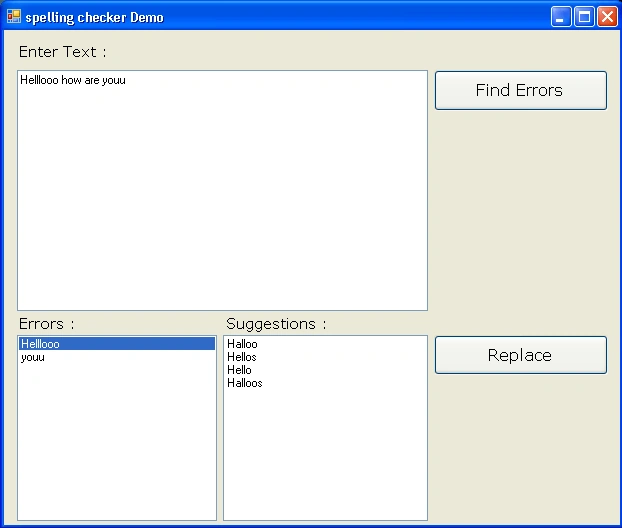
using
System;
using
System.Collections.Generic;
using
System.ComponentModel;
using
System.Data;
using
System.Drawing;
using
System.Linq;
using
System.Text;
using
System.Windows.Forms;
namespace
WindowsFormsApplication7
{
public partial
class Form1 :
Form
{
Microsoft.Office.Interop.Word.Application WordApp = new Microsoft.Office.Interop.Word.Application();
public Form1()
{
InitializeComponent();
// if you want to show genarated
word file then remove comment form nxt line
// WordApp.Visible = true;
this.FormClosed +=
new
FormClosedEventHandler(closed);
}
private void
closed(object sender,
FormClosedEventArgs e)
{
// close the active document without
asking for save
WordApp.Documents.Close(Microsoft.Office.Interop.Word.WdSaveOptions.wdDoNotSaveChanges);
// it will closes the word
application
WordApp.Quit(false);
}
private void
button1_Click(object sender,
EventArgs e)
{
Microsoft.Office.Interop.Word.Range DRange;
this.Text =
"Creating Word...";
//adding new document to word application
WordApp.Documents.Add();
//set title
this.Text = "Genarating error list...";
//get the range of activer document
DRange = WordApp.ActiveDocument.Range();
//insert textbox data after the content of range of
active document
DRange.InsertAfter(textBox1.Text);
//createing object for error collection and store the
all errors
Microsoft.Office.Interop.Word.ProofreadingErrors
SpellCollection = DRange.SpellingErrors;
if (SpellCollection.Count > 0)
{
listBox1.Items.Clear();
listBox2.Items.Clear();
int iword = 0;
string newWord =
null;
for (iword = 1; iword <=
SpellCollection.Count; iword++)
{
newWord = SpellCollection[iword].Text;
listBox1.Items.Add(newWord);
}
}
this.Text =
"spelling checker Demo";
}
private void
listBox1_SelectedIndexChanged(object sender,
EventArgs e)
{
// here it
will find the suggestions based on the selecteditem of listbox1
Microsoft.Office.Interop.Word.SpellingSuggestions CorrectionsCollection;
CorrectionsCollection = WordApp.GetSpellingSuggestions(listBox1.Text);
listBox2.Items.Clear();
if (CorrectionsCollection.Count > 0)
{
int iWord = 0;
for (iWord = 1; iWord <=
CorrectionsCollection.Count; iWord++)
{
listBox2.Items.Add(CorrectionsCollection[iWord].Name);
}
}
else
{
listBox2.Items.Add("No suggestions!");
}
}
private void
button2_Click(object sender,
EventArgs e)
{
// it will replace word
try
{
if (listBox1.SelectedIndex >= 0
& listBox2.SelectedIndex >= 0)
{
textBox1.Select(textBox1.Text.IndexOf(listBox1.SelectedItem.ToString()),
listBox1.SelectedItem.ToString().Length);
textBox1.SelectedText = listBox2.SelectedItem.ToString();
listBox1.Items.Remove(listBox1.SelectedItem);
listBox2.Items.Clear();
}
}
catch (Exception
ex)
{
//handle exception
}
}
}
}
This is my first program for word operation in c#.
If you have any suggestion, feel free to reply.
Thank you.
Joshua FredricksonPosted Jun 7, 2011, 2:31 PM
Thanks for the original code. I've modified for my needs in VB and thought I would post it here for VB users. Public Class Spellchecker Dim wrdApp As Microsoft.Office.Interop.Word.Application Public Sub New() 'Initialize a new session of Word for spellchecking purposes wrdApp = New Microsoft.Office.Interop.Word.Application 'Adds a new document to the Word session wrdApp.Documents.Add() End Sub Public Sub Dispose() 'Cleanup wrdApp.Documents.Close(Microsoft.Office.Interop.Word.WdSaveOptions.wdDoNotSaveChanges) wrdApp.Quit(False) End Sub ''' <summary> ''' Spellchecker which accepts a string and returns an Arraylist with spelling errors found. ''' </summary> ''' <param name="Text">Word(s) to Spellcheck</param> ''' <returns>Arraylist of spelling errors</returns> Public Function SpellCheck(ByVal Text As String) As ArrayList Dim WordList As New ArrayList Dim wrdRange As Microsoft.Office.Interop.Word.Range Dim spellcollection As Microsoft.Office.Interop.Word.ProofreadingErrors Try 'Clears word document wrdApp.ActiveDocument.Bookmarks("\Page").Range.Text = "" 'Adds the text to be spellchecked wrdRange = wrdApp.ActiveDocument.Range() wrdRange.InsertAfter(Text) 'Gets a collection strings/words with spelling errors spellcollection = wrdRange.SpellingErrors 'Verifies spelling errors were found If (spellcollection.Count > 0) Then Dim i As Integer = 1 'Counter for Loop 'Loops through errors and adds each word to the Arraylist Do While i <= spellcollection.Count Dim Word As String = spellcollection(i).Text If Not Word = String.Empty Then WordList.Add(Word) i += 1 Loop End If 'Returns the words with spelling errors as an Arraylist Return WordList Catch ex As Exception 'No spelling errors found, returns nothing Return Nothing Finally 'Cleanup wrdRange = Nothing WordList = Nothing spellcollection = Nothing End Try End Function ''' <summary> ''' Returns an Arraylist of suggested corrections for a word provided. ''' </summary> ''' <param name="Text">Word to be corrected</param> ''' <returns>Arraylist of Suggestions</returns> Public Function Suggestions(ByVal Text As String) As ArrayList Dim CorrectionsCollection As Microsoft.Office.Interop.Word.SpellingSuggestions Dim WordList As New ArrayList Try 'Gets a collection of Spelling Suggestions for word supplied. CorrectionsCollection = wrdApp.GetSpellingSuggestions(Text) 'Verifies that there are suggestions were found If (CorrectionsCollection.Count > 0) Then Dim i As Integer = 1 'Counter for Loop 'Loops through Suggestions and add each Suggestion to an Arraylist Do While i <= CorrectionsCollection.Count Dim Word As String = CorrectionsCollection(i).Name If Not Word = String.Empty Then WordList.Add(Word) i += 1 Loop Else WordList.Add("No Suggestions!") End If 'Returns the Arraylist of Suggestions Return WordList Catch ex As Exception Return Nothing Finally CorrectionsCollection = Nothing WordList = Nothing End Try End Function End Class