

Create an ASP.NET Core Web API Project
Create a new ASP.NET Core Web API project using Visual Studio or the command line.
dotnet new webapi -n WorkingwithSQLLiteinAsp.NETCoreWebAPI
cd WorkingwithSQLLiteinAsp.NETCoreWebAPI
Install SQLite NuGet Package
Install the SQLite NuGet package to enable SQLite support in your project.
dotnet add package Microsoft.EntityFrameworkCore.SqliteNow Create SQLite Database File in your Project
SQLLiteDatabase.dbCreate Model
namespace WorkingwithSQLLiteinAsp.NETCoreWebAPI.Models
{
    // Models/TodoItem.cs
    public class TodoItem
    {
        public long Id { get; set; }
        public string Name { get; set; }
        public bool IsComplete { get; set; }
    }

}
Now Crete Application Database Context
using Microsoft.EntityFrameworkCore;
using WorkingwithSQLLiteinAsp.NETCoreWebAPI.Models;

namespace WorkingwithSQLLiteinAsp.NETCoreWebAPI.ApplicationDbContext
{
    public class AppDbContext : DbContext
    {
        public AppDbContext(DbContextOptions<AppDbContext> options) : base(options) { }

        public DbSet<TodoItem> TodoItems { get; set; }
    }
}
Add Connection string in AppSetting.JSON File
// appsettings.json
{
  "ConnectionStrings": {
    "DefaultConnection": "Data Source=SQLLiteDatabase.db"
  },
  "Logging": {
    "LogLevel": {
      "Default": "Information",
      "Microsoft": "Warning",
      "Microsoft.Hosting.Lifetime": "Information"
    }
  },
  "AllowedHosts": "*"
}
Register the Dependancy in Program.cs File
using Microsoft.EntityFrameworkCore;
using Microsoft.OpenApi.Models;
using WorkingwithSQLLiteinAsp.NETCoreWebAPI.ApplicationDbContext;

var builder = WebApplication.CreateBuilder(args);
var configuration = builder.Configuration;

// Add services to the container.
builder.Services.AddDbContext<AppDbContext>(options =>
        options.UseSqlite(configuration.GetConnectionString("DefaultConnection")));
builder.Services.AddControllers();
// Learn more about configuring Swagger/OpenAPI at https://aka.ms/aspnetcore/swashbuckle
builder.Services.AddEndpointsApiExplorer();
builder.Services.AddSwaggerGen(c =>
{
    c.SwaggerDoc("v1", new OpenApiInfo { Title = "Working with SQLLite In Asp.net Core Web API", Version = "v1" });

});

var app = builder.Build();

// Configure the HTTP request pipeline.
if(app.Environment.IsDevelopment())
{
    app.UseSwagger();
    app.UseSwaggerUI();
}

app.UseHttpsRedirection();

app.UseAuthorization();

app.MapControllers();

app.Run();
Create and Apply Migrations
Run the following commands to create and apply migrations to create the SQLite database.
dotnet ef migrations add InitialCreate
dotnet ef database update
CRUD Operations
Implement CRUD operations in your controller.
// Controllers/TodoController.cs
using Microsoft.AspNetCore.Mvc;
using Microsoft.EntityFrameworkCore;
using WorkingwithSQLLiteinAsp.NETCoreWebAPI.ApplicationDbContext;
using WorkingwithSQLLiteinAsp.NETCoreWebAPI.Models;

[ApiController]
[Route("api/[controller]/[Action]")]
public class TodoController : ControllerBase
{
    private readonly AppDbContext _context;

    public TodoController(AppDbContext context)
    {
        _context = context;
    }

    // GET: api/Todo
    [HttpGet]
    public async Task<ActionResult<IEnumerable<TodoItem>>> GetTodoItems()
    {
        return await _context.TodoItems.ToListAsync();
    }

    // GET: api/Todo/5
    [HttpGet("{id}")]
    public async Task<ActionResult<TodoItem>> GetTodoItem(long id)
    {
        var todoItem = await _context.TodoItems.FindAsync(id);

        if(todoItem == null)
        {
            return NotFound();
        }

        return todoItem;
    }

    // POST: api/Todo
    [HttpPost]
    public async Task<ActionResult<TodoItem>> PostTodoItem(TodoItem todoItem)
    {
        _context.TodoItems.Add(todoItem);
        await _context.SaveChangesAsync();

        return CreatedAtAction(nameof(GetTodoItem), new { id = todoItem.Id }, todoItem);
    }

    // PUT: api/Todo/5
    [HttpPut("{id}")]
    public async Task<IActionResult> PutTodoItem(long id, TodoItem todoItem)
    {
        if(id != todoItem.Id)
        {
            return BadRequest();
        }

        _context.Entry(todoItem).State = EntityState.Modified;

        try
        {
            await _context.SaveChangesAsync();
        }
        catch(DbUpdateConcurrencyException)
        {
            if(!TodoItemExists(id))
            {
                return NotFound();
            }
            else
            {
                throw;
            }
        }

        return NoContent();
    }

    // DELETE: api/Todo/5
    [HttpDelete("{id}")]
    public async Task<IActionResult> DeleteTodoItem(long id)
    {
        var todoItem = await _context.TodoItems.FindAsync(id);
        if(todoItem == null)
        {
            return NotFound();
        }

        _context.TodoItems.Remove(todoItem);
        await _context.SaveChangesAsync();

        return NoContent();
    }

    private bool TodoItemExists(long id)
    {
        return _context.TodoItems.Any(e => e.Id == id);
    }
}
Output
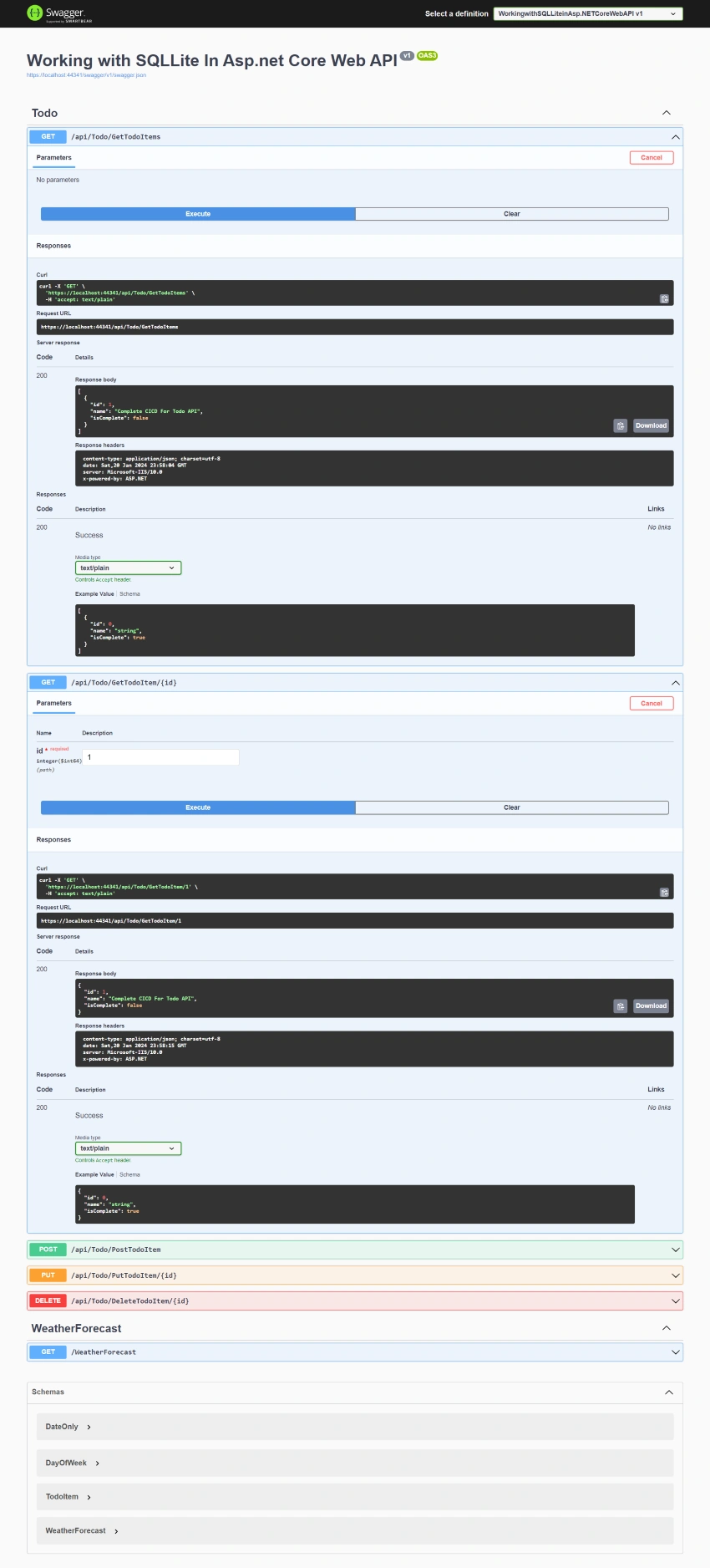
GitHub project URL: https://github.com/SardarMudassarAliKhan/WorkingwithSQLLiteinAsp.NETCoreWebAPI
Conclusion
SQLite is a self-contained, serverless, and zero-configuration relational database management system (RDBMS). It is a lightweight, open-source, and embedded database engine that does not require a separate server process and operates directly on the client's device. Key features of SQLite include.
- Self-contained: The entire database system is contained in a single library, making it easy to deploy and manage.
- Serverless: Unlike traditional database management systems, SQLite does not operate as a separate server process. Instead, it is integrated directly into the application.
- Zero-configuration: SQLite does not require complex setup or administration. A simple file, usually with a
.dbextension serves as the database, and no server setup or maintenance is needed. - Cross-platform: SQLite is cross-platform and works on various operating systems, including Windows, macOS, Linux, and mobile platforms such as Android and iOS.
- Single-user: SQLite is designed for single-user applications, making it well-suited for embedded systems, mobile apps, and lightweight desktop applications.
- ACID-compliant: Despite its lightweight nature, SQLite maintains ACID (Atomicity, Consistency, Isolation, Durability) properties, ensuring data integrity and reliability.
- Dynamic typing: SQLite uses dynamic typing for data storage, allowing users to store different types of data in the same column.
- Wide language support: SQLite supports multiple programming languages, including C, C++, Java, Python, and .NET, making it versatile for various development environments.
Due to its simplicity, portability, and ease of integration, SQLite is commonly used in scenarios where a lightweight and embedded database solution is required, such as mobile applications, desktop software, and embedded systems.
Join the conversation! Your thoughts help the community grow.