

System Requirements
- Microsoft Windows Server 2003 with Service Pack 1
- MS Word 2003
- .Net 2.0
Create a web application. Right click on reference and click on add reference. Select Com tab. Double click on Microsoft Word 11.0 Object Library.
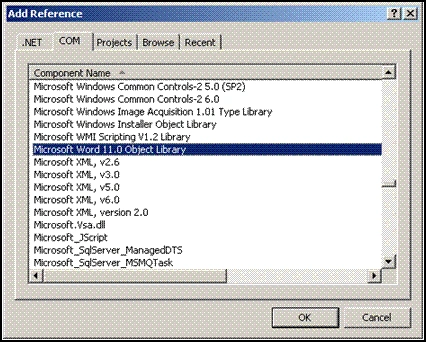
Add following code to create a word file at a folder in root directory at server it is Word folder in my case.
Object
missing = System.Reflection.Missing.Value;
string
file = "myfile";
Object
filename = Server.MapPath("Word/") +
file;
object
readOnly = false;
object
isVisible = true;
Microsoft.Office.Interop.Word.Application oWordApp;
try
{
//
initializing Word Application
oWordApp= new Microsoft.Office.Interop.Word.Application();
//
initializing Word Document
Microsoft.Office.Interop.Word.Document oWordDoc = oWordApp.Documents.Add(ref missing, ref
missing, ref missing, ref missing);
try
{
oWordDoc.Activate();
oWordApp.Selection.TypeText("This is the
text");
oWordApp.Selection.TypeParagraph();
// Saving Word file
oWordDoc.SaveAs(ref filename, ref
missing, ref missing, ref missing,ref
missing, ref missing, ref missing, ref
missing, ref missing,ref missing, ref
missing, ref missing, ref missing, ref
missing,ref missing, ref missing);
}
catch (Exception
ex)
{
Response.Write(ex.Message);
}
finally
{
oWordApp.Application.Quit(ref missing, ref
missing, ref missing);
// Oppening Word file
Response.Redirect("~/Word/"+file,true);
}
}
catch
(Exception Wex)
{
Response.Write(Wex.Message);
}
- Right click on Word Folder select Properties.
- Go to
Security tab and assign the following permissions to the users listed
below:
Security Account Permissions ASP.NET Machine Account Modify, Read, Write IIS_WPG Modify, Read, Write Internet Guest Account (IUSR_<MachineName>) * Read, Write
* These all the account created when IIS installed on the machine.Basicaly IUSR_<MachineName> is used for anonymous user to access the your website by default. But we can change this user to some other user.So please make sure that Internet Guest Account is the same security account that is used for Basic Authentication for anonymous access for this application. If not then give same permission to that user as IUSR_<MachineName>)
Note: If any of the above given security accounts are not already present in the user list then please add the user by following the steps given below:
- Click on Add
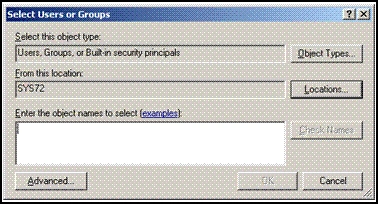
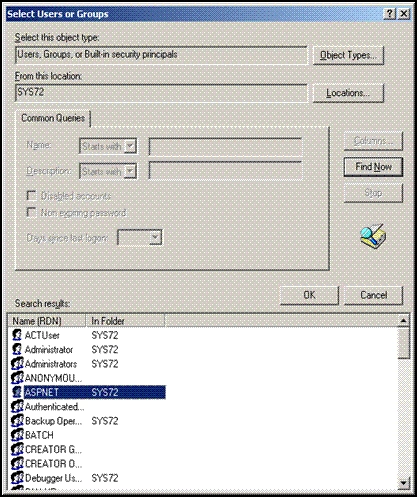
- Click on Advanced -> Find Now
- Select the Particular user
- Click on ok
DCOM Config changes
- Go to Run and type coming and click OK.
- Go to Component Services\Computers\My Computer\DCOM Config
- Right click on Microsoft Word Application and go to Properties
- Go to Security Tab
- Click on Customize and Edit for each section and give Allow permission for
each section to following users
- 1. ASP.NET Machine Account
- 2. IIS_WPG,
- 3. Internet Guest Account(IUSR_<MachineName>) *
* Please make sure that Internet Guest Account is the same security account that is used for Basic Authentication for anonymous access for this application. If not then give same permission to that user as IUSR_<MachineName>
Note: If any of the above mentioned user is not present in user list then please add that user as mentioned in step10 above.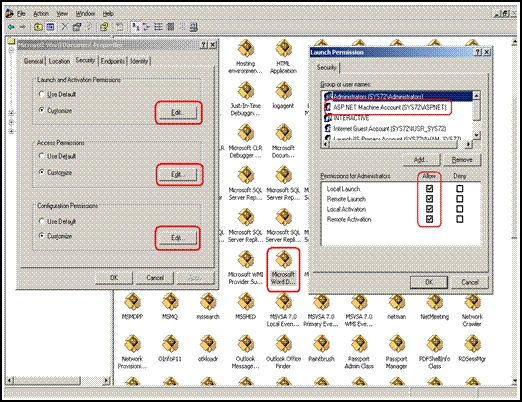
- Click on Add
-
Go to the Identity tab. Click on This User and assign a user having administrative privileges on the machine.
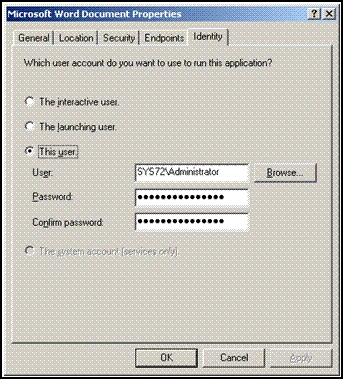
Note: The Administrative user should have invoked MS Word at least once by logging on to the machine or a complete installation of MS Word 2003 should have been performed. No part of the installation should be remaining.
jkhPosted Aug 13, 2008, 11:45 AM
Hello, I have tried everything and I still get an error for this: Exception Details: System.Runtime.InteropServices.COMException: Não é possível activar aplicação Source Error: Line 334: AppDocs.Visible = true; Line 335: Line 336: FileDoc.Application.Activate(); Thank you
jkhPosted Aug 13, 2008, 11:45 AM
Hello, I have tried everything and I still get an error for this: Exception Details: System.Runtime.InteropServices.COMException: Não é possível activar aplicação Source Error: Line 334: AppDocs.Visible = true; Line 335: Line 336: FileDoc.Application.Activate(); Thank you
jkhPosted Aug 13, 2008, 11:45 AM
Hello, I have tried everything and I still get an error for this: Exception Details: System.Runtime.InteropServices.COMException: Não é possível activar aplicação Source Error: Line 334: AppDocs.Visible = true; Line 335: Line 336: FileDoc.Application.Activate(); Thank you
jkhPosted Aug 13, 2008, 11:44 AM
Hello, I have tried everything and I still get an error for this: Exception Details: System.Runtime.InteropServices.COMException: Não é possível activar aplicação Source Error: Line 334: AppDocs.Visible = true; Line 335: Line 336: FileDoc.Application.Activate(); Thank you