

WPF ChildWindow Control
A ChildWindow control is a light weight Window that can be
used as a child window or a popup control. The parent window is automatically
disabled when a child window is active and modal. You can think of a ChildWindow
as a custom modal or modeless dialog where you can place any child controls you
want. However, the ChildWindow has several common Window properties.
This article demonstrates how to use the ChildWindow control
in a WPF application
using C#
and XAML.
Adding Reference to WPF Toolkit
Extended Assembly
The ChildWindow control is an extension to the WPF Toolkit and does not come with Visual Studio 2010. To use the ChildWindow control in your application, you must add reference to the WPFToolkit.Extended.dll assembly. You can download Extended WPF Tookit from the CodePlex or you can use the WPFToolkit.Extended.dll available with this download. All you need is the DLL. See Downloads section of this article.
After downloading the WPFToolkit.Extended.dll, you can add reference to your project by right clicking on the project name in Visual Studio, select Add Reference and browse the DLL. See Figure 1.
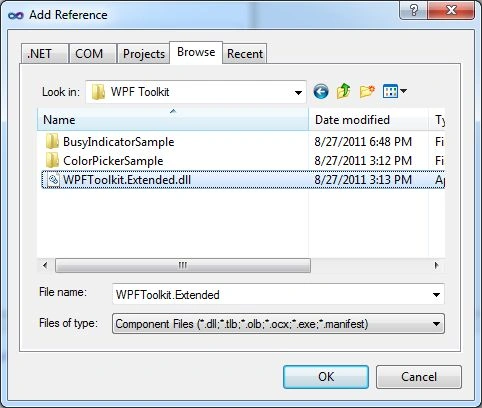
Figure 1
Once the assembly
reference is added, the next step is to import the namespace in XAML using the
xmlns. As soon as you type xmlns in XAML you should see the http://schemas.microsoft.com/winfx/2006/xaml/presentation/toolkit/extended
option in the list. See Figure 2. If you do not see this URL, please read the
next section.
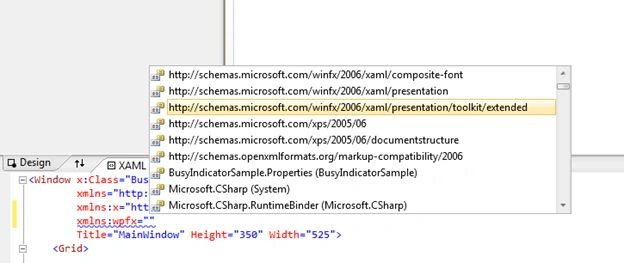
Figure 2
Unblocking the WPF Toolkit Assembly
If an assembly reference is not added to your project correctly, you will see the following message when you build your application.
Unable to load the metadata for assembly 'WPFToolkit.Extended'
You get this message when try to add reference to the Extended WPF Toolkit to a project and build the project. The problem here is when you download an assembly from a Website, it is block by default. All you need to do is, unblock the assembly.
Right click on the DLL
and click Unblock button. See Figure 3.
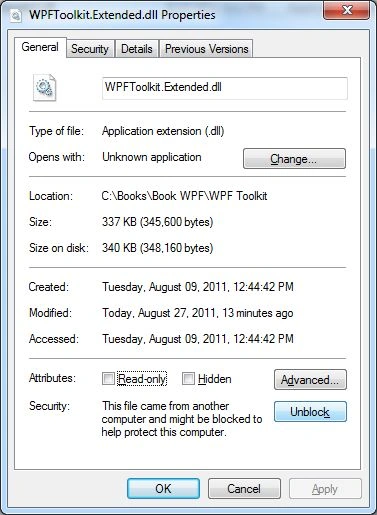
Figure 3
Remove and add reference
again. You are all set.
Creating a ChildWindow
The ChildWindow element represents a WPF ChildWindow control in XAML. The ChildWindow control is defined in the System.Windows.Controls namespace.
Listing 1 creates a simple ChildWindow control with its Width, Height, Name, IsModal and Caption property.
<wpfx:ChildWindow Name="PopupChildWindow" Caption="Child
Window" Width="300" Height="200" IsModal="True" />
Listing 1
By default, the ChildWindow is not visible. We need to call the Show() method to make a Child Window visible.
PopupChildWindow.Show();
The default output of Listing 1 generates Figure 4.
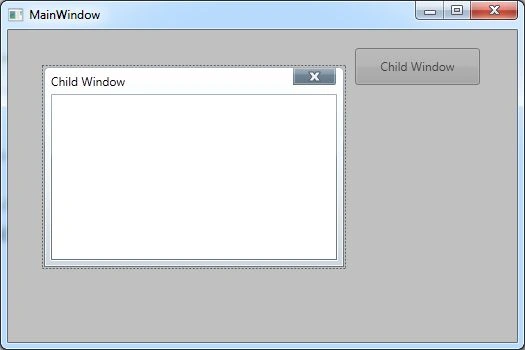
Figure 4
Customizing Caption
The Caption property represents the title/caption of the
window. Here is the good part. The Caption property can have any element inside
it. For example, you can create a child window with caption having an image,
text, and shapes.
The code snippet in Listing 2 customizes the title and adds an image and a few shapes to the title and generates Figure 5.
<wpfx:ChildWindow Name="PopupChildWindow" Width="420" Height="200" IsModal="True" Margin="41,37,0,0">
<wpfx:ChildWindow.Caption >
<WrapPanel Orientation="Horizontal" Background="Gray" Height="61" Width="407">
<Ellipse Width="40" Height="40" Fill="Yellow"
/>
<Ellipse Width="20" Height="20" Fill="Blue" />
<TextBlock Text="Window Title" FontSize="25" Foreground="Green"></TextBlock>
<Image Height="58" HorizontalAlignment="Left" Name="image1" Stretch="Fill" VerticalAlignment="Top" Width="98" Source="/ChildWindowSample;component/Images/mahatma-gandhi1.jpg"
/>
</WrapPanel>
</wpfx:ChildWindow.Caption>
</wpfx:ChildWindow>
Listing 2
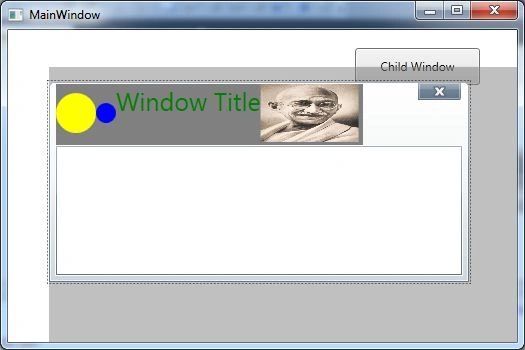
Figure 5
Summary
In this article, we discussed how to use the ChildWindow
control in a WPF
application using C# and XAML.
Sanjay ShekhawatPosted Jul 25, 2019, 6:04 AM
Great work done again :)
Ganesh GodasePosted Apr 29, 2016, 1:08 AM
Which is new way to create child window .Is childwindow part of core wpf now?. can someone help.
Ganesh GodasePosted Apr 15, 2016, 7:45 AM
I could not download WPFToolkit.Extended.dll Please can you provide link
Eduardo ObregonPosted Aug 19, 2015, 10:19 AM
I haven't found the WPFToolkit.Extended.dll file in CodePlex, that's why I'm trying to get the project you provide as a example including the Toolkit Extended dll.
Eduardo ObregonPosted Aug 19, 2015, 10:16 AM
Thanks in advance
Eduardo ObregonPosted Aug 19, 2015, 10:16 AM
Hi there, can you provide the link to download the example?
Santosh YadavPosted Apr 5, 2013, 9:40 AM
Great..very helpful article.
Timo BoehmeeditedPosted Dec 21, 2011, 6:08 AMEdited Dec 21, 2011, 6:09 AM
Great Mahesh Chand! I've tried to include the reference of the extended toolkit but faild first. With your help it was fully easy. Thanks for this great guideline
Sri PavanPosted Sep 29, 2011, 9:06 AM
Hello, This is Pavan. I am working as software programmer in a small company from past 14 months. I did'nt aware of hospital database structures & their relationships between the tables. My up coming project is related to hospital management system under C# winforms. Its not a big or small project, that it means its an private organization. It was newly established. I got an requirement like: - It should be intranet based windows application,with remoting concepts, Because the application is available to front-end desk, doctors, bill generators, administrator with appropriate permissions. - At front-end office, the reception should record the day patients list in everyday. - If a patient is admited in hospital, should keep track list like patient details, treatmentBy, treatmentfrom/to, bed allotment.. - medical record maintains should be in seperate module. - bill records and generated bill in .pdf file for employees, if they need. And also use Crystal reports too for display.. - And esspecially child patients list as seperate module. - Finally they need a screen with patient id, by choosing patient id, should get full details (i.e,address, treatment info_, Medicines list, pay bills) If u have any database structure or even any ideas, please suggest me. I'm looking for your response..to this mail [email protected].. Warm Regards, Pavan P