

Introduction
In this article, I will show you how to consume computer vision API in xamarin.android for analyzing images. I hope you will learn the latest things in Xamarin using cognitive services.
Prerequisites
- Computer Vision API Key
- Microsoft.Net.Http
- Newtonsoft.Json
Computer Vision API keys
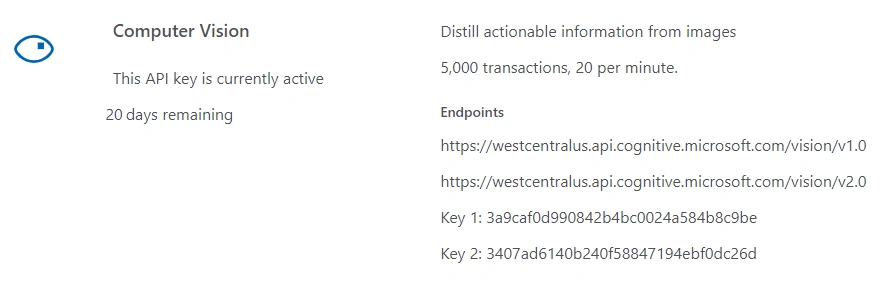
Computer vision services require special subscription keys. Every call to the Computer Vision API requires a subscription key. This key needs to be either passed through a query string parameter or specified in the request header.
To sign up for subscription keys, see Subscriptions. It's free to sign up. Pricing for these services is subject to change.
If you sign up using the Computer Vision free trial, your subscription keys are valid for the westcentral region (https://westcentralus.api.cognitive.microsoft.com).
The steps given below are required to be followed in order to create a Image Analyze app in Xamarin.Android, using Visual Studio.
Step 1 - Create Android Project
Create your Android solution in Visual Studio or Xamarin Studio. Select Android and from the list, choose Android Blank App. Give it a name, like ImageAnalyze.
(ProjectName: ImageAnalyze)
Step 2 - Add References of Nuget Packages
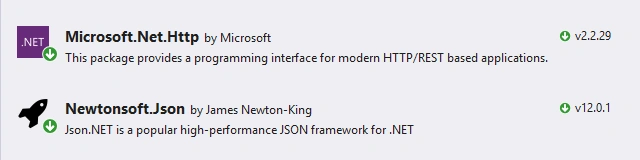
First of all, in References, add the reference of Microsoft.Net.Http and Newtonsoft.Json using NuGet Package Manager, as shown below.
Step 3 - User Interface
Open Solution Explorer-> Project Name-> Resources-> Layout-> Main.axml and add the following code. The layout will have a ImageView in order to display the preview of sample image. I also added a TextView to display the contents of the Image.
(FileName: activity_main.axml)
- <?xml version="1.0" encoding="utf-8"?>
- <LinearLayout xmlns:android="http://schemas.android.com/apk/res/android"
- xmlns:app="http://schemas.android.com/apk/res-auto"
- xmlns:tools="http://schemas.android.com/tools"
- android:layout_width="match_parent"
- android:layout_height="match_parent"
- android:padding="10dp"
- android:orientation="vertical">
- <LinearLayout
- android:orientation="vertical"
- android:layout_width="match_parent"
- android:layout_height="wrap_content"
- android:padding="8dp">
- <ImageView
- android:id="@+id/imgView"
- android:layout_width="350dp"
- android:layout_height="350dp" />
- <ProgressBar
- android:layout_width="match_parent"
- android:layout_height="wrap_content"
- android:id="@+id/progressBar"
- android:visibility="invisible" />
- <Button
- android:id="@+id/btnAnalyze"
- android:text="Analyze"
- android:layout_width="match_parent"
- android:layout_height="wrap_content" />
- <TextView
- android:id="@+id/txtDescription"
- android:text="Description:"
- android:layout_width="match_parent"
- android:layout_height="match_parent"
- android:textSize="18sp"
- android:layout_alignParentBottom="true"/>
- </LinearLayout>
- </LinearLayout>
Step 4 - Analysis Model Class
Add a new class in your project with name AnalysisModel.cs. Add the following properties to get the result set from json response with appropriate namespace.
- using System.Collections.Generic;
- namespace RecognizeCelebrities
- {
- public class AnalysisModel
- {
- public IList<Category> categories { get; set; }
- public object adult { get; set; }
- public IList<Tag> tags { get; set; }
- public Description description { get; set; }
- public string requestId { get; set; }
- public Metadata metadata { get; set; }
- public IList<Face> faces { get; set; }
- public Color color { get; set; }
- public ImageType imageType { get; set; }
- }
- public class FaceRectangle
- {
- public int left { get; set; }
- public int top { get; set; }
- public int width { get; set; }
- public int height { get; set; }
- }
- public class Celebrity
- {
- public string name { get; set; }
- public FaceRectangle faceRectangle { get; set; }
- public double confidence { get; set; }
- }
- public class Detail
- {
- public IList<Celebrity> celebrities { get; set; }
- public object landmarks { get; set; }
- }
- public class Category
- {
- public string name { get; set; }
- public double score { get; set; }
- public Detail detail { get; set; }
- }
- public class Tag
- {
- public string name { get; set; }
- public double confidence { get; set; }
- }
- public class Caption
- {
- public string text { get; set; }
- public double confidence { get; set; }
- }
- public class Description
- {
- public IList<string> tags { get; set; }
- public IList<Caption> captions { get; set; }
- }
- public class Metadata
- {
- public int width { get; set; }
- public int height { get; set; }
- public string format { get; set; }
- }
- public class Face
- {
- public int age { get; set; }
- public string gender { get; set; }
- public FaceRectangle faceRectangle { get; set; }
- }
- public class Color
- {
- public string dominantColorForeground { get; set; }
- public string dominantColorBackground { get; set; }
- public IList<string> dominantColors { get; set; }
- public string accentColor { get; set; }
- public bool isBWImg { get; set; }
- }
- public class ImageType
- {
- public int clipArtType { get; set; }
- public int lineDrawingType { get; set; }
- }
- }
Step 5 - Backend Code
Let's go to Solution Explorer-> Project Name-> MainActivity and add the following code with appropriate namespaces.
Note: Please replace your subscription key and your selected region address in the Main activity class.
(FileName: MainActivity)
- using Android.App;
- using Android.Graphics;
- using Android.OS;
- using Android.Support.V7.App;
- using Android.Views;
- using Android.Widget;
- using Newtonsoft.Json;
- using System;
- using System.IO;
- using System.Net.Http;
- using System.Net.Http.Headers;
- using System.Threading.Tasks;
- namespace AnalyzeImage
- {
- [Activity(Label = "@string/app_name", Theme = "@style/AppTheme", MainLauncher = true)]
- public class MainActivity : AppCompatActivity
- {
- const string subscriptionKey = "3407ad61**********94ebf0dc26d";
- const string uriBase =
- "https://westcentralus.api.cognitive.microsoft.com/vision/v2.0/analyze";
- Bitmap mBitmap;
- private ImageView imageView;
- private ProgressBar progressBar;
- ByteArrayContent content;
- private TextView textView;
- Button btnAnalyze;
- protected override void OnCreate(Bundle savedInstanceState)
- {
- base.OnCreate(savedInstanceState);
- // Set our view from the "main" layout resource
- SetContentView(Resource.Layout.activity_main);
- mBitmap = BitmapFactory.DecodeResource(Resources, Resource.Drawable.myPic);
- imageView = FindViewById<ImageView>(Resource.Id.imgView);
- imageView.SetImageBitmap(mBitmap);
- textView = FindViewById<TextView>(Resource.Id.txtDescription);
- progressBar = FindViewById<ProgressBar>(Resource.Id.progressBar);
- btnAnalyze = FindViewById<Button>(Resource.Id.btnAnalyze);
- byte[] bitmapData;
- using (var stream = new MemoryStream())
- {
- mBitmap.Compress(Bitmap.CompressFormat.Jpeg, 100, stream);
- bitmapData = stream.ToArray();
- }
- content = new ByteArrayContent(bitmapData);
- btnAnalyze.Click += async delegate
- {
- busy();
- await MakeAnalysisRequest(content);
- };
- }
- public async Task MakeAnalysisRequest(ByteArrayContent content)
- {
- try
- {
- HttpClient client = new HttpClient();
- // Request headers.
- client.DefaultRequestHeaders.Add(
- "Ocp-Apim-Subscription-Key", subscriptionKey);
- string requestParameters =
- "visualFeatures=Description&details=Landmarks&language=en";
- // Assemble the URI for the REST API method.
- string uri = uriBase + "?" + requestParameters;
- content.Headers.ContentType =
- new MediaTypeHeaderValue("application/octet-stream");
- // Asynchronously call the REST API method.
- var response = await client.PostAsync(uri, content);
- // Asynchronously get the JSON response.
- string contentString = await response.Content.ReadAsStringAsync();
- var analysesResult = JsonConvert.DeserializeObject<AnalysisModel>(contentString);
- NotBusy();
- textView.Text = analysesResult.description.captions[0].text.ToString();
- }
- catch (Exception e)
- {
- Toast.MakeText(this, "" + e.ToString(), ToastLength.Short).Show();
- }
- }
- void busy()
- {
- progressBar.Visibility = ViewStates.Visible;
- btnAnalyze.Enabled = false;
- }
- void NotBusy()
- {
- progressBar.Visibility = ViewStates.Invisible;
- btnAnalyze.Enabled = true;
- }
- }
- }



Results of Analyzing the Images
Muthu KumarPosted Jan 3, 2019, 7:22 PM
Nice Article sir..