

What is NGXS?
NGXS is a library + state management pattern library for Angular. It acts as a single source of truth for your application's state. It stores the application state as in-memory data.
There are a couple of concepts which we should know before start coding.
- Store
- Action
- State
- Select
Store
It is nothing but the global state manager. It is the central point that helps in dispatching the actions and provides a way to select the data from the store.
Action
Actions are nothing but can be thought of as commands which are issued mostly to mutate the state of the application. Actions can be triggered by components and other parts of the application as well.
State
State are classes that define a global state container. We store all the data in a state and this acts as the single source of truth for all the parts of the application. It has decorators to describe the metadata about the state.
Select
These are used to read the data from the store. In NGXS, there are two methods to select state - we can either call the select method on the Store service or use the @Select decorator.
First, let's look at the @Select decorator.
Snapshots
You can get a snapshot of the state by calling the store.snapshot() method. This will return the entire value of the store for that point in time.
Basic Installations to be done are -
npminstall @ngxs/store@dev –save
npminstall @ngxs/logger-plugin –save
npminstall @ngxs/devtools-plugin -save
- Ngxs/Store is the important one to be installed; the other two are optional and used for logging and debugging the store.
- Verify the package.json file to find the installations.

In App.Module, we need to import the NGXS module and add it to the imports section of the @NgModule.
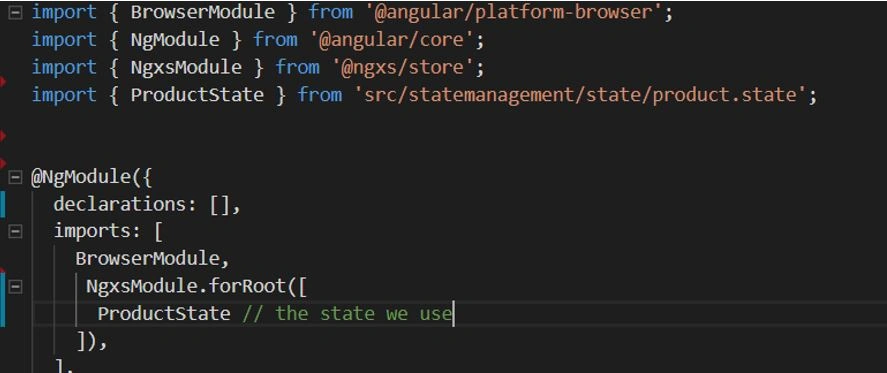
Implementation of NGXS
Creating an interface model : (product.model.ts) – this describes the state what it would contain.
- export interface Product {
- id: number;
- name: string;
- description: string;
- }
Declaring Actions for Store: (production.action.ts)
- import {Product} from '../model/productmodel';
- export const PRODUCT_ADD = 'AddProduct';
- export const PRODUCT_DELETE = 'DeleteProduct';
- export const PRODUCT_CLEAR = 'ClearProduct';
- export class AddProduct {
- static readonly type = 'PRODUCT_ADD';
- constructor(public payload: Product ) {}
- }
- export class DeleteProduct {
- static readonly type = 'PRODUCT_DELETE';
- constructor(public payload: { productId: number }) {}
- }
- export class ClearProducts {
- static type = PRODUCT_CLEAR;
- constructor() {}
- }
- export type Actions = AddProduct | DeleteProduct | ClearProducts;
Declaring State: (production.state.ts)
- // Section 1 Importing the required imports
- import { State, Action, StateContext, Selector } from '@ngxs/store';
- import { Product } from '../model/productmodel';
- import {AddProduct, DeleteProduct, ClearProducts } from '../action/product.action';
- // Section 2 - defining the model for state
- export class ProductStateModel {
- products: Product [];
- }
- // section 3 -declare the state for the store
- @State<ProductStateModel> ({
- name: 'products',
- defaults : {
- products: []
- }
- })
- export class ProductState {
- // Section 4 - declare selectors for retrieving data from the store
- @Selector()
- static getProducts(state: ProductStateModel) {
- return state.products;
- }
- // Section 5 -declare actions to mutate the state of the store
- @Action(AddProduct)
- add(context: StateContext<ProductStateModel> , { payload }: AddProduct) {
- const state = context.getState();
- context.patchState({
- products: [...state.products, payload]
- });
- console.log(context.getState());
- }
- @Action(DeleteProduct)
- remove(
- {getState, patchState }: StateContext<ProductStateModel>,
- { payload: { productId } }: DeleteProduct) {
- patchState({
- products: getState().products.filter(a => a.id !== productId)
- });
- console.log(productId);
- console.log(getState());
- }
- }
App UI
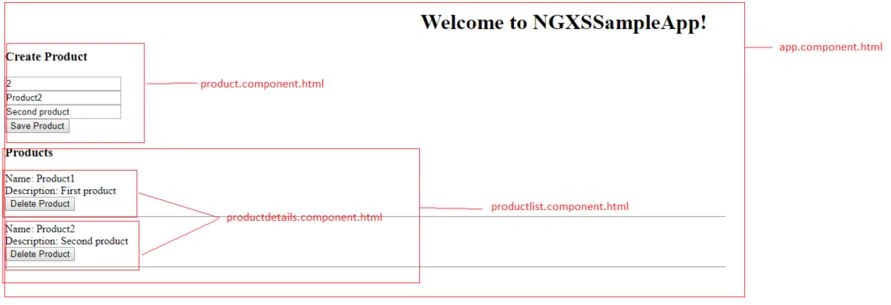
When you run the app, it will appear as below.
- In the "Create Product" section, when we add a product, it gets added to the store and appears in the Products section.
- When we delete the product, it gets removed from the store and the Products section is also updated.
- The products are pulled from the store using @selector getProducts (check out product-list.component.ts).
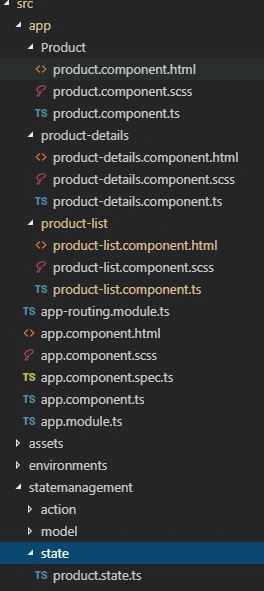
Application structure
product.component.ts
- import { Component, OnInit } from '@angular/core';
- import { Store } from '@ngxs/store';
- import { AddProduct } from 'src/statemanagement/action/product.action';
- @Component({
- selector: 'app-create-product',
- templateUrl: './product.component.html',
- styleUrls: ['./product.component.scss']
- })
- export class CreateProductComponent implements OnInit {
- constructor(private store: Store) { }
- ngOnInit() {
- }
- saveProduct(id, name, description) {
- // Adding Data to store
- this.store.dispatch(new AddProduct(
- {
- id: id,
- name: name,
- description: description
- }
- ));
- }
- }
Product.component.html
- <div style="max-width:300px;">
- <h3>Create Product</h3>
- <div class="form-group">
- <input class="form-control" type="number" placeholder="id" #id>
- </div>
- <div class="form-group">
- <input class="form-control" type="text" placeholder="name" #name>
- </div>
- <div class="form-group">
- <input class="form-control" type="text" placeholder="description" #description>
- </div>
- <button class="btn btn-success" (click)="saveProduct(id.value,name.value,description.value)">Save Product</button>
- </div>
Product-details.component.ts
- import { Component, OnInit, Input } from '@angular/core';
- import { Store } from '@ngxs/store';
- import { Product } from 'src/statemanagement/model/productmodel';
- import { DeleteProduct } from 'src/statemanagement/action/product.action';
- @Component({
- selector: 'app-product-details',
- templateUrl: './product-details.component.html',
- styleUrls: ['./product-details.component.scss']
- })
- export class ProductDetailsComponent implements OnInit {
- @Input() product: Product;
- constructor(private store: Store) { }
- ngOnInit() {
- }
- deleteproduct(id) {
- // Deleting product from the Store
- this.store.dispatch(new DeleteProduct({ productId: id }));
- }
- }
Product-details.component.html
- <div *ngIf="product">
- <div>
- <label>Name: </label> {{product.name}}
- </div>
- <div>
- <label>Description: </label> {{product.description}}
- </div>
- <button class="button is-small btn-danger" (click)='deleteproduct(product.id)'>Delete Product</button>
- <hr/>
- </div>
Product-list.component.ts
- import { Component, OnInit } from '@angular/core';
- import { Store, Select } from '@ngxs/store';
- import { Observable } from 'rxjs';
- import { ProductState } from 'src/statemanagement/state/product.state';
- import { Product } from 'src/statemanagement/model/productmodel';
- @Component({
- selector: 'app-product-list',
- templateUrl: './product-list.component.html',
- styleUrls: ['./product-list.component.scss']
- })
- export class ProductListComponent implements OnInit {
- @Select(ProductState.getProducts) products: Observable<Product[]>;
- constructor(private store: Store) {
- }
- ngOnInit() {
- }
- }
Product-list.component.html
- <div *ngIf="products">
- <h3>Products</h3>
- <div *ngFor="let product of products | async">
- <app-product-details [product]='product'></app-product-details>
- </div>
- </div>
app.component.html<!--The content below is only a placeholder and can be replaced.-->
- <div style="text-align:center">
- <h1>
- Welcome to {{ title }}!
- </h1>
- <!-- <img width="300" alt="Angular Logo" src="https://www.google.co.in/search?q=ngxs+image+link&rlz=1C1GCEA_enIN802IN802&source=lnms&tbm=isch&sa=X&ved=0ahUKEwjAr4exn4jfAhVYyYMKHR2yBKAQ_AUIECgD&biw=1680&bih=909#imgrc=hlHCvEHXyLTMjM:"> -->
- </div>
- <!--
- <router-outlet></router-outlet> -->
- <div class="row">
- <div class="col-sm-4">
- <app-create-product></app-create-product>
- </div>
- <div class="col-sm-4">
- <app-product-list></app-product-list>
- </div>
- </div>
You can find the sourcecode on GitHub also.
Next, we will try to implement the children concept in NGXS.
Thanks.
Join the conversation! Your thoughts help the community grow.