

In this write-up, we will learn about Bootstrap 4 utility classes or helper classes. This is the fourth part of this series of Bootstrap 4 utility classes. In this part we will discuss text classes, block element classes, vertical align classes and close icon classes. Utility classes are useful to add style quickly without writing CSS classes.
Text Classes
By using these classes we can quickly change Text style:
- .text-Left-Left alignment of Text
- .text-center:Center alignment of Text
- .text-right:Right alignment of Text
- .text-justify:Justified text
- .small :Smaller text
- .font-italic: Italic text
- .font-weight-bold:Bold Text
- .font-weight-normal:Normal text
- .text-lowercase:Lowercase Text
- .text-uppercase:Uppercase Text
- .text-capitalize:Capitalize Text
- .list-inline:All list items in a single line
- .list-unstyled :Remove default style of list
Open Visual Studio and create a new project. Rename it as Bootstrap4 and add the reference of the Bootstrap 4 files into the page's head section.
Now, add some Divs and their acting classes.
- <div class="text-left">Text Left</div>
- <div class="text-right">Text Right</div>
- <div class="text-center">Text Center</div>
- <div class="text-justify">Justify Text</div>
- <div class="font-italic">font-italic</div>
- <div class="font-weight-bold">font-weight-bold</div>
- <div class="text-lowercase">Lowercase Text</div>
- <div class="text-capitalize">Capitalize Text</div>
Complete Code
- <!DOCTYPE html>
- <html>
- <head>
- <meta charset="utf-8" />
- <title>Bootstarp 4</title>
- <link rel="stylesheet" href="https://maxcdn.bootstrapcdn.com/bootstrap/4.1.3/css/bootstrap.min.css">
- <script src="https://ajax.googleapis.com/ajax/libs/jquery/3.3.1/jquery.min.js"></script>
- <script src="https://cdnjs.cloudflare.com/ajax/libs/popper.js/1.14.3/umd/popper.min.js"></script>
- <script src="https://maxcdn.bootstrapcdn.com/bootstrap/4.1.3/js/bootstrap.min.js"></script>
- </head>
- <body>
- <div class="text-left">Text Left</div>
- <div class="text-right">Text Right</div>
- <div class="text-center">Text Center</div>
- <div class="text-justify">Justify Text</div>
- <div class="font-italic">font-italic</div>
- <div class="font-weight-bold">font-weight-bold</div>
- <div class="text-lowercase">Lowercase Text</div>
- <div class="text-capitalize">Capitalize Text</div>
- </body>
- </html>
Close icon class
This class is useful to add a close icon.This is useful on alerts and Model Pops.
- <button type="button" class="close">
- <span>×</span>
- </button>
Block Element classes
These classes are used to create Block according to specific screen sizes. d-block class is default class of block element classes.
Now, add some Divs and block element classes.
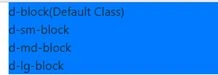
- <span class="bg-primary d-block">d-block(Default Class)</span>
- <span class="bg-primary d-sm-block">d-sm-block</span>
- <span class="bg-primary d-md-block">d-md-block</span>
- <span class="bg-primary d-lg-block">d-lg-block</span>
Complete Code
- <!DOCTYPE html>
- <html>
- <head>
- <meta charset="utf-8" />
- <title>Bootstarp 4</title>
- <link rel="stylesheet" href="https://maxcdn.bootstrapcdn.com/bootstrap/4.1.3/css/bootstrap.min.css">
- <script src="https://ajax.googleapis.com/ajax/libs/jquery/3.3.1/jquery.min.js"></script>
- <script src="https://cdnjs.cloudflare.com/ajax/libs/popper.js/1.14.3/umd/popper.min.js"></script>
- <script src="https://maxcdn.bootstrapcdn.com/bootstrap/4.1.3/js/bootstrap.min.js"></script>
- </head>
- <body>
- <div class="container">
- <span class="bg-primary d-block">d-block(Default Class)</span>
- <span class="bg-primary d-sm-block">d-sm-block</span>
- <span class="bg-primary d-md-block">d-md-block</span>
- <span class="bg-primary d-lg-block">d-lg-block</span>
- </div>
- </body>
- </html>
Run the project and check the result,

Vertical alignment classes
These classes are useful to align elements.
These classes are:
- .align-baseline – align to the baseline
- .align-top – align to the top
- .align-text-top – align text to the top
- .align-bottom – align to the bottom
- .align-text-bottom – align text to the bottom of the line
- .align-middle – align to the middle
Add theses classes in Html,
Complete code
- <!DOCTYPE html>
- <html>
- <head>
- <title>Bootstrap 4</title>
- <meta charset="utf-8" />
- <link rel="stylesheet" href="https://maxcdn.bootstrapcdn.com/bootstrap/4.1.3/css/bootstrap.min.css">
- <script src="https://ajax.googleapis.com/ajax/libs/jquery/3.3.1/jquery.min.js"></script>
- <script src="https://cdnjs.cloudflare.com/ajax/libs/popper.js/1.14.3/umd/popper.min.js"></script>
- <script src="https://maxcdn.bootstrapcdn.com/bootstrap/4.1.3/js/bootstrap.min.js"></script>
- </head>
- <body>
- <div class="container">
- <span class="bg-primary align-baseline">align to the baseline</span>
- <span class="bg-primary align-top">align to the top</span>
- <span class="bg-primary align-text-top">align text to the top</span>
- <span class="bg-primary align-bottom">align to the bottom</span>
- <span class="bg-primary align-text-bottom">align text to the bottom of the line</span>
- <span class="bg-primary align-middle">align to the middle</span>
- </div>
- </body>
- </html>
Run the project and check the result,

Summary
In this blog we learned about text utility classes and block element classes.
Join the conversation! Your thoughts help the community grow.