

Executing a stored procedure/function is easier in entity framework. The following steps explain how to call a stored procedure/function and return single or tabular values.
Step 1: Create an entity class which inherits “DbContext” class.
- public partial class MyDatabaseEntites: DbContext {
- public MyDatabaseEntites(): base("name=MyDatabaseEntites") {
- }
- public DbSet < Table1 > Table1DbSet {
- get;
- set;
- }
- public DbSet < Table2 > Table2DbSet {
- get;
- set;
- }............
- }
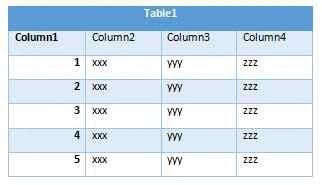
- CREATE PROCEDURE GetTable1Data
- AS
- SELECT * FROM Table1
- GO
- public class Table1Results
- {
- public int Column1 {get; set;}
- public string Column2 {get; set;}
- public string Column3 {get; set;}
- public string Column4 {get; set;}
- }
- public class RepositoryClass {
- private readonly DbContext myDatabaseReposityContext = null;
- public RepositoryClass() {
- myDatabaseReposityContext = new MyDatabaseEntites();
- }
- public List < Table1Results > GetTable1DataFromProc() {
- var query = "Exec GetTable1Data";
- object[] parameters = new object[] {};
- var response = myDatabaseReposityContext.Database.SqlQuery < Table1Results > (query, parameters).ToList();
- return response;
- }
- }
Join the conversation! Your thoughts help the community grow.