

Basically you need the Chart, ChartArea, Legend, and a Series to get started developing chart
Add reference for chart in code behind and also include Microsoft .NET Framework 3.5 Service Pack 1
Using System.Web.UI.DataVisualization.Charting;
System.Windows.Forms.DataVisualization.Charting.ChartArea chartArea1 = new System.Windows.Forms.DataVisualization.Charting.ChartArea();
System.Windows.Forms.DataVisualization.Charting.Legend legend1 = new System.Windows.Forms.DataVisualization.Charting.Legend();
System.Windows.Forms.DataVisualization.Charting.Series series1 = new System.Windows.Forms.DataVisualization.Charting.Series();
chartArea1.Name = "ChartArea1";
this.chartMain.ChartAreas.Add(chartArea1);
legend1.Name = "Legend1";
this.chartMain.Legends.Add(legend1);
this.chartMain.Location = new System.Drawing.Point(217, 12);
this.chartMain.Name = "chartMain";
series1.ChartArea = "ChartArea1";
series1.Legend = "Legend1";
series1.Name = "Series1";
this.chartMain.Series.Add(series1);
this.chartMain.Size = new System.Drawing.Size(504, 414);
this.chartMain.TabIndex = 0;
this.chartMain.Text = "chart1";
this.Controls.Add(this.chartMain);//where 'this' is the Form
Basically you need the Chart, ChartArea, Legend, and a Series to get started.
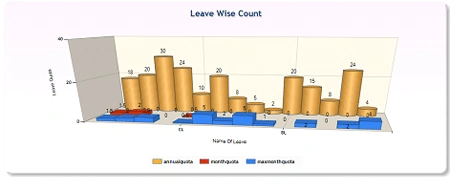
This sample demonstrates how to display 3D Bar and Column charts as cylinders.
Join the conversation! Your thoughts help the community grow.