
Here is designer code xaml:
- <UserControl x:Class="Clock.Page"
- xmlns="http://schemas.microsoft.com/client/2007"
- xmlns:x="http://schemas.microsoft.com/winfx/2006/xaml"
- Width="400" Height="400">
- <Canvas Width="400" Height="400" Loaded="Canvas_Loaded">
- <Canvas.Resources>
- <Storyboard x:Name="clockStoryboard">
- <!-- This animation targets the hour hand transform -->
- <DoubleAnimation x:Name="hourAnimation"
- Storyboard.TargetName="hourHandTransform"
- Storyboard.TargetProperty="Angle"
- Duration="12:0:0" RepeatBehavior="Forever"/>
- <!-- This animation targets the minute hand transform -->
- <DoubleAnimation x:Name="minuteAnimation"
- Storyboard.TargetName="minuteHandTransform"
- Storyboard.TargetProperty="Angle"
- Duration="1:0:0" RepeatBehavior="Forever"/>
- <!-- This animation targets the second hand transform -->
- <DoubleAnimation x:Name="secondAnimation"
- Storyboard.TargetName="secondHandTransform"
- Storyboard.TargetProperty="Angle"
- Duration="0:1:0" RepeatBehavior="Forever"/>
- </Storyboard>
- </Canvas.Resources>
- <!-- Clock Shadow -->
- <!--<Ellipse Width="330" Height="330" Canvas.Left="40"
- Canvas.Top="40" Fill="Black" Opacity="0.5"/>-->
- <!-- Outer rim -->
- <Ellipse Stroke="#FF000000" x:Name="outerCircle" Width="330" Height="330"
- Canvas.Left="32" Canvas.Top="32">
- <Ellipse.Fill>
- <!--This linear gradient creates a subtle shadow effect on the outer rim. -->
- <LinearGradientBrush EndPoint="0.196,0.127" StartPoint="0.852,0.814">
- <GradientStop Color="#FFC0C0C0" Offset="0.788"/>
- <GradientStop Color="#FFE4E5F4" Offset="0.995"/>
- </LinearGradientBrush>
- </Ellipse.Fill>
- </Ellipse>
- <!-- Bevel -->
- <Ellipse Stroke="#FF000000" Width="290" Height="281" Canvas.Left="52"
- Canvas.Top="57">
- <Ellipse.Fill>
- <!-- This linear gradient creates a subtle shadow effect on
- the outer rim. -->
- <LinearGradientBrush EndPoint="0.867,0.848" StartPoint="0.232,0.126">
- <GradientStop Offset="0.1"/>
- <GradientStop Color="#FFE4E5F4" Offset="0.995"/>
- </LinearGradientBrush>
- </Ellipse.Fill>
- </Ellipse>
- <!-- Clock Face -->
- <!--<Ellipse Stroke="#FF000000" Width="273" Height="265"
- Canvas.Left="60" Canvas.Top="65" Fill="#FF000000"/>-->
- <!-- Central Clock Circle -->
- <Ellipse StrokeThickness="7"
- Width="32" Height="31" Canvas.Left="180" Canvas.Top="190">
- <Ellipse.Stroke>
- <LinearGradientBrush EndPoint="1,0.5" StartPoint="0,0.5">
- <GradientStop Color="Black" Offset="0" />
- <GradientStop Color="White" Offset="1" />
- </LinearGradientBrush>
- </Ellipse.Stroke>
- <Ellipse.Fill>
- <LinearGradientBrush EndPoint="1,0.5" StartPoint="0,0.5">
- <GradientStop Color="Black" Offset="1" />
- <GradientStop Color="White" Offset="0" />
- </LinearGradientBrush>
- </Ellipse.Fill>
- </Ellipse>
- <!-- Minute Hand -->
- <Rectangle Fill="Gray" Width="8" Height="80" Canvas.Left="192.5" Canvas.Top="226"
- RenderTransformOrigin="0.41,-0.26" x:Name="MinutedHand">
- <Rectangle.RenderTransform>
- <RotateTransform x:Name="minuteHandTransform"/>
- </Rectangle.RenderTransform>
- </Rectangle>
- <!-- Hour Hand -->
- <Rectangle Fill="Gray" Width="10" Height="60" Canvas.Left="192.5" Canvas.Top="226"
- RenderTransformOrigin="0.35,-0.35" x:Name="HourHand">
- <Rectangle.RenderTransform>
- <RotateTransform x:Name="hourHandTransform"/>
- </Rectangle.RenderTransform>
- </Rectangle>
- <!-- Second Hand -->
- <Rectangle Fill="Gray" Width="5" Height="80" Canvas.Left="192.5" Canvas.Top="226"
- RenderTransformOrigin="0.65,-0.26" x:Name="SecondHand" >
- <Rectangle.RenderTransform>
- <RotateTransform x:Name="secondHandTransform"/>
- </Rectangle.RenderTransform>
- </Rectangle>
- </Canvas>
- </UserControl>
- using System;
- using System.Collections.Generic;
- using System.Linq;
- using System.Windows;
- using System.Windows.Controls;
- using System.Windows.Documents;
- using System.Windows.Input;
- using System.Windows.Media;
- using System.Windows.Media.Animation;
- using System.Windows.Shapes;
- namespace Clock
- {
- public partial class Page : UserControl
- {
- public Page()
- {
- InitializeComponent();
- }
- public void Canvas_Loaded(object sender, EventArgs e)
- {
- // The current date and time.
- System.DateTime date = DateTime.Now;
- // Find the appropriate angle (in degrees) for the hour hand
- // based on the current time.
- double hourangle = (((float)date.Hour) / 12) * 360 + date.Minute / 2;
- // The transform is already rotated 116.5 degrees to make the hour hand be
- // in the 12 o'clock position. You must build this already existing angle
- // into the hourangle.
- hourangle += 180;
- // The same as for the hour angle.
- double minangle = (((float)date.Minute) / 60) * 360;
- minangle += 180;
- // The same for the hour angle.
- double secangle = (((float)date.Second) / 60) * 360;
- secangle += 180;
- // Set the beginning of the animation (From property) to the angle
- // corresponging to the current time.
- hourAnimation.From = hourangle;
- // Set the end of the animation (To property)to the angle
- // corresponding to the current time PLUS 360 degrees. Thus, the
- // animation will end after the clock hand moves around the clock
- // once. Note: The RepeatBehavior property of the animation is set
- // to "Forever" so the animation will begin again as soon as it completes.
- hourAnimation.To = hourangle + 360;
- // Same as with the hour animation.
- minuteAnimation.From = minangle;
- minuteAnimation.To = minangle + 360;
- // Same as with the hour animation.
- secondAnimation.From = secangle;
- secondAnimation.To = secangle + 360;
- // Start the storyboard.
- clockStoryboard.Begin();
- }
- }
- }
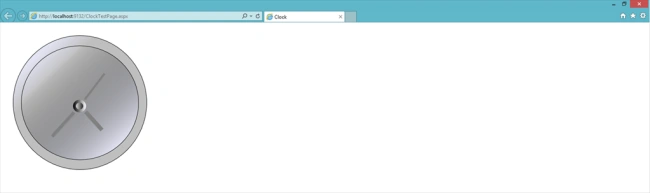
Here is 3D Clock in silverlight with C#.


Santhakumar MunuswamyPosted Jul 8, 2015, 11:54 AM EDT
Nice article. Thanks for sharing
Gowtham RajamanickamTOP 100Posted May 19, 2015, 8:55 PM EDT
good show..
Praveen KumarPosted Jan 11, 2015, 10:23 PM EST
Superb Mr. Piyush
Vithal WadjeTOP 100Posted Jan 10, 2015, 8:56 AM EST
nice,keep it up