
In this article I will explain how to convert table rows into comma separated value using T-SQL. To demonstrate this, we will create a student table and we will display student names into single column with comma separated.
Let's create a Student table first.
Code |
Insert some records into Student table
SQL |
Select Student table, output will display like Figure 1-1.
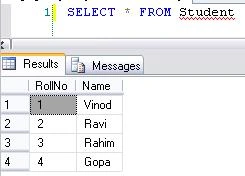
Figure 1-1
Now we will write a SQL query which will convert Student name into single column with comma separated value.
Solution 1:
SQL |
Solution 2:
SQL |
Output of solution 1 and solution will look like Figure 1-2.
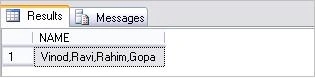
Figure 1-2
Join the conversation! Your thoughts help the community grow.