

If I as a client tell u, I need a custom permission level within minutes what will You Do? Involve more resources to set up custom levels. Here it is a quick way.
First see what kind of permissions you want that custom level to have.
Choose from the following:
- ViewListItems
- AddListItems
- EditListItemsDeleteListItems
- ApproveItems
- OpenItems
- ViewVersions
- DeleteVersions
- CancelCheckout
- ManagePersonalViews
- ManageLists
- ViewFormPages
- Open
- ViewPages
- AddAndCustomizePages
- ApplyThemeAndBorder
- ApplyStyleSheets
- ViewUsageData
- CreateSSCSite
- ManageSubwebs
- CreateGroups
- ManagePermissions
- BrowseDirectories
- BrowseUserInfo
- AddDelPrivateWebParts
- UpdatePersonalWebParts
- ManageWeb
- UseClientIntegration
- UseRemoteAPIs
- ManageAlerts
- CreateAlerts
- EditMyUserInfo
Now here comes the script,
Add the permissions you want to the script.
Powershell Script:
- $site=Get-SPSite "My Site Name Here"
- $web=$site.RootWeb;
- $customPermissionLevel=New-Object Microsoft.SharePoint.SPRoleDefinition
- $customPermissionLevel.Name="Custom Permission in SharePoint"
- $customPermissionLevel.Description="Description: This is a Testing"
- $customPermissionLevel.BasePermissions="EmptyMask,
- ViewListItems,
- AddListItems,
- EditListItems,
- DeleteListItems,
- ApproveItems,
- OpenItems,
- ViewVersions,
- DeleteVersions,
- CancelCheckout,
- ManagePersonalViews,
- ManageLists,
- ViewFormPages,
- ViewPages,
- AddAndCustomizePages,
- ApplyThemeAndBorder,
- ApplyStyleSheets,
- ViewUsageData,
- CreateSSCSite,
- ManageSubwebs,
- CreateGroups,
- ManagePermissions,
- BrowseDirectories,
- BrowseUserInfo,
- AddDelPrivateWebParts,
- UpdatePersonalWebParts,
- ManageWeb,
- UseClientIntegration,
- UseRemoteAPIs,
- ManageAlerts,
- CreateAlerts,
- EditMyUserInfo,
- EnumeratePermissions,
- FullMask"
- $web.RoleDefinitions.Add($customPermissionLevel);
- $web.Dispose()
- $site.Dispose()
- Click on Start > Right click on SharePoint 2010 Management Shell and run as Administrator.
- Paste the above code
- Click enter
- Go to the site > Site Settings> Permission Levels
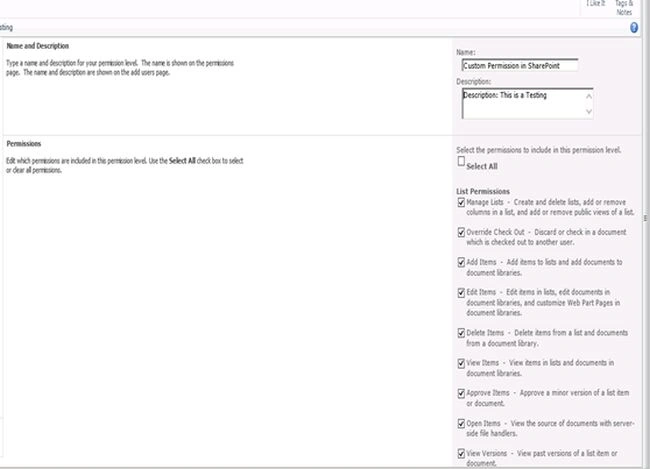
- You will find the below Custom Permission level Created named “Custom Permissions in SharePoint”

On clicking on the custom level you will see the below permissions added to the level.

Quick isn’t it?
Keep Learning,
Cheers.
Join the conversation! Your thoughts help the community grow.