

Introduction
In this blog, I would like to explain how to create Document Set In Document Library, using JSOM. A Document Set is a group of related documents, which can be created in one step and then managed as a single entity.
Source Code
- $(document).ready(function() {
- createDocumentSet();
- });
- functioncreateDocumentSet() {
- varclientContext = new SP.ClientContext.get_current();
- oWeb = clientContext.get_web();
- varoList = oWeb.get_lists().getByTitle("TestLibrary");
- clientContext.load(oList);
- varLibraryFolder = oList.get_rootFolder();
- clientContext.load(LibraryFolder);
- vardocumentSetContentTypeID = "0x0120D520";
- vardocumentSetContentType = clientContext.get_site().get_rootWeb().get_contentTypes().getById(documentSetContentTypeID);
- clientContext.load(documentSetContentType);
- clientContext.executeQueryAsync(QuerySuccess, QueryFailure);
- }
- functionQuerySuccess() {
- vardocumentSetName = "DocumentSetName";
- SP.DocumentSet.DocumentSet.create(clientContext, oLibraryFolder, documentSetName, documentSetContentType.get_id());
- clientContext.executeQueryAsync(Success, Failure);
- }
- functionQueryFailure() {
- console.log('Request failed - ' + args.get_message());
- }
- function Success() {
- console.log('DocumentSet Created Successfully.');
- }
- function Failure(sender, args) {
- console.log('Request failed - ' + args.get_message());
- }
We need to activate it before you can create or configure new Document Set content types.
- Go to the top-level site in the site collection for which you want to enable Document Sets.
- Site Actions menu--> click Site Settings.
- Site Collection Administration- Site collection features.
- Find Document Sets in the list and click Activate.
Add Document Set as a Content Type to your Document Library,
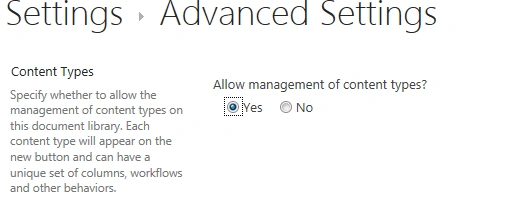
- Go to Document Settings and change the Advanced Settings to Allow management of content types.
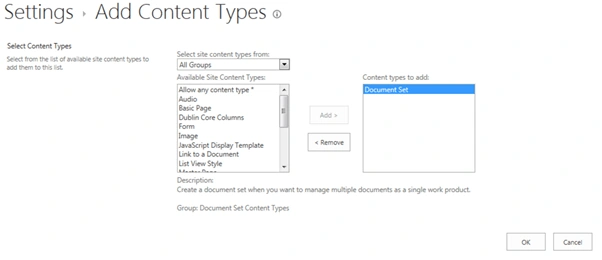
- Go to the Settings- add from existing site content types and find the Document Set content type. Select Document Set and click Add.
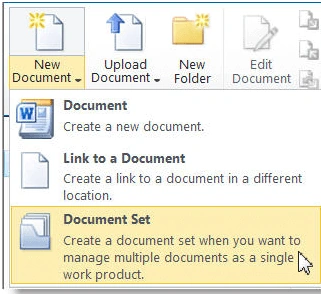
- Go to your Document library and select New Document -> Document Set from the drop-down list,
Here, we will see how to create a Document Set programatically, using Jsom.
Humayun Kabir MamunPosted Oct 6, 2016, 12:07 AM
Nice...
kapil mavaniPosted Oct 5, 2016, 1:35 AM
Document Content Type add for Department wise then create one JS File in include all Create content Type Code & Library.....
kapil mavaniPosted Oct 5, 2016, 1:33 AM
Sharepoint list item added then check & code Enable Version True...
ruthvik deekondaPosted Oct 4, 2016, 6:47 PM
Nice..!!