

Requirement:
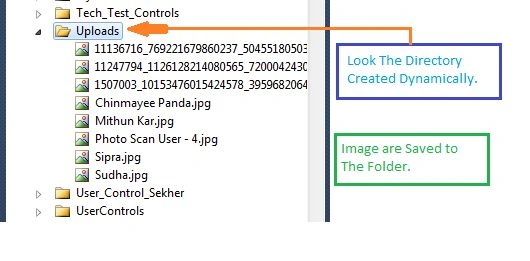
- Create a Directory dynamically, if it does not exist.
- Store the Images to the Folder.
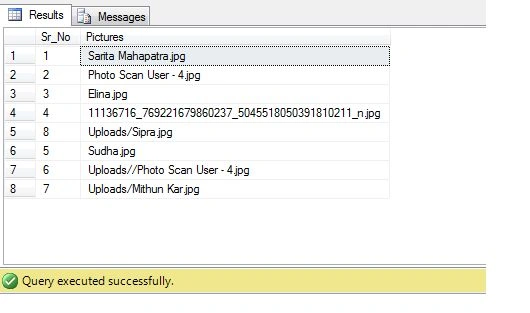
- Store the Image Path to the Database.
Database Table
- create table ImageUpload
- (
- Sr_No int identity,
- Pictures varchar(500)
- )
- <%@ Page Title="" Language="C#" MasterPageFile="~/MasterPage.master" AutoEventWireup="true" CodeFile="Image_Saving_To_SQL_Using_ServerMapPath.aspx.cs" Inherits="Image_Saving_To_SQL" %>
- <asp:Content ID="Content1" ContentPlaceHolderID="head" Runat="Server">
- <style type="text/css">
- .Heading
- {
- font-family: Arial, Helvetica, sans-serif; font-size: 12px; font-weight: bold; font-style: normal;
- font-variant: normal; text-transform: capitalize; color: #808080;
- text-align:center;
- height:30px;
- padding-top:15px;
- margin:10px;
- background-color:Gray;
- }
- .Content
- {
- margin:10px;
- height:400px;
- }
- .style1
- {
- width: 545px;
- }
- .style2
- {
- width: 151px;
- }
- .style3
- {
- width: 126px;
- }
- </style>
- </asp:Content>
- <asp:Content ID="Content2" ContentPlaceHolderID="ContentPlaceHolder1" Runat="Server">
- <div style="height: 783px">
- <div class="Heading">
- Saving Image To Database</div>
- <div class="Content">
- <br />
- <table style="width:100%;">
- <tr>
- <td class="style3">
- </td>
- <td class="style1">
- <asp:Image ID="Image1" runat="server" Height="293px" Width="584px" />
- </td>
- <td>
- </td>
- </tr>
- <tr>
- <td class="style3">
- </td>
- <td class="style1">
- <asp:FileUpload ID="FileUpload1" runat="server" />
- <asp:Button ID="btnUpload" runat="server" BackColor="#009933" Font-Bold="True"
- ForeColor="White" Height="30px" onclick="btnUpload_Click" Text="Upload"
- Width="100px" />
- <asp:Button ID="btnSave" runat="server" BackColor="#009900" Font-Bold="True"
- ForeColor="White" Height="30px" onclick="btnSave_Click" Text="Save"
- Width="100px" />
- </td>
- <td>
- </td>
- </tr>
- <tr>
- <td class="style3">
- </td>
- <td class="style1">
- <asp:Label ID="Label1" runat="server" Text="Label" Visible="False"></asp:Label>
- </td>
- <td>
- </td>
- </tr>
- </table>
- </div>
- </div>
- </asp:Content>
- using System;
- using System.Collections.Generic;
- using System.Linq;
- using System.Web;
- using System.Web.UI;
- using System.Web.UI.WebControls;
- using System.Data;
- using System.Data.SqlClient;
- using System.Data.SqlTypes;
- using System.Drawing;
- using System.Configuration;
- //
- using System.IO; //Include this namespace
- public partial class Image_Saving_To_SQL : System.Web.UI.Page
- {
- SqlConnection con = new SqlConnection(ConfigurationManager.ConnectionStrings["CONN"].ConnectionString.ToString());
- string ImageStr;
- string OldImg;
- protected void Page_Load(object sender, EventArgs e)
- {
- if (!IsPostBack)
- {
- }
- }
- protected void btnUpload_Click(object sender, EventArgs e)
- {
- try
- {
- if (FileUpload1.HasFile)
- {
- string dirUrl = "Uploads" + this.Page.User.Identity.Name;
- string dirPath = Server.MapPath(dirUrl);
- // Check for Directory, If not exist, then create it
- if (!Directory.Exists(dirPath))
- {
- Directory.CreateDirectory(dirPath);
- }
- // save the file to the Specifyed folder
- string fileUrl = dirUrl + "/" + Path.GetFileName(FileUpload1.PostedFile.FileName);
- FileUpload1.PostedFile.SaveAs(Server.MapPath(fileUrl));
- //Display the Image in the File Upload Control
- Image1.ImageUrl = fileUrl;
- }
- }
- catch (Exception Exc)
- {
- Label1.ForeColor = Color.Red;
- Label1.Text = "Application Error : " + Exc.Message;
- }
- }
- protected void btnSave_Click(object sender, EventArgs e)
- {
- try
- {
- con.Open();
- SqlCommand cmd = new SqlCommand("select Pictures from ImageUpload where Pictures='"+Image1.ImageUrl+"' ", con);
- SqlDataReader dr = cmd.ExecuteReader();
- if (dr.Read())
- {
- // Check, if the Image is available in the Database
- OldImg = dr["Pictures"].ToString();
- if (OldImg == Image1.ImageUrl)
- {
- ScriptManager.RegisterStartupScript(this, this.GetType(), "msg", "alert('This Image Already Exist.')", true);
- }
- }
- else
- {
- // If not avaliable, then insert it path to the database
- dr.Close();
- SqlCommand cmd1 = new SqlCommand("insert into ImageUpload values('" + Image1.ImageUrl + "')", con);
- cmd1.ExecuteNonQuery();
- }
- con.Close();
- }
- catch (Exception Exc)
- {
- Label1.ForeColor = Color.Red;
- Label1.Text = "Application Error." + Exc.Message;
- }
- }
- }
- Upload some Photo
- See the Output.
Watch the Database, Table.
Thank You.

Join the conversation! Your thoughts help the community grow.