

Introduction
In this blog, you’ll learn how to create a simple ASP.NET Core Web API from scratch using Visual Studio. This step-by-step guide is perfect for beginners looking to understand how RESTful APIs work.
What is a Web API?
A Web API(Application Programming Interface) allows different applications to communicate with each other over HTTP and is used to build RESTful services.
Why do we use ASP.NET Core Web API?
- Cross-platform(Platform Independent)
- Supports DI(Depenency Injection)
- Supports OpenAI(Swagger)
Prerequisites
- Basic knowledge of C# and SQL
- .NET SDK
- Familiar with Visual Studio IDE
Creating your first Web API project
Step 1
- Open Visual Studio
- Create a new project
- Select the ASP.NET Core Web API template
Step 2
- Name it EmployeeManagement
- Choose the latest .NET version
- Click Create
Understanding the Code Structure
- Program.cs: Entry point for application
- Controllers: Contains API controllers
- Models: Contains business logic
- appsettings.json: Configuration file
DbContext Setup with SQL Server
- To make your API data persistent, you can connect it to a SQL Server database using Entity Framework Core.
- First, install the required EF Core packages that support SQL Server. Then, create a class called EmployeeDbContext that manages database access and maps your Employee model to a database table.
- Next, register this DbContext in the application’s services so that it can be used in the controller. You'll also add a connection string in the configuration file (appsettings.json) to define how the app connects to SQL Server.
CRUD Operations for Employee
Create the Model: Models/Entities/Employee.cs.
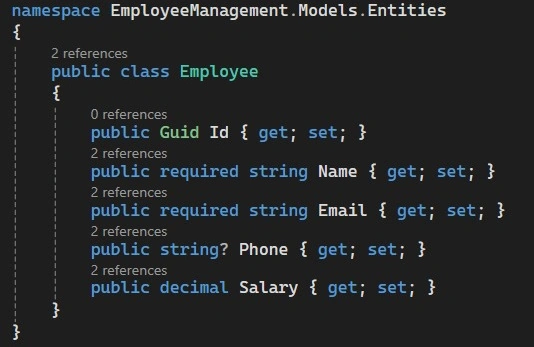
Create the Controller: Controllers/EmployeesController.cs
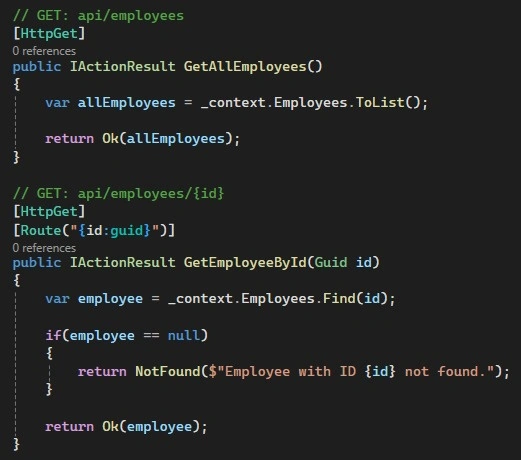
1. GET – Get All Employees & Get by ID
These two methods handle the retrieval of employee data.
- The first method [HttpGet] returns a full list of employees with an HTTP 200 OK response.
- The second method [HttpGet("{id}")] retrieves a specific employee by ID.
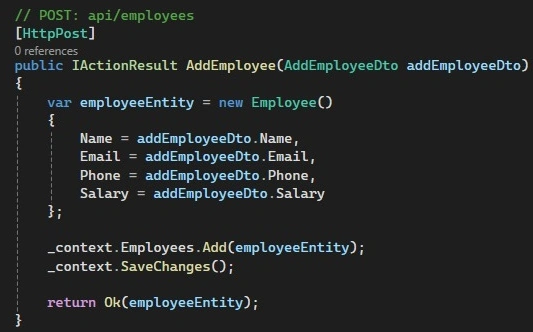
2. POST – Add a New Employee
This method handles employee creation.
- The [HttpPost] method accepts an Employee object from the request body.
- It adds the employee to the database.
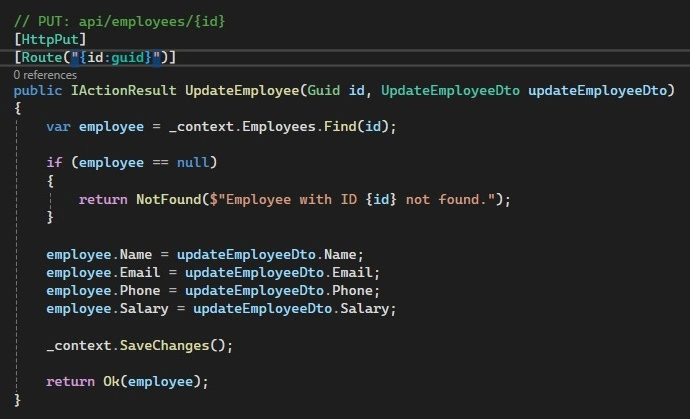
3. PUT – Update an Existing Employee
This method updates the details of an existing employee
- The [HttpPut("{id}")] method checks if an employee with the given ID exists.
- It updates the employee’s name, department, phone, and salary.
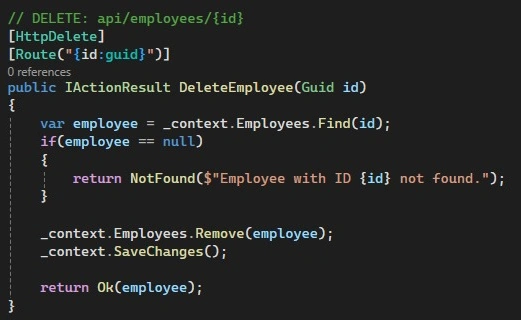
4. DELETE – Remove an Employee
This method deletes an employee based on the provided ID.
- The [HttpDelete("{id}")] method searches for the employee.
- If the employee exists, it removes them from the list.
Testing with Swagger
https://localhost:{port}/swagger/index.html
You can test all GET, POST, PUT, and DELETE requests directly from the Swagger interface.

Conclusion
In this blog, you learned how to build a simple yet functional Employee Management Web API using ASP.NET Core. We covered how to create models, set up controllers, implement CRUD operations, and connect to a SQL Server database using Entity Framework Core.
Source Code
You can find the complete source code for this project on GitHub using the link below.
GitHub Repo: https://github.com/Vinay-Reddy-Thadakala/EmployeeManagement
Join the conversation! Your thoughts help the community grow.