

How to create Listview Control?
- A very flexible to customize.
- A built in data paging support with the new DataPager control.
- Built in support for insert, update, delete.
- Grouping functionality.
Setp 1: Create .aspx page like this. <%@ Page Language="C#" AutoEventWireup="true" CodeBehind="Listview_Demo.aspx.cs"Inherits="listview.Listview_Demo" %>
<!DOCTYPE html PUBLIC "-//W3C//DTD XHTML 1.0 Transitional//EN" "http://www.w3.org/TR/xhtml1/DTD/xhtml1-transitional.dtd"> Setp 2:
Your .cs file code like this.
using System; namespace listview private void BindListView() Now Creating ListViewDemo Database. Run the following create table query.
USE [ListViewDemo] CREATE TABLE [dbo].[EmpInfo]( CONSTRAINT [PK_EmpInfo] PRIMARY KEY CLUSTERED I take linq to SQL as a Datasource so create .dbml file and add some dummy data in to Table.
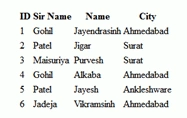
Run this application. The output looks like this.
<html xmlns="http://www.w3.org/1999/xhtml">
<head id="Head1" runat="server">
<title></title>
</head>
<body>
<form id="form1" runat="server">
<div>
<asp:ListView ID="ListView1" runat="server">
<LayoutTemplate>
<table>
<tr>
<th>
ID
</th>
<th>
Sir Name
</th>
<th>
| Name
</th>
<th>
City
</th>
</tr>
<tr id="itemPlaceholder" runat="server"></tr>
</table>
</LayoutTemplate>
<ItemTemplate>
<tr>
<td>
<asp:Label ID="lblid" runat="server"><%#Eval("id")%></asp:Label>
</td>
<td>
<asp:Label ID="lblsname" runat="server"><%#Eval("SName")%></asp:Label>
</td>
<td>
<asp:Label ID="lblname" runat="server"><%#Eval("Name")%></asp:Label>
</td>
<td>
<asp:Label ID="lcity" runat="server"><%#Eval("City")%></asp:Label>
</td>
</tr>
</ItemTemplate
</asp:ListView>
</div>
</form>
</body>
</html>
using System.Collections.Generic;
using System.Linq;
using System.Web;
using System.Web.UI;
using System.Web.UI.WebControls;
{
public partial class Listview_Demo : System.Web.UI.Page
{
protected void Page_Load(object sender, EventArgs e)
{
if (!IsPostBack)
{
BindListView();
}
}
{
using (DataClasses1DataContext dt = new DataClasses1DataContext())
{
var info = from emp in dt.EmpInfos
select emp;
if (info != null)
{
if (info.Count() > 0)
{
ListView1.DataSource = info;
ListView1.DataBind();
}
}
}
}
}
}
GO
/****** Object: Table [dbo].[EmpInfo] Script Date: 02/19/2012 01:07:15 ******/
SET ANSI_NULLS ON
GO
SET QUOTED_IDENTIFIER ON
GO
[id] [int] IDENTITY(1,1) NOT NULL,
[SName] [nvarchar](50) NULL,
[Name] [nvarchar](50) NULL,
[City] [nvarchar](50) NULL,
(
[id] ASC
)WITH (PAD_INDEX = OFF, STATISTICS_NORECOMPUTE = OFF, IGNORE_DUP_KEY = OFF, ALLOW_ROW_LOCKS = ON, ALLOW_PAGE_LOCKS = ON) ON [PRIMARY]
) ON [PRIMARY]
GO
Join the conversation! Your thoughts help the community grow.