
In this blog, you will see how to get a direct link to a team in Microsoft Teams using PowerShell.
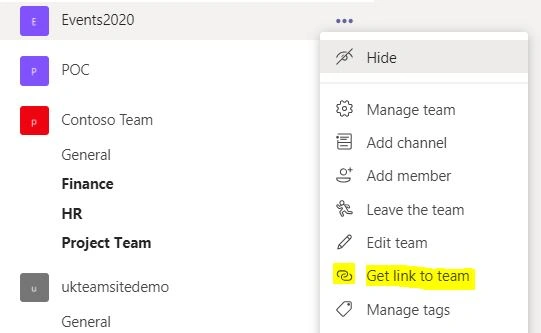
Navigate to Microsoft Teams, click more options and then click Get link to team.
Link
Code
https://teams.microsoft.com/l/team/19%3a19a0e70002ad40fe95aaacc04221b866%40thread.skype/conversations?groupId=651e1d9d-1169-48d7-9ad7-59e834a7e7ea&tenantId=e8e6d018-a834-406b-9f43-2e94ae425876Link Format
Code
https://teams.microsoft.com/l/team/<ChannelID>/conversations?groupId=<GroupID>&tenantId=<TenantID>Prerequisites
Install the Teams Cmdlets module.
Reference URL - https://www.powershellgallery.com/packages/MicrosoftTeams/1.0.5
PowerShell Script
JavaScript
# Input Parameters
$teamName="Events2020"
$channelName="General"
$credentials=Get-Credential

# Connect to Microsoft Teams
$connectTeams=Connect-MicrosoftTeams -Credential $credentials

# Get the tenant ID
$tenantId=$connectTeams.TenantId

# Get the team
$team=Get-Team -DisplayName $teamName

# Get the Group Id
$groupID=$team.GroupId

# Get the channel
$channel=Get-TeamChannel -GroupId $groupID | Where-Object {$_.DisplayName -eq $channelName}

# Get the channel ID
$channelId=$channel.Id

# Get the Team link
$teamLink= "https://teams.microsoft.com/l/team/"+$channelId+"/conversations?groupId="+$groupID+"&tenantId="+$tenantId;
Write-Host -F Green $teamLink
Result

Summary
In this blog, you saw how to get a direct link to a team in Microsoft Teams using PowerShell.


max xnoopyPosted Mar 4, 2022, 12:15 AM EST
Please, how can I get the links of all the teams to csv