
I'm going to explain the way to get data from API and display in UI. Here I'm using angular-in-memory-web-api. You can take the data from API as well.
Step 1
To test our application we need web service Url. Angular provides Angular in-Memory web Api to test our application. Firstly install Angular in-Memoy web Api
npm i [email protected] --save
I have implemented inmemoydbservice
testdata.ts
- import {InMemoryDbService} from 'angular-in-memory-web-api';
- export class TestData implements InMemoryDbService{
- createDb(){
- let bookdetails =[
- {id:100, name:'Abhishek', place:'Bangalore'},
- {id:101, name:'John', place:'Delhi'},
- {id:102, name:'jiva', place:'Kolkata'},
- {id:103, name:'jivan', place:'Kota'},
- {id:104, name:'santan', place:'Durgapur'},
- ];
- return {books :bookdetails}
- }
- }
Step 2
Create a service under src : ng g service book
book.service.ts
- import { Injectable } from '@angular/core';
- import {HttpClient} from '@angular/common/http';
- import { Observable } from 'rxjs';
- import {Book} from './book'
- @Injectable({
- providedIn: 'root'
- })
- export class BookService {
- bookurl='/api/books';
- constructor(private http:HttpClient) { }
- getBookFromStore():Observable<Book[]>
- {
- return this.http.get<Book[]>(this.bookurl);
- }
- }
Step 3
Create a ts file to store Book properties
book.ts
- export interface Book{
- id:number;
- name:string;
- place:string;
- }
Step 4 - app.module.ts
- import { BrowserModule } from '@angular/platform-browser';
- import { NgModule } from '@angular/core';
- import {HttpClientModule} from '@angular/common/http'
- import { RouterModule,Routes } from '@angular/router';
- import { FormsModule } from '@angular/forms';
- import { AppComponent } from './app.component';
- import { BookService } from 'src/book.service';
- import {InMemoryWebApiModule} from 'angular-in-memory-web-api'
- import {TestData} from 'src/testdata'
- @NgModule({
- declarations: [
- AppComponent
- ],
- imports: [
- BrowserModule,
- HttpClientModule,
- InMemoryWebApiModule.forRoot(TestData)
- ],
- providers: [BookService],
- bootstrap: [AppComponent]
- })
- export class AppModule { }
Step 5 - app.component.ts
- import { Component } from '@angular/core';
- import { BookService } from 'src/book.service';
- import { TestData } from 'src/testdata';
- import { Book } from 'src/book';
- @Component({
- selector: 'app-root',
- templateUrl: './app.component.html'
- })
- export class AppComponent {
- title = 'httpclient get in Angular 7';
- softbook :Book[];
- constructor(private bookservice:BookService){
- }
- ngOnInit(){
- this.getsoftBook();
- }
- getsoftBook(){
- this.bookservice.getBookFromStore().subscribe(books=>this.softbook=books);
- }
- }
Step 6 - app.component.html
- <style>
- table, th, td {
- border: 1px solid black;
- border-collapse: collapse;
- }
- th, td {
- padding: 5px;
- }
- th {
- text-align: left;
- }
- </style>
- <body>
- <h1 style="color:red;">welcome to {{title}}</h1>
- <div class="container">
- <table>
- <thead>
- <tr>
- <th>Id</th>
- <th>Name</th>
- <th>Place</th>
- </tr>
- </thead>
- <tbody *ngFor="let bk of softbook">
- <tr>
- <td>{{bk.id}}</td>
- <td>{{bk.name}}</td>
- <td>{{bk.place}}</td>
- </tr>
- </tbody>
- </table>
- </div>
- </body>
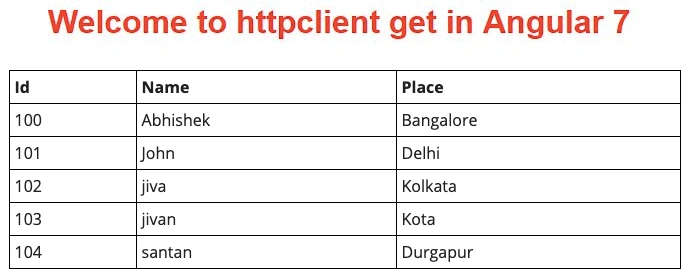
Output
Join the conversation! Your thoughts help the community grow.