
Just add the right code to your app to encourage ratings & reviews and get more rating to your app, also if you are on DVLUP, it will be helpful for many challenges such as "Rate my app related Challenge!" & "Quality Challenges" those need ratings on DVLUP under Windows Phone Platform. So many asked me question How to add "Rate and Review" mechanism in Windows Phone App, so I am writing this article.
Steps to implement Rate and Review Mechanism in Windows Phone 8 Application.
1. Right click on project name in solution explorer and go to "Mange NuGet Packages"
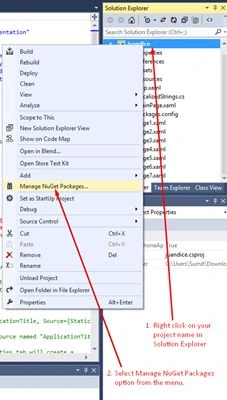
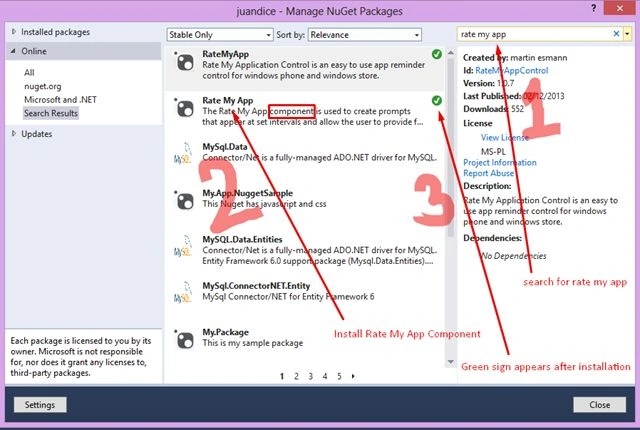
2. Search for “Rate My App” and install it.
- Select Online >> (at right top corner) Text Box >> (query)"Rate My App".
- Browse and Install Rate My App Component and controls.
- It will show green icon sign after successfully installation.
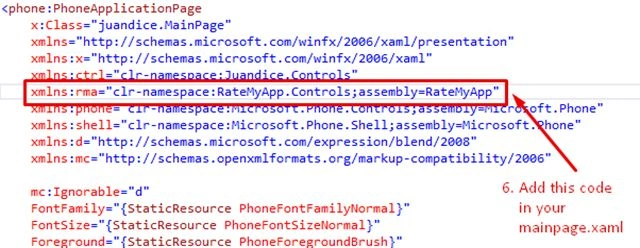
3. Then add namespace code in MainPage.xaml as follows:
- xmlns:rma="clr-namespace:RateMyApp.Controls;assembly=RateMyApp"
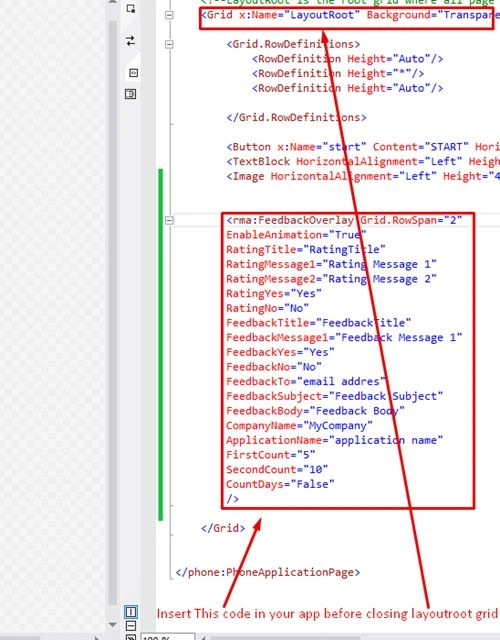
4. Add following code to the LayoutRoot grid in MainPage.xaml:
- <rma:FeedbackOverlay Grid.RowSpan="2"
- EnableAnimation="True"
- RatingTitle="RatingTitle"
- RatingMessage1="Rating Message 1"
- RatingMessage2="Rating Message 2"
- RatingYes="Yes"
- RatingNo="No"
- FeedbackTitle="FeedbackTitle"
- FeedbackMessage1="Feedback Message 1"
- FeedbackYes="Yes"
- FeedbackNo="No"
- FeedbackTo="[email protected]"
- FeedbackSubject="Feedback Subject"
- FeedbackBody="Feedback Body"
- CompanyName="MyCompany"
- ApplicationName="MyApplication"
- FirstCount="5"
- SecondCount="10"
- CountDays="False"
- />
Above code will look as below shown image, in which shown, you have to copy above code in your app code before closing the "LayoutRoot" Grid.
5. Save your project and build again and run it, open and close your app 5 times it will show Rate and Review Notification.
Followed above all Steps, means you did with the Rate my app in your Windows Phone application.
For More Details Click Here.


Aditya PatilPosted Jul 10, 2014, 5:43 PM EDT
Thanx Sir
Mohammad MirshahiPosted Jul 10, 2014, 11:43 AM EDT
like ... very nice ! www.zunkan.ir