

----Create type-----
create type _table as table
(
E_Name varchar(50),
Salary varchar(200)
)
2. After that create Procedure in sql:=>here I have to use _table type as table-valued parameter in Procedure.
The table-valued parameter "@tablevariable" must be declared with the READONLY option.
------Create
procedure with the table-valued parameter---
as
begin
insert into mytable(Name,salary) select E_Name,Salary from @tablevariable
end
3. Create this method that contains multiple rows
create type _table as table
(
E_Name varchar(50),
Salary varchar(200)
)
2. After that create Procedure in sql:=>here I have to use _table type as table-valued parameter in Procedure.
The table-valued parameter "@tablevariable" must be declared with the READONLY option.
create proc
uspInsertBulkRow
@tablevariable
_table readonlyas
begin
insert into mytable(Name,salary) select E_Name,Salary from @tablevariable
end
3. Create this method that contains multiple rows
private DataTable _datatableData(){
DataTable _dt = new DataTable();
_dt.Columns.Add("id");
_dt.Columns.Add("Name");
_dt.Columns.Add("Salary");
_dt.Rows.Add("1","Anu", "12000");
_dt.Rows.Add("3","Anamika", "15000");
_dt.Rows.Add("4", "Ram", "17000");
_dt.Rows.Add("5","Aman", "4000");
_dt.Rows.Add("6","Tarun", "18000");
_dt.Rows.Add("7","Akash", "5000");
return _dt;}
_dt.Columns.Add("id");
_dt.Columns.Add("Name");
_dt.Columns.Add("Salary");
_dt.Rows.Add("1","Anu", "12000");
_dt.Rows.Add("3","Anamika", "15000");
_dt.Rows.Add("4", "Ram", "17000");
_dt.Rows.Add("5","Aman", "4000");
_dt.Rows.Add("6","Tarun", "18000");
_dt.Rows.Add("7","Akash", "5000");
return _dt;}
Then write this code on the Save button click
Here I have to pass the datatable as a parameter value in the stored
procedure and This procedure inserts the multiple row in the SQL table.
using (SqlCommand cmd = new SqlCommand("uspInsertBulkRow",
con)){
_datatableData() Is a method and its return datatable- this method contain multiple row----------
cmd.Parameters.AddWithValue("@tablevariable", _datatableData());
cmd.CommandType = CommandType.StoredProcedure;
con.Open();
cmd.ExecuteNonQuery();
con.Close();
}
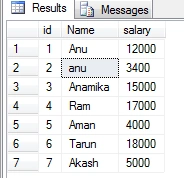
Output is: Its a simple example. you can use this concept as per requirement
Ramdas ChavanPosted Feb 10, 2014, 12:59 AM
very helpful to me .Thank you -Ramdas Chavan