
Introduction
This blog Is Useful To Get Direction Of Two Different Point and Find out Distance. It is useful to Best Path of you going to Location easily find out. How to Integrate Google Map in (C#) and Any Other Language. Person Can Enter Starting Point and Ending Point.
Screen Shot
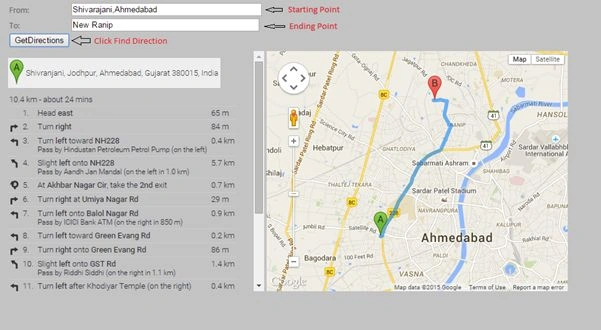
Using The Code
Step 1: Adding Script and Function.
- <script type="text/javascript" src="http://maps.googleapis.com/maps/api/js?sensor=false"></script>
- <script language="javascript" type="text/javascript">
- var directionsDisplay;
- var directionsService = new google.maps.DirectionsService();
- function InitializeMap() {
- directionsDisplay = new google.maps.DirectionsRenderer();
- var latlng = new google.maps.LatLng(-34.397, 150.644);
- var myOptions =
- {
- zoom: 8,
- center: latlng,
- mapTypeId: google.maps.MapTypeId.ROADMAP
- };
- var map = new google.maps.Map(document.getElementById("map"), myOptions);
- directionsDisplay.setMap(map);
- directionsDisplay.setPanel(document.getElementById('directionpanel'));
- var control = document.getElementById('control');
- control.style.display = 'block';
- }
- function calcRoute() {
- var start = document.getElementById('startvalue').value;
- var end = document.getElementById('endvalue').value;
- var request = {
- origin: start,
- destination: end,
- travelMode: google.maps.DirectionsTravelMode.DRIVING
- };
- directionsService.route(request, function (response, status) {
- if (status == google.maps.DirectionsStatus.OK) {
- directionsDisplay.setDirections(response);
- }
- });
- }
- function Button1_onclick() {
- calcRoute();
- }
- window.onload = InitializeMap;
- </script>
- <table id="control">
- <tr>
- <td>
- <table>
- <tr>
- <td>
- From:
- </td>
- <td>
- <input id="startvalue" type="text" style="width: 305px" />
- </td>
- </tr>
- <tr>
- <td>
- To:
- </td>
- <td>
- <input id="endvalue" type="text" style="width: 301px" />
- </td>
- </tr>
- <tr>
- <td align="right">
- <input id="Button1" type="button" value="GetDirections" onclick="return Button1_onclick()" />
- </td>
- </tr>
- </table>
- </td>
- </tr>
- <tr>
- <td valign="top">
- <div id="directionpanel" style="height: 390px; overflow: auto">
- </div>
- </td>
- <td valign="top">
- <div id="map" style="height: 390px; width: 489px">
- </div>
- </td>
- </tr>
- </table>
This blog Related Any Issues and Any Google API Integration of Your Own Site Than Contact Me : My Email Id: [email protected].
Former memberPosted Jun 2, 2015, 12:34 PM
Thanks
NitinPosted Jun 2, 2015, 5:09 AM
thanks for sharing
Former memberPosted Jun 1, 2015, 4:58 AM
Thanks for sharing such a great information..Its really nice and informative.http://www.joinfita.com/sharepoint-training-in-chennai/
Santhakumar MunuswamyPosted May 31, 2015, 11:34 PM
Thanks for sharing