

Introduction:
This blog tells you how to implement the kendo DropDownList for Angular 2. For the demo purpose, I have created a kendo DropDownList for Angular 2 with a simple data binding of complex array.
Before going through this blog, I highly recommend to read my previous article to get an idea about how to use/configure Kendo UI component for Angular 2
Kendo DropDownList for Angular 2
To use the kendo DropDownList for Angular 2, we need to install the kendo DropDownList package. Just pass the below command to install it.
- npm install -S @progress/kendo-angular-dropdowns
Once the installation is successful, you will get the following message. Here, we can neglect the warning.
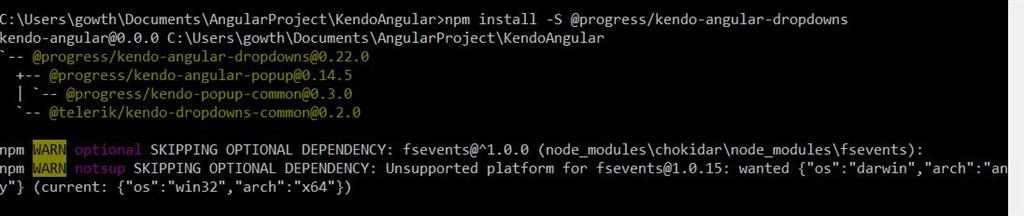
After installation, you will get the kendo DropDownList package folder under "node_modules -> @progress" in your project.
Write the following code in app/app.component.ts
- import { Component } from '@angular/core';
- @Component({
- selector: 'app-root',
- template: `
- <kendo-dropdownlist
- [data]="listItems"
- [textField]="'text'"
- [valueField]="'value'"
- >
- </kendo-dropdownlist>
- `
- })
- export class AppComponent {
- public listItems: Array<{ text: string, value: number }> = [
- { text: "India", value: 1 },
- { text: "USA", value: 2 },
- { text: "China", value: 3 }
- ];
- }
textField and valueField properties are bound to the data text and value in the array respectively.
app/app.module.ts
- import { NgModule } from '@angular/core';
- import { BrowserModule } from '@angular/platform-browser';
- import { DropDownsModule } from '@progress/kendo-angular-dropdowns';
- import { HttpModule } from '@angular/http';
- import { AppComponent } from './app.component';
- @NgModule({
- imports: [BrowserModule, DropDownsModule, HttpModule],
- declarations: [AppComponent],
- bootstrap: [AppComponent]
- })
- export class AppModule { }
Index.html
- <!doctype html>
- <html>
- <head>
- <meta charset="utf-8">
- <title>KendoAngular</title>
- <base href="/">
- <meta name="viewport" content="width=device-width, initial-scale=1">
- <link rel="icon" type="image/x-icon" href="favicon.ico">
- </head>
- <body>
- <h3> Kendo DropDown List for Angular 2</h3>
- <br />
- <app-root>Loading...
- </app-root>
- </body>
- </html>
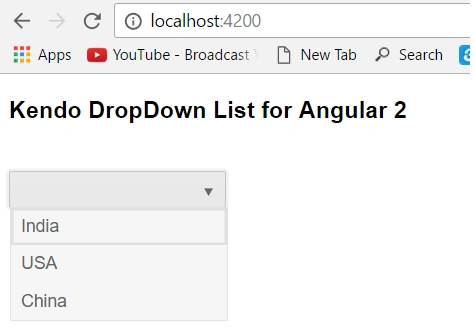
I hope, you have enjoyed this blog. Your valuable feedback, questions, and comments about this blog are always welcome.
Get the source code from GitHub.
Join the conversation! Your thoughts help the community grow.