

Pivot is an operator in SQL Server that is used for rotating a table. Pivot operator can be used to rotatae unique values from one column, into multiple columns in the output.
Steps to follow
Create a table.
Create a table.
- Create Table tblContribution
- (
- Article nvarchar(50),
- Author nvarchar(50),
- Counts int
- )
- Insert into tblContribution values('Sql Server', 'Satyaprakash Samantaray', 1)
- Insert into tblContribution values('Sql Server', 'Satyaprakash Samantaray', 2)
- Insert into tblContribution values('Sql Server', 'Satyaprakash Samantaray', 3)
- Insert into tblContribution values('MVC', 'Satyaprakash Samantaray', 4)
- Insert into tblContribution values('MVC', 'Satyaprakash Samantaray', 5)
- Insert into tblContribution values('MVC', 'Satyaprakash Samantaray', 6)
- Insert into tblContribution values('C#', 'Satyaprakash Samantaray', 7)
- Insert into tblContribution values('C#', 'Satyaprakash Samantaray', 8)
- Insert into tblContribution values('C#', 'Satyaprakash Samantaray', 9)
- Insert into tblContribution values('Sql Server', 'Kulu', 4)
- Insert into tblContribution values('Sql Server', 'Kulu', 5)
- Insert into tblContribution values('Sql Server', 'Kulu', 6)
- Insert into tblContribution values('MVC', 'Kulu', 7)
- Insert into tblContribution values('MVC', 'Kulu', 8)
- Insert into tblContribution values('MVC', 'Kulu', 9)
- Insert into tblContribution values('C#', 'Kulu', 1)
- Insert into tblContribution values('C#', 'Kulu', 2)
- Insert into tblContribution values('C#', 'Kulu', 3)
- Insert into tblContribution values('Sql Server', 'Prakash', 9)
- Insert into tblContribution values('Sql Server', 'Prakash', 8)
- Insert into tblContribution values('Sql Server', 'Prakash', 7)
- Insert into tblContribution values('MVC', 'Prakash', 6)
- Insert into tblContribution values('MVC', 'Prakash', 5)
- Insert into tblContribution values('MVC', 'Prakash', 4)
- Insert into tblContribution values('C#', 'Prakash', 3)
- Insert into tblContribution values('C#', 'Prakash', 2)
- Insert into tblContribution values('C#', 'Prakash', 1)
- Select Author, Article, SUM(Counts) as Total
- from tblContribution
- group by Author, Article
- order by Author, Article
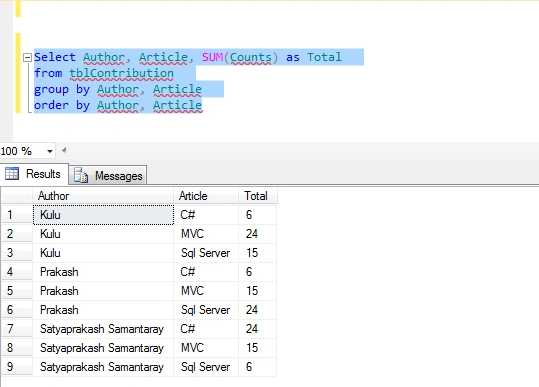
Execute the below stored procedure SQL script using Pivot Operator.
- Create Procedure Sp_Pivot
- as
- Begin
- Select Author, [Sql Server], [MVC], [C#]
- from tblContribution
- pivot
- (
- Sum(Counts) for Article in ([Sql Server],[MVC],[C#])
- ) as PivotTable
- end
- exec Sp_Pivot
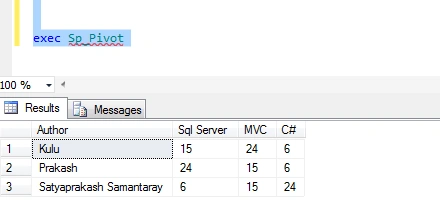
Summary
We learned what Pivot Operator in SQL Server is and how to implement it using stored procedure in real time scenarios.
We learned what Pivot Operator in SQL Server is and how to implement it using stored procedure in real time scenarios.
rodrigo cabreraPosted Apr 19, 2020, 10:28 PM
Hi Satyaprakash, I did it in sql management studio and works very fine, but when I trayed to use the store from C# (winforms) id did'nt return the dataset where the table, so could you helpo please telling me how should I execute the store procedure from c# , thanks