I’m new to WPF and data binding. After wandering around the web for a good practical solution, all I could find were (in my opinion) overly complicated solutions to a problem that will most probably be fixed in the future.
Problem
It seems that when adding or removing elements from an observable collection, data binding works. However, when an element within the collection changes value, the GUI element is not updated.
Solution
For this, I made a new collection class that would implement the ObservableCollection with a Refresh() method which would just raise the collection change event.
Aim - Simplify the process of updating the GUI
My XAML Code
- <Button Content="Add" HorizontalAlignment="Left" Margin="366,69,0,0" VerticalAlignment="Top" Width="75" Click="AddDate" />
- <ListBox Name="MyListBox" HorizontalAlignment="Left" Height="95" Margin="131,84,0,0" VerticalAlignment="Top" Width="197">
- <ListBox.ItemTemplate>
- <DataTemplate>
- <StackPanel Orientation="Horizontal">
- <TextBlock Text="{Binding Now}"></TextBlock>
- <CheckBox IsChecked="{Binding IsChecked}"></CheckBox>
- </StackPanel>
- </DataTemplate>
- </ListBox.ItemTemplate>
- </ListBox>
- <Button Content="Mark All" HorizontalAlignment="Left" Margin="366,94,0,0" VerticalAlignment="Top" Width="75" Click="MarkAll" />
- <Button Content="Unmark All" HorizontalAlignment="Left" Margin="366,119,0,0" VerticalAlignment="Top" Width="75" Click="UnMarkAll" />
Class file
- namespace WpfApp1 {
- //create our test class
- public class NowDate {
- public string Now {
- get;
- set;
- }
- public bool IsChecked {
- get;
- set;
- }
- }
- //create a new collection class with a refresh method
- public class ObservableCollectionPropertyNotify < T > : ObservableCollection < T > {
- //OnCollectionChange method is protected, accesible only within a child class in this case. This is why
- //I made a new Collection class with a public method Refresh.
- public void Refresh() {
- for (var i = 0; i < this.Count(); i++) {
- this.OnCollectionChanged(new NotifyCollectionChangedEventArgs(NotifyCollectionChangedAction.Reset));
- }
- }
- }
- public partial class MainWindow: Window {
- public ObservableCollectionPropertyNotify < NowDate > Dates {
- get;
- set;
- }
- public MainWindow() {
- InitializeComponent();
- //Set up a simple collection with some items.
- Dates = new ObservableCollectionPropertyNotify < NowDate > {
- new NowDate {
- Now = "1", IsChecked = false
- },
- new NowDate {
- Now = DateTime.Now.ToString(), IsChecked = false
- }
- };
- MyListBox.DataContext = this;
- MyListBox.ItemsSource = Dates;
- }
- private void AddDate(object sender, RoutedEventArgs e) {
- //in this case GUI updates implicitly. No need to call Refres()
- Dates.Add(new NowDate {
- Now = DateTime.Now.ToString(), IsChecked = true
- });
- }
- private void MarkAll(object sender, RoutedEventArgs e) {
- foreach(var item in Dates)
- item.IsChecked = true;
- //calling refresh after item has changed
- Dates.Refresh();
- }
- private void UnMarkAll(object sender, RoutedEventArgs e) {
- //calling refresh after item has changed
- foreach(var item in Dates)
- item.IsChecked = false;
- Dates.Refresh();
- }
- }
- }
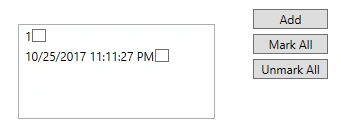
Result
- When adding a new item – GUI updates.
- When clicking mark all – GUI updates instantly.
- When clicking unmark all – GUI updates instantly.


CsharpestPosted Nov 11, 2018, 6:45 PM EST
This was just what I was looking for. Simple and elegant solution. Thanks!