

Office Open XML
Office Open XML is introduced by Microsoft to work with documents. For e.g.: - read/write MS word documents.
Prerequisites
- Visual Studio
- MS Word Document
- Open XML SDK
Execute below command to Install DocumentFormat.OpenXml SDK in your project
- Install-Package DocumentFormat.OpenXml Install-Package DocumentFormat.OpenXml
Note
In this example, I am using a windows form application to interact with word document and display the result on the screen.
In this example, I am using a windows form application to interact with word document and display the result on the screen.
How to find first table from word document?
- Table table = doc.MainDocumentPart.Document.Body.Elements<Table>().First();
Here .First() is extension method to find first table from word document.
The WordprocessingDocument Methods
|
EXTENSION METHOD
|
DESCRIPTION
|
|
.Elements<Table>().First()
|
To get the first table from the word document
|
|
.Elements<Table>().Last()
|
To get the last table from the word document
|
|
.Elements<Table>().FisrtOrDefault()
|
To get the first table from the word document or return the default value if the document does not contain table.
|
|
.Elements<Table>().LastOrDefault()
|
To get the Last table from word document or return the default value if the document does not contain table.
|
|
.Elements<Table>().ElementAt(Index)
|
To get the exact table from the word document by index number. Default index number is 0.
|
|
Table.Elements<TableRow>().ElementAt(index)
|
To get the exact table row from selected table by index number. Default index number is 0.
|
|
Row.Elements<TableCell>().ElementAt(Index)
|
To get the exact row cell from selected row by index number. Default index number is 0.
|
Execute the following code to read the first table from the word document,
- using System;
- using System.Collections.Generic;
- using System.Data;
- using System.Linq;
- using System.Windows.Forms;
- using DocumentFormat.OpenXml.Packaging;
- using DocumentFormat.OpenXml.Wordprocessing;
- namespace ReadTable
- {
- public partial class Form1 : Form
- {
- public Form1()
- {
- InitializeComponent();
- }
- // To browse and select files on a computer in an application
- private void btnBrowse_Click(object sender, EventArgs e)
- {
- DialogResult result = this.openDB.ShowDialog();
- if (result == DialogResult.OK)
- {
- txtBrowse.Text = openDB.FileName;
- }
- }
- private void btnReadTable_Click(object sender, EventArgs e)
- {
- // Open word document for read
- using (var doc = WordprocessingDocument.Open(txtBrowse.Text.Trim(), false))
- {
- // To create a temporary table
- DataTable dt = new DataTable();
- int rowCount = 0;
- // Find the first table in the document.
- Table table = doc.MainDocumentPart.Document.Body.Elements<Table>().First();
- // To get all rows from table
- IEnumerable<TableRow> rows = table.Elements<TableRow>();
- // To read data from rows and to add records to the temporary table
- foreach (TableRow row in rows)
- {
- if (rowCount == 0)
- {
- foreach (TableCell cell in row.Descendants<TableCell>())
- {
- dt.Columns.Add(cell.InnerText);
- }
- rowCount += 1;
- }
- else
- {
- dt.Rows.Add();
- int i = 0;
- foreach (TableCell cell in row.Descendants<TableCell>())
- {
- dt.Rows[dt.Rows.Count - 1][i] = cell.InnerText;
- i++;
- }
- }
- }
- // To display the result
- // Bind datatable(temporary table) to the datagridview
- dgvTable.DataSource = dt;
- }
- }
- }
- }
Output
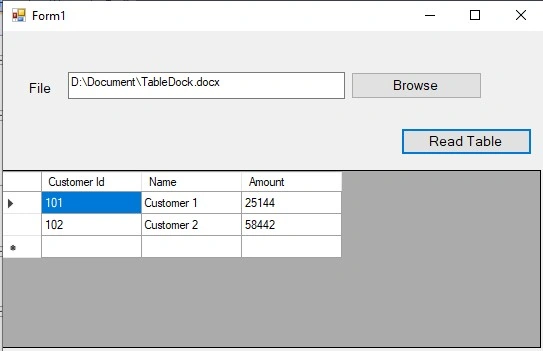
In the above example, I have used .First() extension method to get the first table from word document. You can use other extension methods to find exact table or you can use for/foreach loop to find the exact table from the word document.
Summary
In this session, I discussed how to read the table from the word document using c#. I hope the above session will help you to read the table from the word document using C#.
Join the conversation! Your thoughts help the community grow.