

For this task we use some library and method.
Steps:
- Create a sample ASP.NET Website, add new web form.
- Paste the below design code into aspx page.
- <%@ Page Language="C#" AutoEventWireup="true" CodeFile="Default.aspx.cs" Inherits="_Default" %>
- <!DOCTYPE html PUBLIC "-//W3C//DTD XHTML 1.0 Transitional//EN" "http://www.w3.org/TR/xhtml1/DTD/xhtml1-transitional.dtd">
- <html xmlns="http://www.w3.org/1999/xhtml">
- <head runat="server">
- <title></title>
- </head>
- <body>
- <form id="form1" runat="server">
- <div>
- <asp:FileUpload ID="FileUpload1" runat="server" />
- <br />
- <asp:Button ID="Button1" runat="server" Text="Upload" onclick="Button1_Click" />
- <br />
- <!-- To display the Size of image -->
- <span>Size Before Resize : </span>
- <asp:Label ID="Label1" runat="server" Text=""></asp:Label>
- <br />
- <span>Size After Resize : </span>
- <asp:Label ID="Label2" runat="server" Text=""></asp:Label>
- <br />
- <!-- To display the Resize Image -->
- <asp:Image ID="Image1" runat="server" />
- </div>
- </form>
- </body>
- </html>
- Now use the following code into Button1_Click event on aspx.cs page:
Note: Before using above code you must use the Following Namespace:- protected void Button1_Click(object sender, EventArgs e)
- {
- // Check file exist or not
- if (FileUpload1.PostedFile != null)
- {
- // Check the extension of image
- string extension = Path.GetExtension(FileUpload1.FileName);
- if (extension.ToLower() == ".png" || extension.ToLower() == ".jpg")
- {
- Stream strm=FileUpload1.PostedFile.InputStream;
- using (var image = System.Drawing.Image.FromStream(strm))
- {
- // Print Original Size of file (Height or Width)
- Label1.Text = image.Size.ToString();
- int newWidth = 240; // New Width of Image in Pixel
- int newHeight = 240; // New Height of Image in Pixel
- var thumbImg = new Bitmap(newWidth, newHeight);
- var thumbGraph = Graphics.FromImage(thumbImg);
- thumbGraph.CompositingQuality = CompositingQuality.HighQuality;
- thumbGraph.SmoothingMode = SmoothingMode.HighQuality;
- thumbGraph.InterpolationMode = InterpolationMode.HighQualityBicubic;
- var imgRectangle = new Rectangle(0, 0, newWidth, newHeight);
- thumbGraph.DrawImage(image, imgRectangle);
- // Save the file
- string targetPath = Server.MapPath(@"~\Images\") + FileUpload1.FileName;
- thumbImg.Save(targetPath, image.RawFormat);
- // Print new Size of file (height or Width)
- Label2.Text = thumbImg.Size.ToString();
- //Show Image
- Image1.ImageUrl = @"~\Images\" + FileUpload1.FileName;
- }
- }
- }
- }
- using System.Drawing;
- using System.Drawing.Drawing2D;
- using System.IO;
- Now run the website and upload and image.
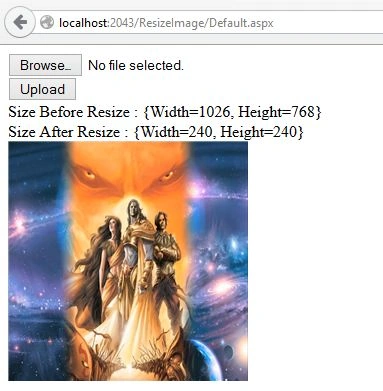
Thanks for reading.
Aktham MahmoudPosted Dec 28, 2019, 3:54 PM
That's great ..am get some of your code and implement it with my code.. which working on it as below:FileUpload fu = (FileUpload)DV_AddEmployee.FindControl("FU_Photo"); int a = fu.PostedFile.ContentLength; // Get File size double b = (a / 1024f) / 1024f; if (fu.HasFile || a < 2000)// Check whether file size is less than 2MB { string fileName = fu.FileName; string exten = Path.GetExtension(fileName); //here we have to restrict file type exten = exten.ToLower(); string[] acceptedFileTypes = new string[4]; acceptedFileTypes[0] = ".jpg"; acceptedFileTypes[1] = ".jpeg"; acceptedFileTypes[2] = ".gif"; acceptedFileTypes[3] = ".png"; bool acceptFile = false; for (int i = 0; i <= 3; i++) { if (exten == acceptedFileTypes[i]) { acceptFile = true; } } if (!acceptFile) { lbFmsg.Text = "The file you are trying to upload is not a permitted file type! Or File must be Less than 2MB"; } else { //upload the file onto the server with new image size 100Px*100px Stream strm = fu.PostedFile.InputStream; //using (var image = System.Drawing.Image.FromStream(strm)) //{ var image = System.Drawing.Image.FromStream(strm); int newWidth = 100; // New Width of Image in Pixel int newHeight = 100; // New Height of Image in Pixel var thumbImg = new Bitmap(newWidth, newHeight); var thumbGraph = Graphics.FromImage(thumbImg); thumbGraph.CompositingQuality = CompositingQuality.HighQuality; thumbGraph.SmoothingMode = SmoothingMode.HighQuality; thumbGraph.InterpolationMode = InterpolationMode.HighQualityBicubic; var imgRectangle = new Rectangle(0, 0, newWidth, newHeight); fu.SaveAs(Server.MapPath("~/images/staff/" + Path.GetFileName(fileName))); string link = "~/images/staff/" + Path.GetFileName(fileName); thumbGraph.DrawImage(image, imgRectangle); thumbImg.Save(link, image.RawFormat);=======>but I've a bug is (A generic error occurred in GDI+. )so...I don't know what I do>>
Jason BPosted May 21, 2018, 8:31 PM
Such a nice an elegant solution I would love to attach this to an email. I hope you are still active I would love to use: attachment myAttachment = new Attachment(FileUpload1.FileContent, fileName); It just wont work. Sends a file but no picture :(