

In this see Role Based login From using sql database login Table data.
- User Login Table
- Create table User_MST
- (
- UserID int identity (1,1) constraint PK_U_ID primary key,
- UserName nvarchar(30),
- UPassword nvarchar(30),
- URoleID int constraint FK_UR_ID foreign key references UserRole(RoleID)
- )
- UserRole Table
- Create table User_Role
- (
- RoleID int identity (1,1) constraint PK_U_ID primary key,
- RoleName nvarchar(30)
- )
Follow step,
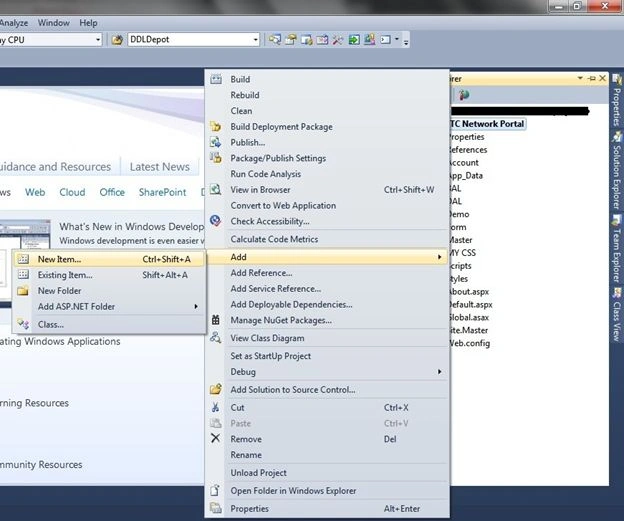
Solution Explorer -> Add -> New Item
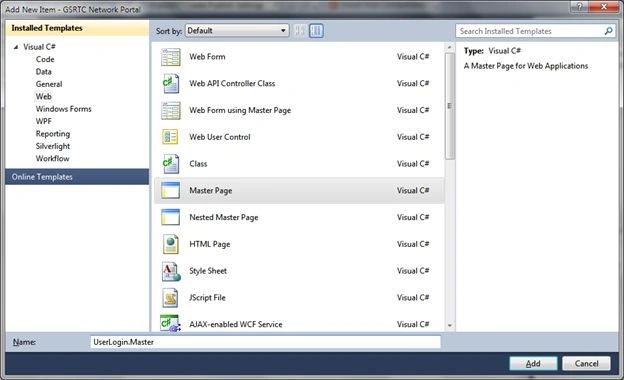
Select Master Page and give Name -> User Login.Master
Now design for User Login Master,
Login.Master
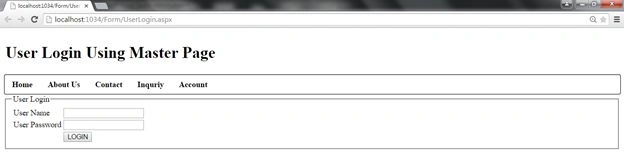
Login.Master source
- <div>
- <fieldset style="width:auto" >
- <legend>User Login</legend>
- <asp:Table runat="server" >
- <asp:TableRow>
- <asp:TableCell>User Name</asp:TableCell><asp:TableCell><asp:TextBox runat="server" ID="txtUserName"></asp:TextBox></asp:TableCell>
- </asp:TableRow>
- <asp:TableRow>
- <asp:TableCell>User Password</asp:TableCell><asp:TableCell><asp:TextBox runat="server" ID="txtPassword" TextMode="Password"></asp:TextBox></asp:TableCell>
- </asp:TableRow>
- <asp:TableRow>
- <asp:TableCell></asp:TableCell><asp:TableCell><asp:Button runat="server" ID="btnLogin" Text="LOGIN" onclick="btnLogin_Click" /> </asp:TableCell>
- </asp:TableRow>
- </asp:Table>
- </fieldset>
- </div>
- public partial class Login : System.Web.UI.MasterPage
- {
- string ConnStr = ConfigurationManager.ConnectionStrings["connString"].ConnectionString;
- string strqry,User,Password;
- int RowCount;
- protected void Page_Load(object sender, EventArgs e)
- {
- }
- protected void btnLogin_Click(object sender, EventArgs e)
- {
- UserLogin();
- }
- protected void UserLogin()
- {
- using(SqlConnection con =new SqlConnection(ConnStr))
- {
- strqry = "Select * from User_MST";
- using(SqlCommand cmd = new SqlCommand(strqry))
- {
- using (SqlDataAdapter da = new SqlDataAdapter(cmd.CommandText, con))
- {
- DataTable dt = new DataTable();
- da.Fill(dt);
- RowCount = dt.Rows.Count;
- for (int i = 0; i < RowCount; i++)
- {
- User = dt.Rows[i]["UserName"].ToString();
- Password = dt.Rows[i]["UPassword"].ToString();
- if (User == txtUserName.Text && Password == txtPassword.Text)
- {
- Session["UserName"] = User;
- if (dt.Rows[i]["URoleID"].ToString() == "1")
- Response.Redirect("~/Demo/AdminDemo.aspx");
- else if (dt.Rows[i]["URoleID"].ToString() == "2")
- Response.Redirect("~/Demo/DemoUser.aspx");
- }
- else
- {
- lblmsg.Text = "Invalid User Name or Password!";
- }
- }
- }
- }
- }
- }
- }
UserLogin.aspx
Now, add UserLogin.aspx using master page
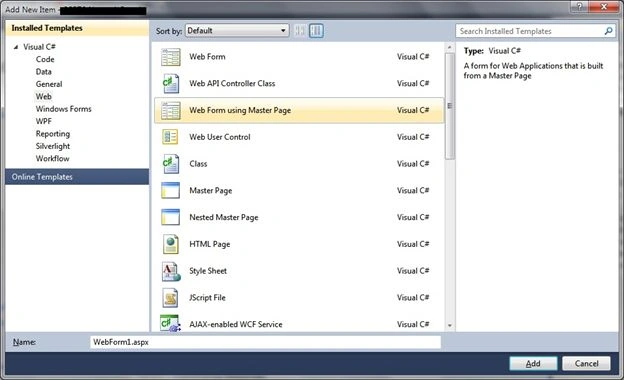
Now looking Here your Login Page
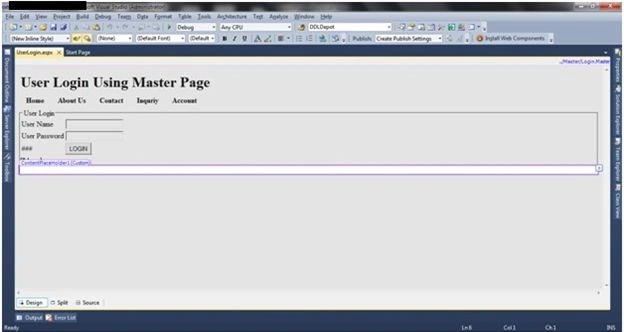
And Also Add two New from
- AdminDemo.aspx
- DemoUser.aspx
Now, you fill in textbox Username & Password as Role Admin or Employee name
And click login button and Redirect to Admin Page OR Employee Page
Login for Admin
UserName : Rakesh
Password : rakesh
and Click button LOGIN and you see Admin From
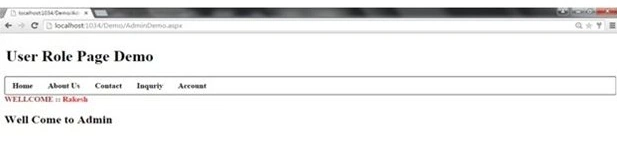
Employee Login
For Employee Login fill in login textbox,
Username : chavda
Password: chavda
and Click button LOGIN and you see Employee From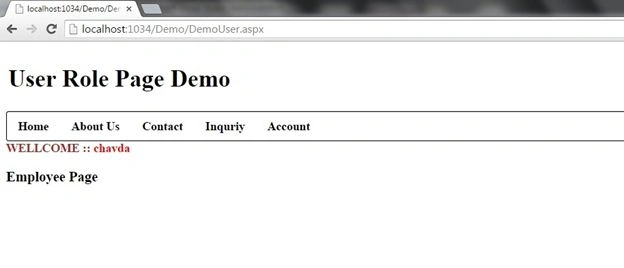
Gowtham ReddyPosted Oct 31, 2019, 8:17 AM
Can u tell which software did u use
Santhakumar MunuswamyPosted May 10, 2015, 11:54 AM
Good work. I think it should be article category..