
Description
"SELECT 1 FROM TABLE" is a simple way to check if there are any rows in the specified MySQL table. It doesn't retrieve any data from the table but rather returns a result set with a single column containing the value 1 for each row that satisfies the conditions in the WHERE clause (if any).
Let's get into an Example.
Step 1
- I am creating one table called Employee.
SQL
CREATE TABLE Employee ( employeeId INT IDENTITY(1,1) PRIMARY KEY, employeeName VARCHAR(50) ) - Then Inserting Some values in that Employee table.
SQL
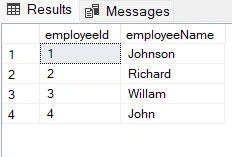
INSERT INTO Employee (employeeName) VALUES('Johnson'),('Richard'), ('Willam'),('John') - After inserting the value, the result will be as follows.
Step 2
- Execute the following Query without the WHERE Clause.
SQL
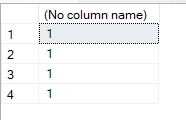
SELECT 1 FROM Employee
Output Message: (4 rows affected)
Result
- Now Exceute with WHERE Clause.
SQL
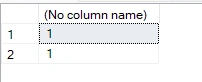
SELECT 1 FROM Employee WHERE employeeName LIKE 'John%'
Output Message: (2 rows affected)
Result
I trust this blog has been helpful in understanding the usage of SELECT 1 From the table in SQL Server. Best of luck.
Join the conversation! Your thoughts help the community grow.