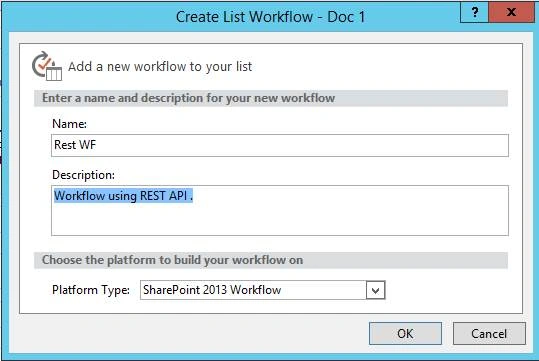
Step 1 : Add a workflow for your list/library.
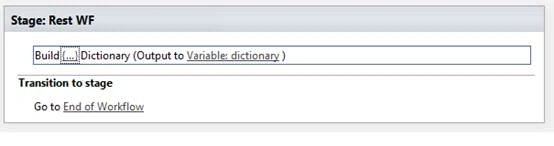
Step 2 : Add Build tag using Action menu.
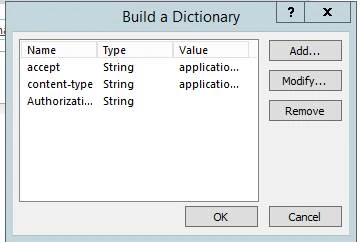
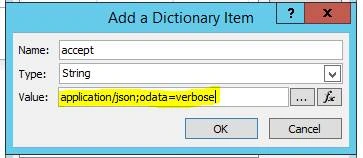
Step 3 : Add Accept, ContentType, and Authorization, as a string, as shown below. By clicking Build{…} and adding value as application/json;odata=verbose, you get the output in JSON format .


Step 4 : Add Call action and click on this. Write REST API call to get the Title of the current site.

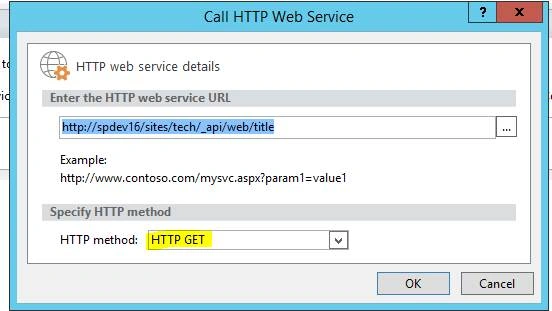
Step 5 :Add a variable as a Dictionary Type, for saving your output value .


Step 6 : Add Get action to get the Title value.
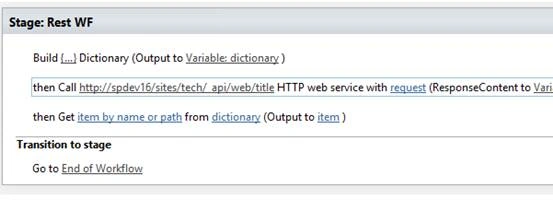
Step 7 : Write d/Title for getting value from variable. Log output1 for viewing the Title of current site .

Step 8 : Start the workflow and check the logs.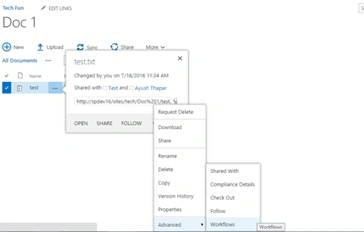

Sharepoint Designer 2013 Workflow Using REST API
In this blog, you will learn how to fetch current SharePoint site title using REST API, in workflow.


Gokul ParanjothyPosted Jan 7, 2019, 11:22 PM EST
Thanks for your article. It helped me
kalu singh raoPosted Jul 25, 2016, 4:09 AM EDT
Good Starting