

Here is the step by step version of, How the Azure SQL database is created. Below is the Wizard to create the SQL Database.
The options are,
- Name of the database,
- Server Configuration - Where the data can be stored.
- Select Source - A blank database or an example database.
- Pricing Options.
- Collation related configurations
- Resource group to which you are integrated.
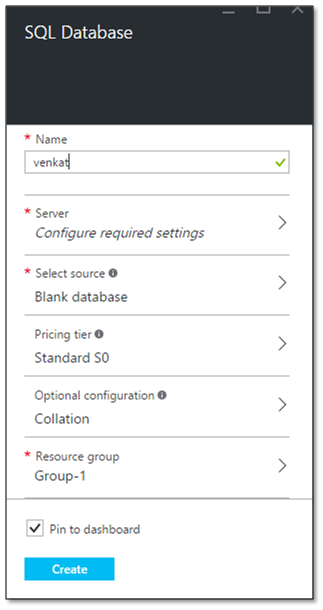
Provide the name of the database of your SQL Azure.

Once we try to configure server, a new windo appears indicating whether you want to create a new server and go ahead with the existing server.

Below wizard on the server information provides the detailed list of,
- Server Name.
- Server Login.
- Server Password.
- Server Location in the globe.
- Option to set the latest Server update.

Setting all the above information, you are set to go.The Server configuration for SQL Azure is configured.

Shobana JPosted Jul 29, 2016, 4:02 AM
Clear explanation sir