

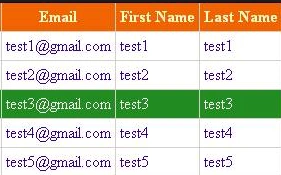
This blog will show you, how you can highlight the table row at the click of the mouse on row of HTML table, using jQuery. In this blog, I will show you three ways by which, you can highlight the clicked row to HTML table.
First, we need to add the reference, given below-
- <script src="https://ajax.googleapis.com/ajax/libs/jquery/2.1.3/jquery.min.js"></script>
Way 1. In this section, we will apply for each loop to highlight the clicked row.
- $('#tableId tbody>tr').each(function () {
- if ($(this).hasClass('highlight')) {
- var nRowIndex = $(this).index();
- if (parseInt(nRowIndex,10) % 2 == 0)
- $(this).removeClass().addClass('Even');
- else
- $(this).removeClass().addClass('Odd');
- return;
- }
- });
- $(this).removeClass().addClass('highlight');
- for (i = 0; i < $('#tableId tbody>tr').length; i++) {
- var tr=$('#tblDevelopers tbody>tr').eq(i);
- if (tr.hasClass('highlight')) {
- var nRowIndex = tr.index();
- if (parseInt(nRowIndex,10) % 2 == 0)
- tr.removeClass().addClass('Even');
- else
- tr.removeClass().addClass('Odd');
- break;
- }
- }
- $(this).removeClass().addClass('highlight');
- $('#tableIdtbody tr').click(function () {
- var nRowIndex = $('#<%= HiddenField1.ClientID %>').val();
- if (nRowIndex.length > 0)
- {
- if (parseInt(nRowIndex,10) % 2 == 0)
- $('#tableId tbody tr').eq(nRowIndex).removeClass().addClass('Even');
- else
- $('#tableId tbody tr').eq(nRowIndex).removeClass().addClass('Odd');
- }
- $(this).removeClass().addClass('highlight');
- $('#<%= HiddenField1.ClientID %>').val($(this).index());
- });
Bhuvan PandeyPosted Aug 30, 2016, 8:11 AM
Good