

Introduction
In this blog post, we'll cover two important functions in PowerApps: First and Last. These functions help you get particular information from your data. I will explain how they work in easy terms, so you can use them to find the first or last items in your data source.
First Function
The First function returns the first record from a data source or a collection. It is commonly used with galleries or forms to display initial data.
Syntax
First(DatasourceName)Last Function
The Last function returns the last record from a data source or a collection. It is commonly used with galleries or forms to display initial data.
Syntax
Last(DatasourceName)Example
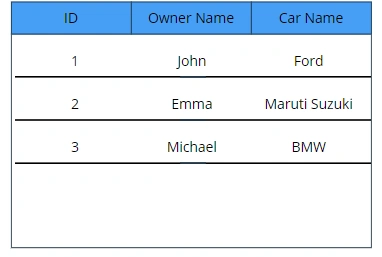
- If you have a SharePoint data source connected to your gallery or you have a collection of records we can use this function to retrieve the first record from both data source and collection. Here I am creating a collection named CarOwners and will load some data to the collection.
CSS
ClearCollect(CarsOwners, { ID: 1, Name: "John", Carname: "Ford" }, { ID: 2, Name: "Emma", Carname: "Maruti Suzuki" }, { ID: 3, Name: "Michael", Carname: "BMW" } ) - Here I have a added gallery to my screen and connected my collection to the gallery.
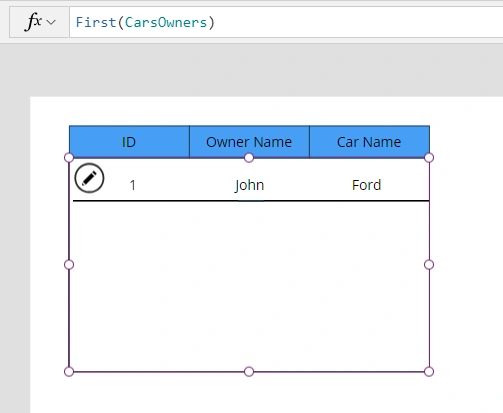
First Function Output: As you can see my gallery is showing only the first record stored in my collection
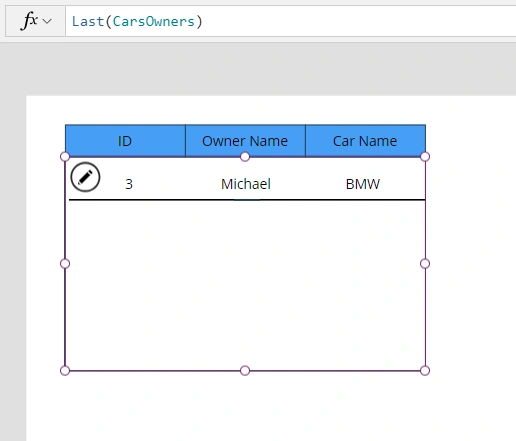
Last Function Output: As you can see my gallery is showing only the last record stored in my collection.
Conclusion
These are just basic examples of how you can use the First and Last functions in PowerApps. Similarly, we have FIRSTN and LASTN functions in PowerApps which I will cover in the next blog.
Join the conversation! Your thoughts help the community grow.