

Introduction
Many programmers load jQuery from a local server. There is nothing wrong with that process but there is another option to load jQuery without using the local server, that is, with the help of CDN (Content Delivery network). But while using this CDN, there will be a certain downfall loading the script if the network is not stable. In this blog, we are going to see how to fall back to load the script from a local server if the CDN fails.
Benefits of CDN
- Caching the Scripts
- Allow for parallelism
- Support for https and https and many more
Click here to learn more about CDN.
jQuery library Google CDN link
- <script src="//ajax.googleapis.com/ajax/libs/jquery/3.2.1/jquery.min.js"></script>
There is no protocol in the above link, which means that the link will get loaded for both, HTTP and HTTPS protocols based on our domain.
Let’s get into action.
Providing a CDN fallback
Anytime while using a CDN, we need to provide a fallback.
- window.jQuery || document.write("<script src='JS/jquery.min.js'><\/script>");
Complete Code
- <!DOCTYPE html>
- <html>
- <head>
- <meta charset="utf-8" />
- <title></title>
- <script src="http://ajax.googleapis.com/ajax/libs/jquery/3.2.1/jquery.min.js"></script>
- <script>
- window.jQuery || document.write("<script src='JS/jquery.min.js'><\/script>");
- </script>
- <script>
- $(document).ready(function () {
- $("#example").html("Testing CDN.. ");
- })
- </script>
- </head>
- <body>
- <div id="example">
- </div>
- </body>
- </html>
Result
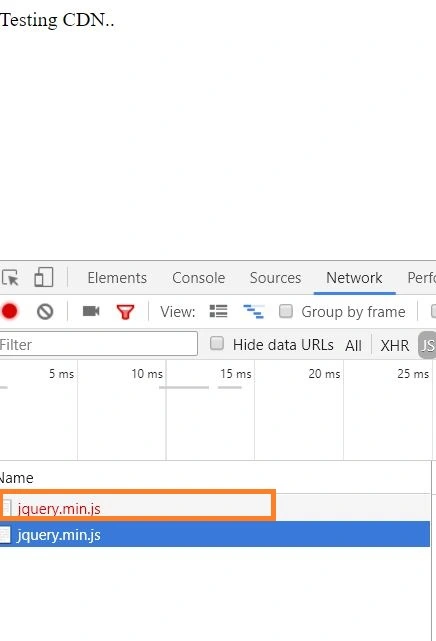
From the above figure, you can notice that the CDN load fails and the jQuery loads from the local server.
I hope you have learned from this blog. Your valuable feedback, questions, or comments about this blog are always welcome.
From the above figure, you can notice that the CDN load fails and the jQuery loads from the local server.
I hope you have learned from this blog. Your valuable feedback, questions, or comments about this blog are always welcome.
Sagar Pandurang KapPosted Jan 22, 2018, 11:40 PM
Nice one..........
Naresh SinghalPosted Jan 22, 2018, 11:38 PM
Very nice............