

Introduction
In this blog, I am going to create a warning message box in Python GUI application, when a user clicks a warning item from the message menu, it will display the warning message in the application screen.
Software requirement
Python 3.5 and IDLE (Python 3.5)
Programming code
- #Create Warning Box in Python GUI Application
- import tkinter as tk
- from tkinter import ttk
- from tkinter import Menu
- from tkinter import messagebox as mbox
- app = tk.Tk()
- #Add a Title
- app.title("Python GUI App")
- #Label
- ttk.Label(app, text="Warning Messsage Box App").grid(column=0,row=0,padx=20,pady=30)
- #Create a Menu Bar
- menuBar=Menu(app)
- app.config(menu=menuBar)
- #Display a Message Box
- def _msgBox():
- mbox.showwarning('Python Warning Message','This Python GUI Application Using Warning Box.')
- #Create warning Message Menu
- infoMenu=Menu(menuBar, tearoff=0)
- infoMenu.add_command(label="Warning", command=_msgBox)menuBar.add_cascade(label="Message", menu=infoMenu)
- #Calling Main()
- app.mainloop()
About
- First, I am importing the tkinter modules.
- Next, I assign a class and variables and give the application title.
- Next, I create a menu bar and add a menu item in the menu bar.
- Next, I create a warning message function and add the warning message in displaying a command menu.
- Finally, I have started the windows event loop by calling the mainloop method then I execute the code.
Output
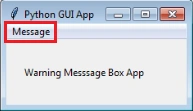
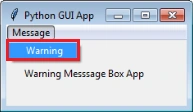
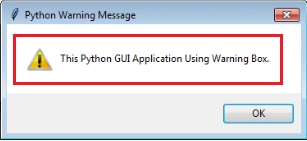
Join the conversation! Your thoughts help the community grow.