Skip to content
Loading
  • +1

    MAnas/Tapan,

    Tapan: I posted my code as you advised
    MAnas: I replied to your questions regarding the links.
    Tapan/MAnas: Do you think NOT having .NET 4.5 is the reason for the problem?
    +1
  • Tapan Patel
    +1
    Your code looks okay but is it throwing any exception?
    Try debugging the code (with setting as, Break on All Exceptions) and see if it hits any exception). At the same time, go through event viewer if OS is throwing any error which is not captured in CLR.
    +1
  • +1

    No exception. IT just stops to work (that is nothing gets written into the file)after generating file size of 1.5GB

    On another machine, it stopsafter generating file size of 2GB
    +1
  • Tapan Patel
    +1
    if .NET 4.5 is the issue, then you would get something as an exception.
    Also, there is no TRY/CATCH block in your code. try adding some , then only you will get an exception.
    Did you find anything in Event Viewer?
    +1
  • +1
    Thanks, sorry I did not get about the event viewer? Where to look for that?
    +1
  • +1

    Hi Tapan,

    Can you advise where to put the try catch block? Also about the event viewer?

    +1
  • Tapan Patel
    +1
    I would still suggest to add Try Catch first in your code and see where it fails. 
     
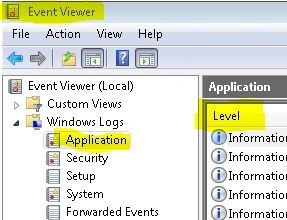
    It is utility by windows where all events happening in current machine gets recorded.
    Take a look at below screenshot. Look for something that has Error level immediately after you try running the program. (Be patient while it loads as there would be thousands of events data to be loaded)..
    +1
  • Tapan Patel
    +1
    Insert try catch block where you start writing bytes to file or while creating new line to file.
    1. this.FileRep.WriteNBytes(nbytes);
    +1
  • +1
    How/where did you get the eventviewer screenshot from?
    +1
  • Ali Haider
    +1
    C# program that uses BinaryWriter
    using System.IO;
    class Program
    {
    static void Main()
    {
    W();
    }
    static void W()
    {
    // Create 12 integers.
    int[] a = new int[]
    {
    1, 4, 6, 7, 11, 55, 777, 23, 266, 44, 82, 93 };
    // Use using statement and File.Open.
    using (BinaryWriter b = new BinaryWriter( File.Open("file.bin", FileMode.Create)))
    {
    // Use foreach and write all 12 integers.
    foreach (int i in a)
    {
    b.Write(i);
    }
    }
    }
    }
    +1
  • Ramesh Palaniappan
    0
    C# program that uses BinaryWriter
    using System.IO;
    class Program
    {
    static void Main()
    {
    W();
    }
    static void W()
    {
    // Create 12 integers.
    int[] a = new int[]
    {
    1, 4, 6, 7, 11, 55, 777, 23, 266, 44, 82, 93 };
    // Use using statement and File.Open.
    using (BinaryWriter b = new BinaryWriter( File.Open("file.bin", FileMode.Create)))
    {
    // Use foreach and write all 12 integers.
    foreach (int i in a)
    {
    b.Write(i);
    }
    }
    }
    }
    0