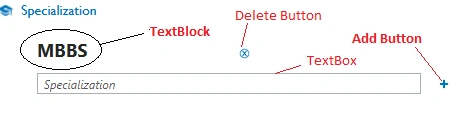
Bind data in WPF MVVMDhaval Sojitra11yAsked Dec 30, 2015, 7:35 PM EST5 answersShareLinkedInXCopy linkSaveHow do I bind data in Textblock?when I write data in textbox then press add button and it will be bind data in textblock using listview WPF MVVM ?
Bind data in WPF MVVMDhaval Sojitra11yAsked Dec 30, 2015, 7:35 PM EST5 answersShareLinkedInXCopy linkSaveHow do I bind data in Textblock?when I write data in textbox then press add button and it will be bind data in textblock using listview WPF MVVM ?
Rhishikesh Lathe183 reputation11y agoPosted Dec 30, 2015, 10:25 PM EST0Try bellow code://Code behind namespace WpfApplication1{ /// /// Interaction logic for MainWindow.xaml /// public partial class MainWindow : Window { System.Collections.ObjectModel.ObservableCollection Specs = new System.Collections.ObjectModel.ObservableCollection(); public MainWindow() { InitializeComponent(); //bind item source of list to ObservableCollection lst.ItemsSource = Specs; } //on click of add + button private void ADD_Click(object sender, RoutedEventArgs e) { Specs.Add(txtSpec.Text); } }} //XAML: xmlns="http://schemas.microsoft.com/winfx/2006/xaml/presentation" xmlns:x="http://schemas.microsoft.com/winfx/2006/xaml" xmlns:d="clr-namespace:WpfApplication1" Title="MainWindow" Height="350" Width="525"> 0Dhaval Sojitra42 reputation11y agoPosted Dec 30, 2015, 11:21 PM EST0Hello Rhishikesh Thank you for your replay. I want above answer in MVVM.0Rhishikesh Lathe183 reputation11y agoPosted Dec 30, 2015, 11:54 PM EST0With MVVM your code behind will look as bellow:There is no change in XAML. public partial class MainWindow : Window { ViewModel objViewModel = null; public MainWindow() { InitializeComponent(); objViewModel = new ViewModel(); this.DataContext = objViewModel; //bind item source of list to ObservableCollection lst.ItemsSource = objViewModel.Specs; } //on click of add + button private void ADD_Click(object sender, RoutedEventArgs e) { objViewModel.Specs.Add(txtSpec.Text); } } public class ViewModel { public System.Collections.ObjectModel.ObservableCollection Specs = new System.Collections.ObjectModel.ObservableCollection(); public ViewModel() { } } 0Dhaval Sojitra42 reputation11y agoPosted Dec 31, 2015, 6:58 PM EST0Hi, Can you go with step by step because i am new in this technology.0Mageshwaran RRank #411 · 6.1K reputation7y agoPosted Nov 24, 2019, 6:46 AM EST0Hi,Please refer the below link, it might helps youhttps://www.c-sharpcorner.com/blogs/databinding-in-wpf-part-i 0Join to answer this questionEvery answer you publish earns 20 SHARP.Create free accountSign inKnow the answer?Answer a question in the forums and earn +20 SHARP for every answer.See unanswered questionsForumsTop experts01Arun PottiAnswers in the forums20answers02Tahir AnsariAnswers in the forums5answers03Kamlesh KumarAnswers in the forums5answers04Sam HobbsAnswers in the forums4answers05Željko PerićAnswers in the forums3answers?YouYour name goes here.Every answer: 20 SHARP.JoinFull leaderboard →2026DevSocialUpcoming · 3rd editionAI Agents ConferenceDec 1–3, 2026Live onlineFree to attend5days leftRegister
Dhaval Sojitra42 reputation11y agoPosted Dec 30, 2015, 11:21 PM EST0Hello Rhishikesh Thank you for your replay. I want above answer in MVVM.0
Rhishikesh Lathe183 reputation11y agoPosted Dec 30, 2015, 11:54 PM EST0With MVVM your code behind will look as bellow:There is no change in XAML. public partial class MainWindow : Window { ViewModel objViewModel = null; public MainWindow() { InitializeComponent(); objViewModel = new ViewModel(); this.DataContext = objViewModel; //bind item source of list to ObservableCollection lst.ItemsSource = objViewModel.Specs; } //on click of add + button private void ADD_Click(object sender, RoutedEventArgs e) { objViewModel.Specs.Add(txtSpec.Text); } } public class ViewModel { public System.Collections.ObjectModel.ObservableCollection Specs = new System.Collections.ObjectModel.ObservableCollection(); public ViewModel() { } } 0
Dhaval Sojitra42 reputation11y agoPosted Dec 31, 2015, 6:58 PM EST0Hi, Can you go with step by step because i am new in this technology.0
Mageshwaran RRank #411 · 6.1K reputation7y agoPosted Nov 24, 2019, 6:46 AM EST0Hi,Please refer the below link, it might helps youhttps://www.c-sharpcorner.com/blogs/databinding-in-wpf-part-i 0

Rhishikesh Lathe183 reputationPosted Dec 30, 2015, 10:25 PM EST
Dhaval Sojitra42 reputationPosted Dec 30, 2015, 11:21 PM EST
Rhishikesh Lathe183 reputationPosted Dec 30, 2015, 11:54 PM EST
Dhaval Sojitra42 reputationPosted Dec 31, 2015, 6:58 PM EST
Mageshwaran RRank #411 · 6.1K reputationPosted Nov 24, 2019, 6:46 AM EST
Answer a question in the forums and earn +20 SHARP for every answer.
See unanswered questionsTop experts