
I have a grid like structure in one of my page
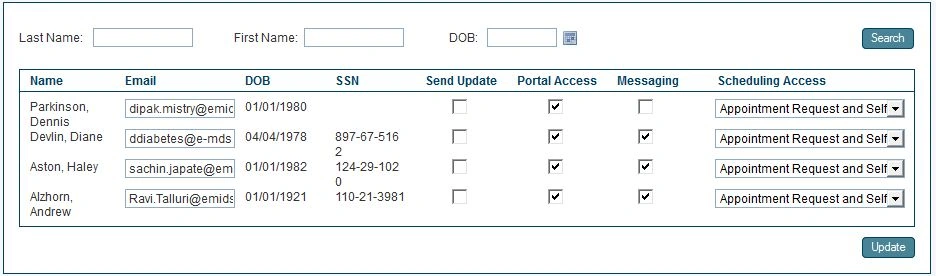
In my Cshtml,
@Html.TextBoxFor(model => model.PatientPreferences[index].Email, new { @id = "patEmail" + index })
My Problem is,when is click on search button without entering any values it displays all the values and when i change something and click on update its also working fine.but when i enter some first name and click on search It displayed the corresponding row except Email field it remain the first value like '[email protected]' For a work around what i did,
i have changed my cshtml to
@Html.TextBoxFor(model => model.PatientPreferences[index].Email, new { style = "display:none", @id = "patEmail" + index })
It works But wont be able to bind it to the model that is why its not updating...
Do anyone faced this problem ever???
Note:It works fine if change it from textbox to lable.







Rewant ChoudharyRank #4,270 · 354 reputationPosted Sep 30, 2012, 11:34 PM EDT
this is html structure so you can this text value in Controller also like
Note :Define Textbox Name attributes
[HttpPost]
public ActionResult CreateTEs(addStore AddModel, FormCollection FormClct)
{
string textboxvalue= FormClct["test"].ToString();
save this value to database
}
Prasant JinagaRank #2,383 · 594 reputationPosted Oct 2, 2012, 8:28 PM EDT
Thanks for the reply But the Rows are not static its Dynamic So i wont be able to use Formcollection.
Thanks,
Prasant
Rewant ChoudharyRank #4,270 · 354 reputationPosted Oct 4, 2012, 3:57 AM EDT
in dynamic row you can give the name like
int count=0;
foreach (string key in FormClct.AllKeys)
{
if (key.Contains("option[1][name]"))
{
count++;
}
}
try
{
string optionstring = string.Empty;
string optionvalue, optionvalue1, optionvalue2, optionvalue3;
for (int i = 1; i <= count; i++)
{
optionstring = optionstring + FormClct["option[" + i + "][name]"].ToString() + "," + FormClct["option[" + i + "][type]"].ToString() + ",";
for (int j = 1; j <= 10; j++)
{
if (FormClct.AllKeys.Contains("option[" + i + "][values][" + j + "][name]"))
{
optionvalue = FormClct["option[" + i + "][values][" + j + "][name]"].ToString();
optionvalue1 = FormClct["option[" + i + "][values][" + j + "][value]"].ToString();
optionvalue2 = FormClct["option[" + i + "][values][" + j + "][weight]"].ToString();
optionvalue3 = FormClct["option[" + i + "][values][" + j + "][price]"].ToString();
optionstring += optionvalue + "," + optionvalue1 + "," + optionvalue2 + "," + optionvalue3;
}
}
optionstring += "&&";
}
}
get dyanamic value in controller