Hi, I am trying to deserilize the below sample json, however, it seems that the list doesn't hold all the data in one object. Please advise.
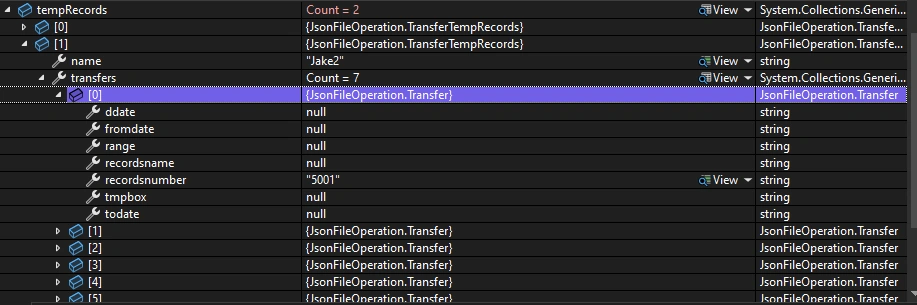
C#
 internal class Program
 {
     static void Main(string[] args)
     {

         string jsonString = @"[
             {
             ""userid"": ""0001"",
             ""name"": ""Jake1"",
             ""transfers"": [
                 { ""recordsnumber"": ""5001"" },
                 { ""recordsname"": ""test"" },
                 { ""tmpbox"": ""5005"" },
                 { ""ddate"": ""10/23/2024"" },
                 { ""fromdate"": ""10/23/2024"" },
                 { ""todate"": ""10/23/2024"" },
                 { ""range"": ""5004"" }
             ]
             },
             {
             ""userid"": ""0002"",
             ""name"": ""Jake2"",
             ""transfers"": [
                 { ""recordsnumber"": ""5001"" },
                 { ""recordsname"": ""test"" },
                 { ""tmpbox"": ""5005"" },
                 { ""ddate"": ""10/23/2024"" },
                 { ""fromdate"": ""10/23/2024"" },
                 { ""todate"": ""10/23/2024"" },
                 { ""range"": ""range"" }
             ]
             }
         ]";
         List tempRecords = ParseJsonFromString(jsonString);
     }
     public static List ParseJsonFromString(string jsonString)
     {
         try
         {
             return JsonSerializer.Deserialize>(jsonString);
         }
         catch (JsonException ex)
         {
             Console.WriteLine($"Error parsing JSON: {ex.Message}");
             return null;
         }
     }
 }

 public class TransferTempRecords
 {
     public string userid { get; set; }
     public string name { get; set; }
     public List transfers { get; set; }
 }

 public class Transfer
 {
     public string recordsnumber { get; set; }
     public string recordsname { get; set; }
     public string tmpbox { get; set; }
     public string ddate { get; set; }
     public string fromdate { get; set; }
     public string todate { get; set; }
     public string range { get; set; }
 }






Vijay Pratap SinghRank #381 · 6.6K reputationPosted Oct 27, 2024, 1:24 AM EDT
The JSON structure you're working with will not deserialize properly because the objects within the transfers array do not have a consistent structure. In the JSON, each transfers array item is a separate object with different properties, while the Transfer class expects a single object with all properties present.
Replace the Transfer class with a dictionary to handle dynamic key-value pairs in the transfers array.
using System;
using System.Collections.Generic;
using System.Text.Json;

internal class Program
{
    static void Main(string[] args)
    {
        string jsonString = @"[
            {
                ""userid"": ""0001"",
                ""name"": ""Jake1"",
                ""transfers"": [
                    { ""recordsnumber"": ""5001"" },
                    { ""recordsname"": ""test"" },
                    { ""tmpbox"": ""5005"" },
                    { ""ddate"": ""10/23/2024"" },
                    { ""fromdate"": ""10/23/2024"" },
                    { ""todate"": ""10/23/2024"" },
                    { ""range"": ""5004"" }
                ]
            },
            {
                ""userid"": ""0002"",
                ""name"": ""Jake2"",
                ""transfers"": [
                    { ""recordsnumber"": ""5001"" },
                    { ""recordsname"": ""test"" },
                    { ""tmpbox"": ""5005"" },
                    { ""ddate"": ""10/23/2024"" },
                    { ""fromdate"": ""10/23/2024"" },
                    { ""todate"": ""10/23/2024"" },
                    { ""range"": ""range"" }
                ]
            }
        ]";

        List tempRecords = ParseJsonFromString(jsonString);

        // Output the result to check if parsing was successful
        foreach (var record in tempRecords)
        {
            Console.WriteLine($"UserID: {record.userid}, Name: {record.name}");
            foreach (var transfer in record.transfers)
            {
                foreach (var kvp in transfer)
                {
                    Console.WriteLine($"  {kvp.Key}: {kvp.Value}");
                }
            }
        }
    }

    public static List ParseJsonFromString(string jsonString)
    {
        try
        {
            return JsonSerializer.Deserialize>(jsonString);
        }
        catch (JsonException ex)
        {
            Console.WriteLine($"Error parsing JSON: {ex.Message}");
            return null;
        }
    }
}

public class TransferTempRecords
{
    public string userid { get; set; }
    public string name { get; set; }
    public List> transfers { get; set; } // Change to List of Dictionary
}
Hope this will help.
Jignesh KumarRank #91 · 22.9K reputationPosted Oct 29, 2024, 12:20 AM EDT
Hello,
As per your code debug snippet, you need to do below changes in your code,
using System; using System.Collections.Generic; using System.Text.Json; internal class Program { static void Main(string[] args) { string jsonString = @"[ { ""userid"": ""0001"", ""name"": ""Jake1"", ""transfers"": [ { ""recordsnumber"": ""5001"", ""recordsname"": ""test"", ""tmpbox"": ""5005"", ""ddate"": ""10/23/2024"", ""fromdate"": ""10/23/2024"", ""todate"": ""10/23/2024"", ""range"": ""5004"" } ] }, { ""userid"": ""0002"", ""name"": ""Jake2"", ""transfers"": [ { ""recordsnumber"": ""5001"", ""recordsname"": ""test"", ""tmpbox"": ""5005"", ""ddate"": ""10/23/2024"", ""fromdate"": ""10/23/2024"", ""todate"": ""10/23/2024"", ""range"": ""range"" } ] } ]"; List tempRecords = ParseJsonFromString(jsonString); // Optional: Print results to verify foreach (var record in tempRecords) { Console.WriteLine($"User: {record.name}, UserId: {record.userid}"); foreach (var transfer in record.transfers) { Console.WriteLine($" Transfer Record Number: {transfer.recordsnumber}"); } } } public static List ParseJsonFromString(string jsonString) { try { return JsonSerializer.Deserialize>(jsonString); } catch (JsonException ex) { Console.WriteLine($"Error parsing JSON: {ex.Message}"); return null; } } } public class TransferTempRecords { public string userid { get; set; } public string name { get; set; } public List transfers { get; set; } } public class Transfer { public string recordsnumber { get; set; } public string recordsname { get; set; } public string tmpbox { get; set; } public string ddate { get; set; } public string fromdate { get; set; } public string todate { get; set; } public string range { get; set; } }Asma KhalidRank #160 · 14.7K reputationPosted Nov 1, 2024, 4:39 AM EDT
If you have sample JSON then copy it. Next inside visual studio, goto Edit -> Paste Special -> Paste JSON as Classes This will create an object mapper for your JSON. Adjust the name and data type if needed. Now, you have exact object mapper as your sample json, no room for errors. But, if your issue still presist, then this means the issue is with your data not object mapper.
Aman GuptaRank #193 · 12.4K reputationPosted Nov 4, 2024, 1:39 AM EST
Hi Yang,
The issue you're encountering is due to the structure of the JSON data. In your JSON, the
transfersarray contains multiple objects, each with a single property. This means that thetransfersarray does not directly map to theTransferclass as you've defined it. Instead, you need a way to represent each property of theTransferclass within a single object in thetransfersarray.To resolve this, you have two main options:
Option 1: Change the JSON Structure
If you have control over the JSON structure, you can change it so that each
transfersentry is a single object that contains all the properties. Here’s how the modified JSON would look:With this structure, each transfer is a single object containing all the properties, which will match your
Transferclass.Option 2: Modify the Data Model to Match the JSON Structure
If you cannot change the JSON structure, you will need to create a different data model to deserialize the JSON properly. Here’s how you can do it:
public class TransferProperties { public string recordsnumber { get; set; } public string recordsname { get; set; } public string tmpbox { get; set; } public string ddate { get; set; } public string fromdate { get; set; } public string todate { get; set; } public string range { get; set; } }TransferTempRecordsclass to hold a list ofTransferProperties:public class TransferTempRecords { public string userid { get; set; } public string name { get; set; } public List transfers { get; set; } }Now, you can deserialize the original JSON without any change
public static List ParseJsonFromString(string jsonString)
{
    try
    {
        return JsonSerializer.Deserialize>(jsonString);
    }
    catch (JsonException ex)
    {
        Console.WriteLine($"Error parsing JSON: {ex.Message}");
        return null;
    }
}
Summary
Choose the option that best fits your situation.