Skip to content
Loading
  
  •     
  •   
  • i think you want code like this.
    0
  • 0
    thanks for the reply.
     
    but i need code in c# buddy. 
    0
  • 0
    thanks for the reply Shubham
    but i need code in c# buddy.
    0
  • 0
    Yes Shubham. I need it in c# windows application.
    0
  • Shubham Kule
    0
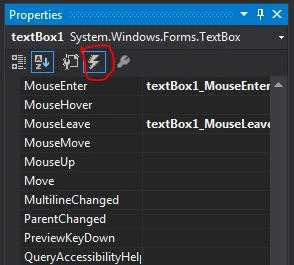
    first select textbox then right click > properties> click event icon and double click on MouseEnter And Mouse Leave then enter below code
     
    1. using System;  
    2. using System.Collections.Generic;  
    3. using System.ComponentModel;  
    4. using System.Data;  
    5. using System.Drawing;  
    6. using System.Linq;  
    7. using System.Text;  
    8. using System.Threading.Tasks;  
    9. using System.Windows.Forms;  
    10.   
    11. namespace Sample  
    12. {  
    13.     public partial class Form1 : Form  
    14.     {  
    15.         public Form1()  
    16.         {  
    17.             InitializeComponent();  
    18.         }
    19.         private void textBox1_MouseEnter(object sender, EventArgs e)  
    20.         {  
    21.             textBox2.Visible = false;  
    22.         }  
    23.         private void textBox1_MouseLeave(object sender, EventArgs e)  
    24.         {  
    25.             textBox2.Visible = true;
    26.         }  
    27.         private void textBox2_MouseEnter(object sender, EventArgs e)  
    28.         {  
    29.             textBox1.Visible = false;
    30.         }
    31.         private void textBox2_MouseLeave(object sender, EventArgs e)  
    32.         {  
    33.             textBox1.Visible = true;
    34.         }
    35.     }  
    36. }  
    done.
    0
  • 0
    This works Shubham. But the textile is in one textbox only. So this kind of effect needs to be applied for textile lines in one textbox only. Is it possible?
    0