Hi Guys,
I'm hoping someone out there can point me in the right direction with a task I need to do. I've spent the last few hours googling for solutions, I've learned a lot, but I'm missing a big piece of the picture still. I wouldn't say I'm a beginner, the bulk of my experience in programming has been with c# web applications, but I'm now building my first windows app using c# .Net 2 (2005).
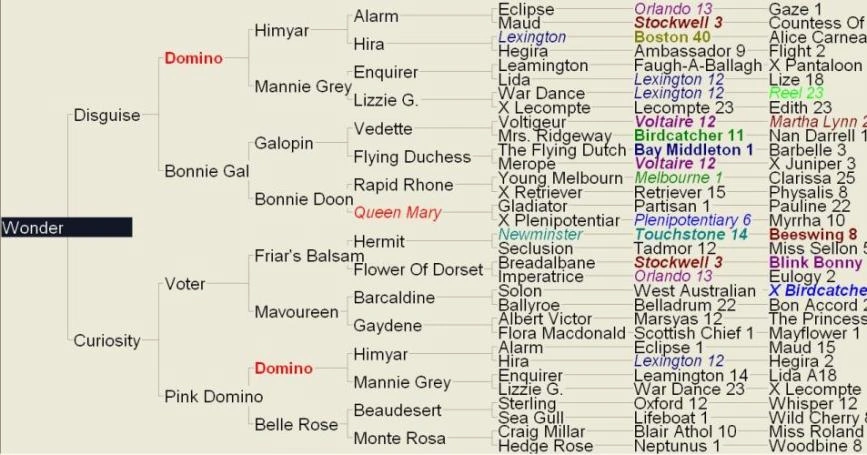
I need to build a view which is basically a family tree. Each node could have 0, 1 or 2 child nodes. Individual nodes need to be able to have their text formatted independently from other nodes, for instance if I click a button only one particular node should have its text changed to red. Individual nodes need to be able to handle click events. And nodes need to be connected with a plain black line, one line pointing to each child node, except for the last generation where the nodes are a one to one relationship and the nodes are in line with each other with just a single straight line in between them.
I know this can be done, I've seen it done before. I have a basic idea on how to build the data structure, but getting it to display on the screen has stumped me. I can't think of any existing controls that I could adapt for this except for the treeview control. But the way it shows the relationships won't suit the job. Unless that aspect of it can be customised? I've been told it's a recursive binary tree, there are plenty of sample classes on the web but they only handle the storing and searching of the data. I'm more concerned with displaying it in the family tree structure. I've included an example attached to this thread.
Thanks heaps in advance.
Tim
Tim EarlPosted Sep 24, 2010, 12:37 AM
I've made some progress. I went down the path of creating my own structure, but it became messy and slow very quickly. I've gone with the option of having just a simple array to hold the data, and labels in a table layoput panel. It works quite well, and resizes nicely. Event handeling is working, I have bretty much done what I need to do except for the connections lines.
My issue is that when I paint the lines they end up under the controls. I've tried a couple of diferent methods I've found on the web but cant get them to work as I'd expect them to. The only luck I've had is with drawing directly to the desktop. It seems mesy though, the lines dissapear again whenever the mouse is moved, and it's out of whack because the control positions that I use to get my drawing point are relative to the form, and not the screen.
I hope someone can give me some advise please on how to get my lines on top of all the labels, while still being able to handel click events.
thanks verry much as always.
rgds
Tim
P.S. I've attached what I have so far.
Sam HobbsPosted Aug 17, 2010, 12:21 PM
Mike GoldPosted Aug 17, 2010, 11:28 AM
void Draw(Graphics g)
{
// do drawing here
}
This would only get called on the OnPaint event handler of your form.
foreach (Node node in Nodes)
{
node.Draw(g);
}
This would just handle drawing though. To handle click and edit, you probably want to maintain the coordinates and extents of all nodes in your node class and in the leftmousedown button cycle through the nodes and check if any of the nodes were clicked. If you find a node that is inside the mouse coordinates, then move an invisible textbox into the node and then turn it visible so you can edit the name.
-Mike
Tim EarlPosted Aug 17, 2010, 8:07 AM
using System;
using System.Collections.Generic;
using System.Text;
using System.Drawing;
using System.Drawing.Drawing2D;
using System.Windows.Forms;
namespace TestApplication
{
class TreeNode
{
private TreeNode leftBranch;
private TreeNode rightBranch;
private string storedValue;
public TreeNode(string valueToStore)
{
storedValue = valueToStore;
}
public void addLeftBranch(string valueToStore)
{
leftBranch = new TreeNode(valueToStore);
}
public void addRightBranch(string valueToStore)
{
rightBranch = new TreeNode(valueToStore);
}
public void show()
{
//do drawing here and call the childrens show()
}
}
}
Have i got the right idea? I dont know how I would get the paint event to get the graphics object from to draw on. I want to do this in the node class as i just want to call its show() and have it populate any child nodes itself and display them. So in the form i would just do something like this;
TreeNode node = new Node(34123);
it would then use that entity id and check if the entity has children, if so add the children to the node, the children would do the same and so on untill there are no more children. Then I would call the show();
node.show()
it would then draw the name of the entity, call its childrens draw() to do the same and so on.
I hope i am not getting more lost.
Tim EarlPosted Aug 17, 2010, 12:56 AM
Thanks heaps for your comments. Unfortunately I've already put 200+ hrs into this application so I'll have to stick with win forms, however I might consider WPF for my next project. Haven't used GDI+ before, I just read quite a lenghty article on it and it seems like it will meet my needs. But it did remind me of one more thing the view needs to be able to do. You need to be able to click on a node, and have a cursor appear so you can type in some text. Thats how all the names get there to start off with. Can that also be done with GDI+?
Thanks Mike
Tim
Mike GoldPosted Aug 16, 2010, 11:28 PM