Error Msg="A column named '1' already belongs to this DataTable."
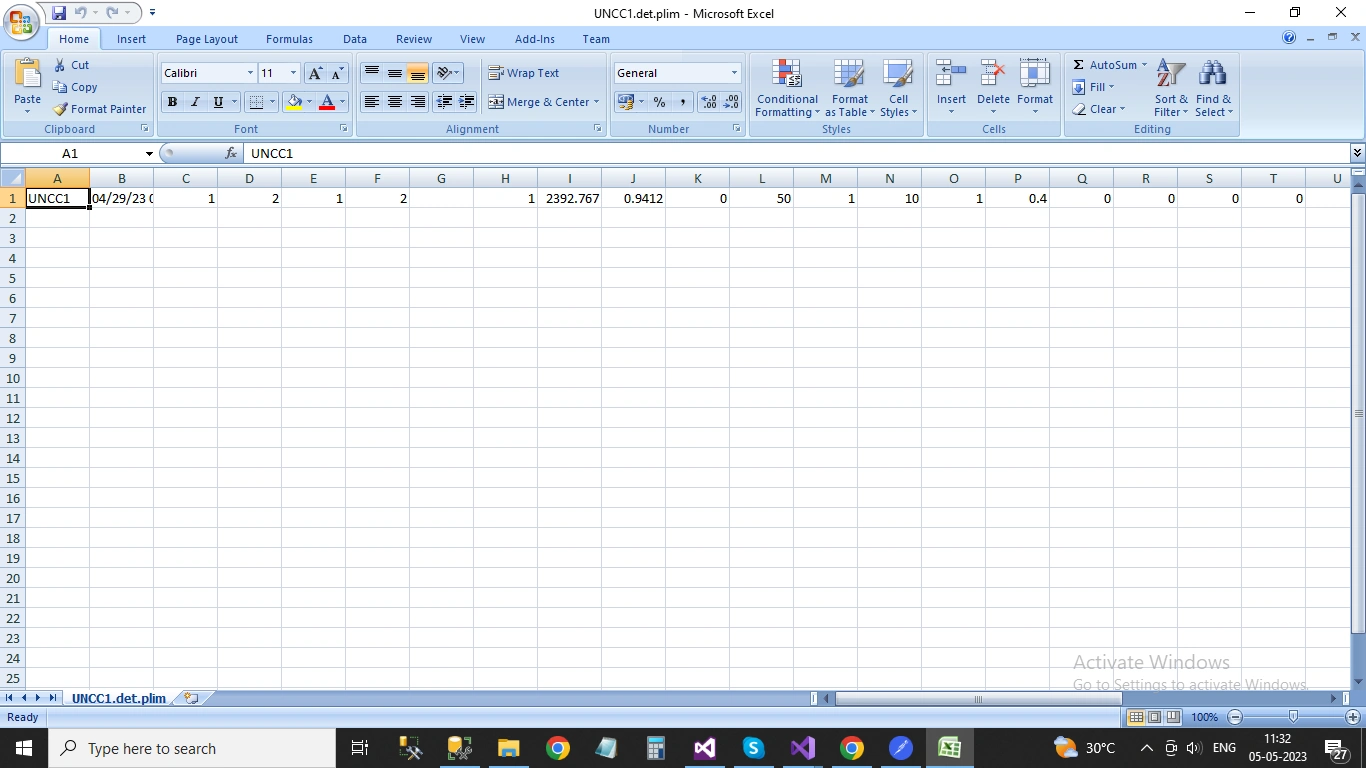
this is my CSV file which i want to import and make datatable
My Code is
C#
public static DataTable ConvertCSVtoDataTable(dynamic file)
{
    DataTable dt = new DataTable();
    using (StreamReader sr = new StreamReader(file.InputStream))
    {
        string[] headers = sr.ReadLine().Split(',');
        foreach (string header in headers)
        {
            dt.Columns.Add(header);
        }
        while (!sr.EndOfStream)
        {
            string[] rows = sr.ReadLine().Split(',');
            DataRow dr = dt.NewRow();
            for (int i = 0; i < headers.Length; i++)
            {
                dr[i] = rows[i];
            }
            dt.Rows.Add(dr);
        }
    }
    return dt;
}







Tuhin PaulRank #7 · 71.9K reputationPosted May 5, 2023, 5:02 AM EDT
The error message you're getting indicates that one of the column names in your CSV file is a number, specifically '1', which is causing a conflict when trying to add it as a column in the DataTable. This is because column names cannot begin with a number. To fix this, you can modify your code to handle this case by checking if the column name is a number and if so, appending a prefix to it to make it a valid column name.
public static DataTable ConvertCSVtoDataTable(dynamic file)
{
    DataTable dt = new DataTable();
    using (StreamReader sr = new StreamReader(file.InputStream))
    {
        string[] headers = sr.ReadLine().Split(',');
        foreach (string header in headers)
        {
            // check if header is a number
            if (int.TryParse(header, out int n))
            {
                // if header is a number, prefix it with an underscore
                dt.Columns.Add("_" + header);
            }
            else
            {
                dt.Columns.Add(header);
            }
        }
        while (!sr.EndOfStream)
        {
            string[] rows = sr.ReadLine().Split(',');
            DataRow dr = dt.NewRow();
            for (int i = 0; i < headers.Length; i++)
            {
                // check if column name is a number
                if (int.TryParse(headers[i], out int n))
                {
                    // if column name is a number, use the corresponding column with underscore prefix
                    dr[i] = rows[n-1]; // subtract 1 since CSV row is 0-indexed
                }
                else
                {
                    dr[i] = rows[i];
                }
            }
            dt.Rows.Add(dr);
        }
    }
    return dt;
}
This modification prefixes any column names that are numbers with an underscore, and also handles mapping the row values to the correct columns by using the corresponding column with the underscore prefix.