Skip to content
Loading
  • Debarshi Chakraborty
    +1
    Hi, i see you are using three entities - productuonDays, Weeks and Models. But you havn't joined the Models entity with the other two. Also, are you looking a output like this ? Yr : week : model1 : model2 : model3 2021 : 34 :. Y. :. : 2021 : 33 :. :. Y. :. Y 2021.: 32.:. Y. :. Y. :. 2021 : 31 :. Y. : Y. :. Y?
    +1
  • +1
    Derbashi yes
    +1
  • Debarshi Chakraborty
    +1
    Can u share the query for Models entity as well, just like u gave for week and production days? I can chk whats to join on Also, u can try this: break your steps into 2. Step 1 : use the linq to get data in the list by joining the three entities. Your data shouls look something like this: { 2021, 36, model1,etc 2021, 35, model2,etc 2021, 35, model3,etc 2021, 34, model4,etc 2021, 33, model4 } Etc. Step 2: now iterate thru the above list and get to arrange the items in your extractionView. I.e. Foreach (item in aboveList) { Yr = item.year; Wk = item.week; Dt = item.etc field; Switch (item.model) Case model1: model1= item.model or count; Case model2: model2= item.model or count; So on }
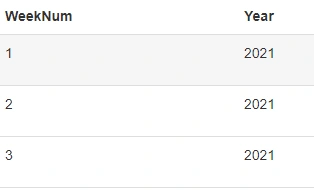
    +1
  • +1
    Hi Debarshi 
     
    I am stuck with that query, but it should be something like this below
    1. var scheduleList = (from p in db.ProductionDays  
    2.   
    3. from m in db.Models  
    4. join w in db.Weeks on p.WeekId equals w.WeekId  
    5. join m in db.Name on p.WeekId equals w.WeelId  
    6. orderby w.year ascending, m.Name descending  
    7. where(m.Inactive == false)  
    8.   
    9. select new ExtractionViewModel {  
    10.   
    11. Year = w.Yer,  
    12. Day = p.ProductionDate,  
    13. VW270 = mt.Name  
    14. }).ToList();  
    15.   
    16. return scheduleList;  
    17.   
    18.   
    19. // Sql for Model  
    20. SELECT TOP (1000) [ModelId]  
    21.       ,[Name]  
    22.       ,[Code]  
    23.       ,[CreatedDate]  
    24.       ,[CreatedBy]  
    25.       ,[ModifiedDate]  
    26.       ,[ModifiedBy]  
    27.       ,[InActive]  
    28.   FROM [ProductionManagement].[Schedule].[Model]  
    29.   where Name = 'VW240'  
    30.   order by InActive  
     
    +1
  • +1
    Hi Dershani
     
    Do you mind sharing psydo logic of those steps, i can figure it out and give feedback 
    +1
  • Debarshi Chakraborty
    +1
    Check if this helps. You may require to do some changes based on what's not compiling:
     
    1. //declare a variable string[] containing all the models you are looking for:  
    2. var myModels = new string[] {"VW270", "VW250", "VW270PA","VW250/2PA"};  
    3.   
    4. STEP 1:  
    5.   
    6. //get the data for this models  
    7. var list1 = (from w in db.Weeks  
    8.              from p in db.ProductionDays on w.WeekId = p.WeekId  
    9.              from m in db.Models on p.ProductionDate =  m.CreatedDate  
    10.              where  
    11.              (myModels.Contains(m.Name.ToString().ToUpper()))  
    12.              select  
    13.              {  
    14.               w.Year,  
    15.               w.WeekNum,  
    16.               p.ProductionDate,  
    17.               p.DayOfWeek,  
    18.               m.Name,  
    19.               m.Code,  
    20.               m.InActive  
    21.              }).ToList();              
    22.              //please make user you are comparing the right casing - lower or upper  
    23.              //also not sure, but plz check if you have to compare Name or Code from Models   
    24.     
    25.   
    26. STEP 2:  
    27. //iterate thru the above list and create your entity collection  
    28. List view = new List();  
    29. ExtractionViewModel v = null;  
    30. bool alreadyAdded = false;  
    31. foreach (item in list1)  
    32. {  
    33.      
    34.    //we need to check if the item is already there in the collection based on the year and week number  
    35.    var alreadyAddedItem = view.Where(i => i.Year == item.Year && i.Week == item.Week && i.Day == item.Day);  
    36.    if (alreadyAddedItem != null)  
    37.    {  
    38.         v = alreadyAddedItem;  
    39.         alreadyAdded = true;  
    40.    }  
    41.    else  
    42.    {  
    43.         v = new ExtractionViewModel();  
    44.         alreadyAdded = false;  
    45.    }  
    46.      
    47.    if (!alreadyAdded)  
    48.    {  
    49.        v.Year  = item.Year;  
    50.        v.Week  = item.WeekNum;  
    51.        v.Day   = item.ProductionDate;  
    52.    }  
    53.    select (item.Name)  
    54.    {  
    55.         case "VW270":  
    56.             v.VW270 = item.InActive == false ? item.Name : null;  
    57.             break;  
    58.         case "VW250":  
    59.             v.VW250 = item.InActive == false ? item.Name : null;  
    60.             break;  
    61.         case "VW270PA":  
    62.             v.VW270PA = item.InActive == false ? item.Name : null;  
    63.             break;  
    64.         case "VW250/2PA":  
    65.             v.VW2502PA  = item.InActive == false ? item.Name : null;  
    66.             break;  
    67.    }  
    68.    if (!alreadyAdded)  
    69.         view.Add(v);  
    70. }   
     
    +1
  • +1
    Debarshi
     
    My method uses IList GetExtractionViewModels
    1. public IList GetExtractionViewModels() {  
    2. // this complies errors. is this a unique method must i create?  
    3. }  
    +1
  • Debarshi Chakraborty
    +1
    made the minor change in the STEP 2
     
    1. STEP 2:  
    2. //iterate thru the above list and create your entity collection  
    3. IList view = new  List();  
    4. ExtractionViewModel v = null;  
    5. bool alreadyAdded = false;  
    6. foreach (item in list1)  
    7. {  
    8.      
    9.    //we need to check if the item is already there in the collection based on the year and week number  
    10.    var alreadyAddedItem = list1.Where(i => i.Year == item.Year && i.Week == item.Week && i.Day == item.Day);  
    11.    if (alreadyAddedItem != null)  
    12.    {  
    13.         v = alreadyAddedItem;  
    14.         alreadyAdded = true;  
    15.    }  
    16.    else  
    17.    {  
    18.         v = new ExtractionViewModel();  
    19.         alreadyAdded = false;  
    20.    }  
    21.      
    22.    if (!alreadyAdded)  
    23.    {  
    24.        v.Year  = item.Year;  
    25.        v.Week  = item.WeekNum;  
    26.        v.Day   = item.ProductionDate;  
    27.    }  
    28.    select (item.Name)  
    29.    {  
    30.         case "VW270":  
    31.             v.VW270 = item.InActive == false ? item.Name : null;  
    32.             break;  
    33.         case "VW250":  
    34.             v.VW250 = item.InActive == false ? item.Name : null;  
    35.             break;  
    36.         case "VW270PA":  
    37.             v.VW270PA = item.InActive == false ? item.Name : null;  
    38.             break;  
    39.         case "VW250/2PA":  
    40.             v.VW2502PA  = item.InActive == false ? item.Name : null;  
    41.             break;  
    42.    }  
    43.    if (!alreadyAdded)  
    44.         view.Add(v);  
    45. }   
    46. return view;  
     IList is an interface and List is a concrete class that uses IList. it should work with the minor change above. 
     
    now put the whole code Step 1 and Step 2 inside your method public IList GetExtractionViewModels()
    +1