1. Form_Load()

2. After click the button
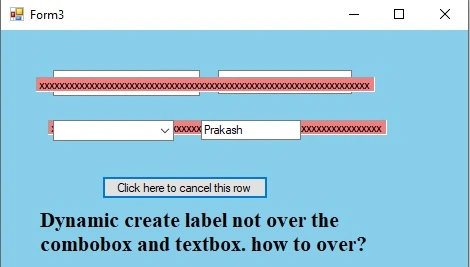
My code is:
C#
private void Form3_Load(object sender, EventArgs e)
{
    ComboBox cc1 = new ComboBox();
    cc1.Location = new Point(52, 90);
    cc1.Name = "combox_123";
    cc1.Items.Add("aaaaa");
    cc1.Items.Add("bbbbbbbb");

    TextBox t = new TextBox();
    t.Location = new Point(200, 90);
    t.Name = "textBox123";
    t.Text = "Prakash";
    panel1.Controls.Add(cc1);
    panel1.Controls.Add(t);
}

private void button1_Click(object sender, EventArgs e)
{
    Label lb = new Label();
    lb.AutoSize = true;
    lb.BackColor = System.Drawing.Color.LightCoral;
    lb.BorderStyle = System.Windows.Forms.BorderStyle.Fixed3D;
    lb.Location = new System.Drawing.Point(47, 90);
    lb.Name = "label1";
    lb.Size = new System.Drawing.Size(339, 15);
    lb.TabIndex = 5;
    lb.Text = "xxxxxxxxxxxxxxxxxxxxxxxxxxxxxxxxxxxxxxxxxxxxxxxxxxxxxxxxxxxxxxxxxx";

    panel1.Controls.Add(lb);
}






Sachin SinghRank #66 · 26.2K reputationPosted Mar 20, 2022, 10:22 AM EDT
Prakash MondalRank #5,602 · 293 reputationPosted Mar 21, 2022, 12:54 AM EDT
Sachin SinghRank #66 · 26.2K reputationPosted Mar 21, 2022, 1:12 AM EDT
BringToFront() method should have worked. Is your panel inside another panel?
Prakash MondalRank #5,602 · 293 reputationPosted Mar 21, 2022, 10:11 AM EDT
Prakash MondalRank #5,602 · 293 reputationPosted Mar 21, 2022, 10:20 AM EDT
Gajendra JangidRank #157 · 14.9K reputationPosted Mar 21, 2022, 10:39 PM EDT