my gridview and added a modal popup like this to view users details
when i click on the approved button inside the modalpopup the status column in the grid must be changed to "Activated " .
present value in that column is "success"
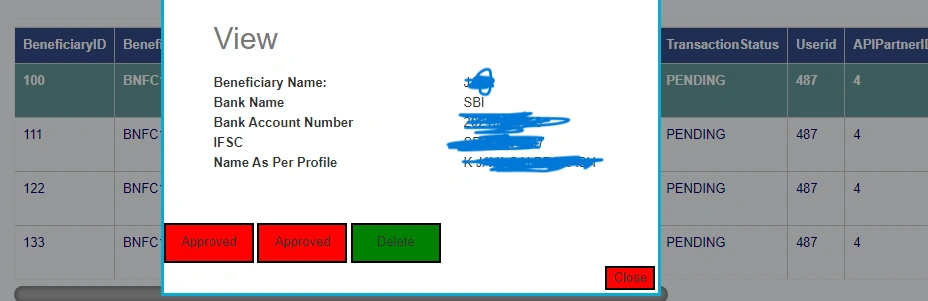
here i am trying to get the selected row value from inside popupmodal i am unable to catch the row index pls help me i dont know what to do
C#
protected void lbtnApprove_Click(object sender, EventArgs e)
{
    try
    {
       // BankList list = new BankList();
        GridViewRow selectedRow = grdvwMerchantBanks.SelectedRow;
        long id = list.BeneficiaryID;
        if (selectedRow != null && long.TryParse(selectedRow.Cells[0].Text, out id))
        {
            using (SqlConnection con = new SqlConnection(ConfigurationManager.ConnectionStrings["ConnectionString"].ConnectionString))
            {
                con.Open();
                SqlCommand cmd = new SqlCommand("UPDATE BeneficiaryDetails SET Status = 'Activated' WHERE BeneficiaryID = @BeneficiaryID", con);
                cmd.Parameters.AddWithValue("@Beneficiary", id);
                cmd.ExecuteNonQuery();
                con.Close();
            }
            selectedRow.Cells[1].Text = "Activated";
           // lblSuccessMessage.Text = "Beneficiary Approved Successfully";
        }
        else
        {
            //lblErrorMessage.Text = "Please select a beneficiary";
        }
    }
    catch(Exception ex)
    {
        throw ex;
    }
}
my db i"ve taken identity for beneficiaryid
SQL
ALTER procedure [dbo].[usp_InsertMerchantBanks]
(
	@BeneficiaryID				bigint,
	@BeneficiaryCode			nvarchar(200)='' ,
	@BankName					nvarchar(250) ,
	@IFSC						nvarchar(80) ,
	@AccountNumber				nvarchar(200) ,
	@BeneficiaryName			nvarchar(200) ,
	@TransactionStatus			nvarchar(200)='',
	@Userid						int='' ,
	@APIPartnerID				int='' ,
	@NameAsPerBank				nvarchar(200)='' ,
	@Validated					bit ='',
	@AccVerifyTransactionID		nvarchar(200)='' ,
	@Status					    nvarchar(200) ='',
	@CreatedDatetime			datetime ='',
	@username					nvarchar(200)=''
)
AS BEGIN
begin try
if(@BeneficiaryID=0)
INSERT INTO MerchantBanks VALUES
(
	@BeneficiaryCode			,
	@BankName					,
	@IFSC						,
	@AccountNumber				,
	@BeneficiaryName			,
	@TransactionStatus			,
	@Userid						,
	@APIPartnerID				,
	@NameAsPerBank				,
	@Validated					,
	@AccVerifyTransactionID		,
	@Status					    ,
	@CreatedDatetime			,
	@username
)
end






Amit MohantyRank #112 · 20K reputationPosted May 3, 2023, 12:31 AM EDT
Try this:
protected void lbtnApprove_Click(object sender, EventArgs e) { try { // Get a reference to the GridView control from the parent page GridView gv = (GridView)this.Parent.FindControl("grdvwMerchantBanks"); // Get the selected row from the GridView control GridViewRow selectedRow = gv.SelectedRow; // Retrieve the BeneficiaryID from the first cell of the selected row long id = 0; if (selectedRow != null && long.TryParse(selectedRow.Cells[0].Text, out id)) { using (SqlConnection con = new SqlConnection(ConfigurationManager.ConnectionStrings["ConnectionString"].ConnectionString)) { con.Open(); SqlCommand cmd = new SqlCommand("UPDATE BeneficiaryDetails SET Status = 'Activated' WHERE BeneficiaryID = @BeneficiaryID", con); cmd.Parameters.AddWithValue("@BeneficiaryID", id); cmd.ExecuteNonQuery(); con.Close(); } // Update the Status column in the selected row to "Activated" selectedRow.Cells[1].Text = "Activated"; // lblSuccessMessage.Text = "Beneficiary Approved Successfully"; } else { //lblErrorMessage.Text = "Please select a beneficiary"; } } catch(Exception ex) { throw ex; } }Amit MohantyRank #112 · 20K reputationPosted May 3, 2023, 1:15 AM EDT
The GridView control is outside of the ModalPopup control, thats why you cannot access it directly using the Parent property of the ModalPopup control. Instead, you can try the following:
Declare a global variable to store the GridView control.
Initialize the global variable in the Page_Load event handler or any other appropriate event handler.
Use the global variable to access the GridView control in the lbtnApprove_Click event handler.
// Declare a global variable to store the GridView control private GridView gv; protected void Page_Load(object sender, EventArgs e) { // Initialize the global variable with the GridView control gv = (GridView)Page.FindControl("grdvwMerchantBanks"); } protected void lbtnApprove_Click(object sender, EventArgs e) { try { // Get the selected row from the GridView control GridViewRow selectedRow = gv.SelectedRow; // Retrieve the BeneficiaryID from the first cell of the selected row long id = 0; if (selectedRow != null && long.TryParse(selectedRow.Cells[0].Text, out id)) { using (SqlConnection con = new SqlConnection(ConfigurationManager.ConnectionStrings["ConnectionString"].ConnectionString)) { con.Open(); SqlCommand cmd = new SqlCommand("UPDATE BeneficiaryDetails SET Status = 'Activated' WHERE BeneficiaryID = @BeneficiaryID", con); cmd.Parameters.AddWithValue("@BeneficiaryID", id); cmd.ExecuteNonQuery(); con.Close(); } // Update the Status column in the selected row to "Activated" selectedRow.Cells[1].Text = "Activated"; // lblSuccessMessage.Text = "Beneficiary Approved Successfully"; } else { //lblErrorMessage.Text = "Please select a beneficiary"; } } catch(Exception ex) { throw ex; } }Jaya PrakashRank #1,293 · 1.3K reputationPosted May 3, 2023, 1:02 AM EDT
Amit Mohanty
getting error 'Object reference not set to an instance of an object.'
at this line GridView gv = (GridView)this.Parent.FindControl("grdvwMerchantBanks");