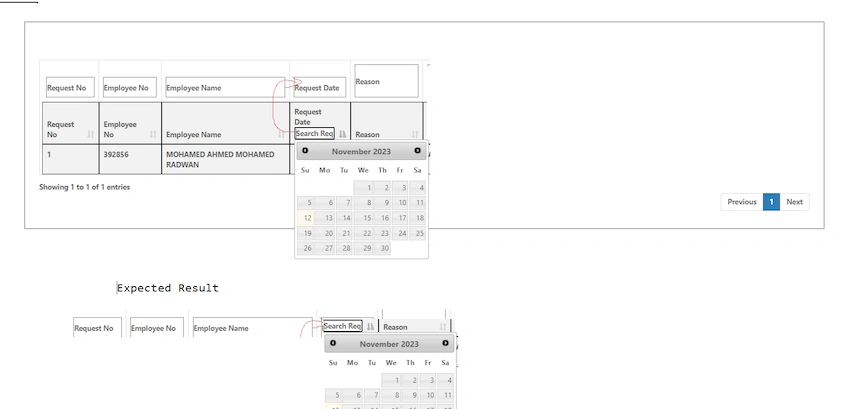
I work on jQuery data table i face issue request date not display search related as date picker
it display as input text
search is working on all columns and request date also as input text .
but only issue I can't solve it request date display as input text
desired result is to display request date as date picker and enable search
request date search working success but on header
I need to display it on row above or before header
why i try as below
TypeScript
                    Request No


                    Employee No


                    Employee Name


                    Request Date


                Reason


            @foreach (var item in Model)
            {


                        @Html.DisplayFor(modelItem => item.RequestNo)


                        @Html.DisplayFor(modelItem => item.EmpID)


                        @Html.DisplayFor(modelItem => item.EmpName)


                        @Html.DisplayFor(modelItem => item.ResignationSubmissionDate)


                    @Html.DisplayFor(modelItem => item.Reason)


            }


                Request No
                Employee No
                Employee Name
                Request Date
                Reason


$(document).ready(function () {

       new DataTable('#dtbl', {
           "dom": 'rtip',
           "order": [[0, 'desc'], [2, 'asc']],
           initComplete: function () {
               $('#dtbl tfoot tr').insertBefore($('#dtbl thead tr'))
               this.api()
                   .columns()
                   .every(function () {
                       let column = this;
                       let title = column.footer().textContent;


                       let input = document.createElement('input');
                       input.placeholder = title;

                       $(input).css({
                           "width": "100%",
                           "padding": "0",
                           "margin": "0",
                           "height": $(column.header()).height() + "px",
                           "box-sizing": "border-box"
                       });
                       column.footer().innerHTML = ''; // Clear the footer cell
                       column.footer().replaceChildren(input);

                       var input22;
                       if (title === "Request Date") {

                           let datepickerInput = document.createElement('input');
                           datepickerInput.type = "text";
                           datepickerInput.id = "datepicker";
                           datepickerInput.placeholder = "Search " + title;
                           $(datepickerInput).datepicker({
                               dateFormat: 'yy-mm-dd',
                               onSelect: function (dateText) {
                                   column.search(dateText).draw();
                               }
                           });

                           column.header().appendChild(datepickerInput);

                       }
                       else {
                           $(this).html('');
                       }

                       $(column.footer()).html(input);
                       input.addEventListener('keyup', () => {
                           if (column.search() !== this.value) {
                               column.search(input.value).draw();
                           }
                       });
                   });
           }
       });
 });
expected result as image below







Jayraj ChhayaRank #304 · 8.2K reputationPosted Nov 17, 2023, 8:36 AM EST
Hello @ahmed salah
The issue is that the
datepickerInputis being created as an input of type "text" instead of "date".To fix this bug, you need to change the
typeattribute of thedatepickerInputto "date" as shown below:if (title === "Request Date") { let datepickerInput = document.createElement('input'); datepickerInput.type = "date"; // Change the type to "date" datepickerInput.id = "datepicker"; datepickerInput.placeholder = "Search " + title; $(datepickerInput).datepicker({ dateFormat: 'yy-mm-dd', onSelect: function (dateText) { column.search(dateText).draw(); } }); column.header().appendChild(datepickerInput); }Request Date Display as Date Picker
To display the request date as a date picker and enable search, you can modify the code as follows:
$(document).ready(function () {
    new DataTable('#dtbl', {
        "dom": 'rtip',
        "order": [[0, 'desc'], [2, 'asc']],
        initComplete: function () {
            $('#dtbl tfoot tr').insertBefore($('#dtbl thead tr'))
            this.api()
                .columns()
                .every(function () {
                    let column = this;
                    let title = column.footer().textContent;

                    let input = document.createElement('input');
                    input.placeholder = title;

                    $(input).css({
                        "width": "100%",
                        "padding": "0",
                        "margin": "0",
                        "height": $(column.header()).height() + "px",
                        "box-sizing": "border-box"
                    });

                    column.footer().innerHTML = ''; // Clear the footer cell
                    column.footer().replaceChildren(input);

                    if (title === "Request Date") {
                        let datepickerInput = document.createElement('input');
                        datepickerInput.type = "date"; // Change the type to "date"
                        datepickerInput.id = "datepicker";
                        datepickerInput.placeholder = "Search " + title;
                        $(datepickerInput).datepicker({
                            dateFormat: 'yy-mm-dd',
                            onSelect: function (dateText) {
                                column.search(dateText).draw();
                            }
                        });

                        column.header().appendChild(datepickerInput);
                    } else {
                        $(this).html('');
                    }

                    $(column.footer()).html(input);
                    input.addEventListener('keyup', () => {
                        if (column.search() !== this.value) {
                            column.search(input.value).draw();
                        }
                    });
                });
        }
    });
});