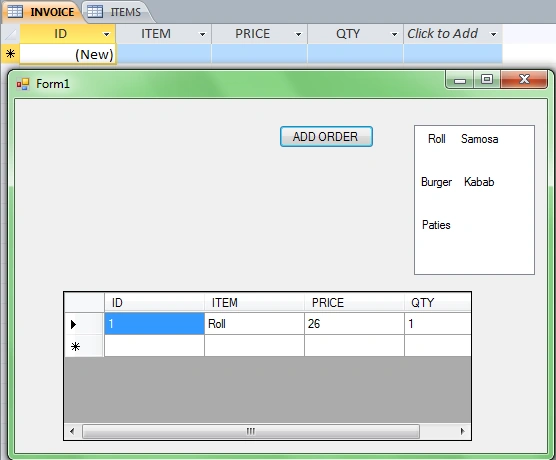
I m designing an application of a restaurant but I m facing a problem, I want to restrict duplicate values in GridView. For example: I Want if a user select particular item form LISTVIEW twice item will not add but quantity increase.
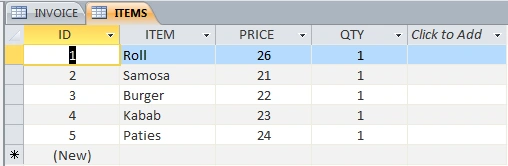
Note :I m inserting rows in Invoice Table when retrieving rows in Gridview from Items Table;
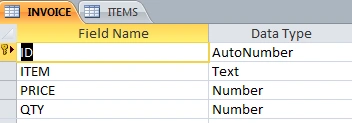
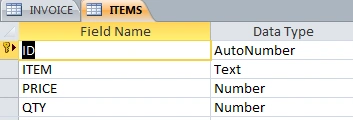
Please help me, I also attached GUI and Table snaps and sourceCode, Thanks
using System;
using System.Collections.Generic;
using System.ComponentModel;
using System.Data;
using System.Data.OleDb;
using System.Drawing;
using System.Linq;
using System.Text;
using System.Windows.Forms;
namespace WindowsFormsApplication8
{
public partial class Form1 : Form
{
public Form1()
{
InitializeComponent();
}
OleDbConnection con;
OleDbDataAdapter dAdapter;
OleDbCommandBuilder cBuilder;
DataTable dTable;
//DataSet ds;
OleDbCommand cmd;
DataView myDataView;
//string query;
private void button1_Click(object sender, EventArgs e)
{
int index = listView1.SelectedItems[0].Index;
con = new OleDbConnection(@"Provider=Microsoft.ACE.Oledb.12.0;Data Source=D:\\gridview.accdb");
cmd = new OleDbCommand();
cmd.CommandText = "Select * from ITEMS";
dAdapter = new OleDbDataAdapter(cmd.CommandText, con);
dTable = new DataTable();
cBuilder = new OleDbCommandBuilder(dAdapter);
cBuilder.QuotePrefix = "[";
cBuilder.QuoteSuffix = "]";
myDataView = dTable.DefaultView;
dAdapter.Fill(dTable);
dataGridView1.Rows.Add(dTable.Rows[index][0], dTable.Rows[index][1], dTable.Rows[index][2], dTable.Rows[index][3]);
cmd = new OleDbCommand();
cmd.CommandText = string.Format("INSERT INTO INVOICE VALUES('{0}','{1}','{2}','{3}')", dataGridView1.Rows[index].Cells[0].Value, dataGridView1.Rows[index].Cells[1].Value, dataGridView1.Rows[index].Cells[2].Value, dataGridView1.Rows[index].Cells[3].Value);
cmd.Connection = con;
con.Open();
cmd.ExecuteNonQuery();
MessageBox.Show("ORDER DELIVERED");
con.Close();
}
private void Form1_Load(object sender, EventArgs e)
{
DataGridViewTextBoxColumn col = new DataGridViewTextBoxColumn();
col.HeaderText = "ID";
col.ValueType = typeof(int);
dataGridView1.Columns.Add(col);
col = new DataGridViewTextBoxColumn();
col.HeaderText = "ITEM";
col.ValueType = typeof(String);
dataGridView1.Columns.Add(col);
col = new DataGridViewTextBoxColumn();
col.HeaderText = "PRICE";
col.ValueType = typeof(int);
dataGridView1.Columns.Add(col);
col = new DataGridViewTextBoxColumn();
col.HeaderText = "QTY";
col.ValueType = typeof(int);
dataGridView1.Columns.Add(col);
}
}
}
EhteshamPosted May 11, 2012, 5:35 AM
if(datagridview1.rows[rowindex].Cells["colname"].Value.equals("Valuebeingadded"))
{
datagridview1.rows[rowindex].Cells["ItemCount"].Value=int.parse(datagridview1.rows[rowindex].Cells["colname"].Value)+addingquantity;
}
else
{
//add new item to grid
}
}
prinze shilzPosted May 11, 2012, 4:20 AM
SenthilkumarPosted May 11, 2012, 4:17 AM
are you expecting the logics to do or exact code???
prinze shilzPosted May 11, 2012, 4:03 AM
SenthilkumarPosted May 11, 2012, 3:52 AM
You need to check the item already added or not, if it is not there then you can insert it.
If already added then you need to add the counts only.