

GitHub Copilot is available in Xcode’s built-in coding assistant through a public preview.
GitHub Copilot is now available inside Xcode’s built-in coding assistant in a public preview that starts with Xcode 27.3 beta. GitHub announced the integration on November 4, 2026, giving Apple-platform developers a native Xcode option for using Copilot alongside the existing separate GitHub Copilot for Xcode extension.
Key takeaways
- GitHub Copilot can now be configured as a provider in Xcode’s built-in coding assistant.
- The feature is a public preview available with Xcode 27.3 beta, not a generally available Xcode release.
- Developers need a Mac running macOS Tahoe 26.6 or later.
- Setup is available through Xcode > Settings > Intelligence, and GitHub says all Copilot plans are supported.
- The existing GitHub Copilot for Xcode extension remains available as a separate workflow.
What did GitHub announce?
GitHub announced that Copilot can be used directly in Xcode’s own coding assistant. In practical terms, this means developers can select and set up GitHub Copilot from Xcode’s Intelligence settings rather than relying only on a separate extension for Copilot access.
The announcement describes the feature as a public preview beginning with Xcode 27.3 beta. Apple’s Xcode 27.3 beta release notes independently list GitHub Copilot as a new Coding Intelligence feature. GitHub’s November 4, 2026 changelog announcement says the goal is to bring Copilot into the native Xcode workflow.
For beginners, Xcode is Apple’s development environment for building software for iPhone, iPad, Mac, Apple Watch, Apple TV, and Apple Vision Pro. A coding assistant is an AI-enabled area of the development environment that can help a developer work with code through prompts and conversations. This announcement is about where Copilot is accessed in Xcode; it does not announce a new Copilot model.
How does GitHub Copilot work in Xcode?
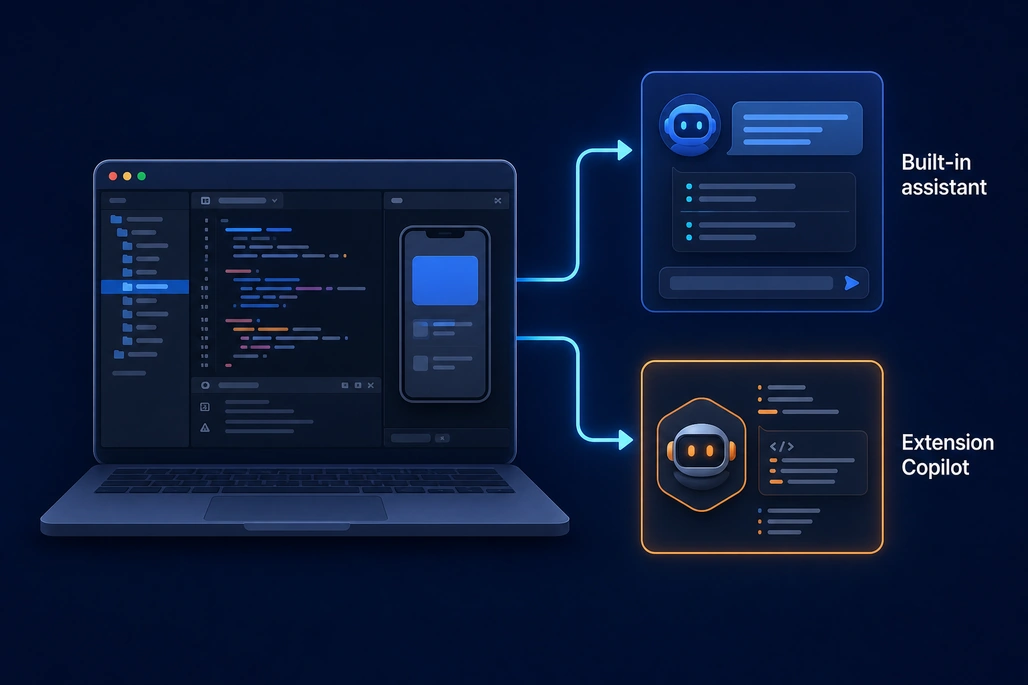
Developers can choose the built-in assistant preview or the existing extension workflow.
Developers configure the preview from Xcode > Settings > Intelligence. GitHub directs users to download Xcode 27.3 beta from Apple Developer Downloads, then set up GitHub Copilot in the coding assistant.
This is distinct from the existing GitHub Copilot for Xcode extension. GitHub says that extension remains a separate option, so developers can choose between the extension-based workflow and the built-in coding-assistant workflow. The company has not said that one option replaces the other.
| Option | Where Copilot is used | Status after the announcement |
|---|---|---|
| Built-in coding assistant | Xcode > Settings > Intelligence | New public preview in Xcode 27.3 beta |
| GitHub Copilot for Xcode extension | Separate Xcode extension workflow | Still available |
Apple’s release notes provide only a short entry for the feature, while GitHub’s announcement focuses on the setup path and supported plans. Neither announcement details whether every capability available through the extension is also available in the built-in assistant. Developers evaluating the preview should therefore test the workflow they use most, such as asking for code explanations, generating a change, or working through a project task.
What are the system requirements?
GitHub says the preview requires Xcode 27.3 beta and a Mac running macOS Tahoe 26.6 or later. Apple’s Xcode system-requirements page lists the same macOS requirement for Xcode 27.3 beta.
Apple’s Xcode 27.3 beta release notes also state that the release includes Swift 6.4 and software development kits for iOS 27.3, iPadOS 27.3, tvOS 27.3, watchOS 27.3, macOS 27.3, and visionOS 27.3. Those platform SDK updates are separate from the Copilot integration, but they are part of the beta developers must install to access this preview.
Which GitHub Copilot plans are supported?
GitHub says all Copilot plans are supported for the Xcode coding-assistant integration. The changelog does not provide a separate pricing table or state that the Xcode preview has a separate charge.
However, GitHub has not published feature-by-feature details for Copilot in this particular Xcode integration. The announcement does not specify which models appear in Xcode, whether usage has different request limits, or how functionality compares with the standalone Xcode extension. Those details remain unconfirmed in the public announcement.
When can developers use the preview?
The public preview is available starting with Xcode 27.3 beta. GitHub published its announcement on November 4, 2026, and Apple’s release notes identify GitHub Copilot as a new capability in that beta.
No general-availability date for the integration was included in GitHub’s announcement or Apple’s Xcode 27.3 beta release notes. Developers should treat the feature as preview software and provide feedback through the GitHub Copilot for Xcode repository or Apple Feedback Assistant, as GitHub recommends.
Why does the integration matter for Apple developers?
Before this preview, GitHub Copilot was already available to Xcode developers through GitHub’s separate extension. The new option puts Copilot into the coding-assistant area that Apple has built into Xcode, which may simplify setup for developers who prefer to use Xcode’s native Intelligence settings and assistant interface.
The change also gives teams another deployment and workflow choice. A developer or organization already using GitHub Copilot can now evaluate the built-in assistant path without treating the extension as the only Xcode route. Because this is a public preview, teams should validate it against their normal code-review, testing, and security processes before depending on it for production work.
Frequently asked questions
Is GitHub Copilot available in Xcode?
Yes. GitHub Copilot is available in Xcode’s built-in coding assistant as a public preview beginning with Xcode 27.3 beta.
What does GitHub Copilot in Xcode require?
It requires Xcode 27.3 beta and a Mac running macOS Tahoe 26.6 or later.
How do developers set up Copilot in Xcode?
In Xcode, open Settings, select Intelligence, and set up GitHub Copilot in the coding assistant.
Does Copilot in Xcode replace the GitHub Copilot for Xcode extension?
No. GitHub says the existing GitHub Copilot for Xcode extension remains a separate option.
When will Copilot in Xcode be generally available?
GitHub and Apple have announced a public preview, but neither source provided a general-availability date.
Based on reporting by The GitHub Blog, Apple Developer, 9to5Mac and MacRumors.





Join the conversation! Your thoughts help the community grow.