
This feature helps to allow\deny access to a website based on IPv4 address or its range or domain name.
Let’s open IIS 7.5 manager and check whether IP & Domain Restrictions module present or not under IIS section as shown below:

If it doesn't exist, we can install the same by going to “Turn on or off Windows Feature” in Control Panel and selecting same under Internet Information Services, WWW Services, Security, then clicking IP Security.
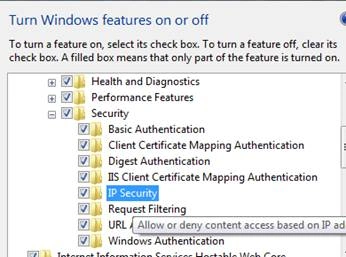
Let’s select “Default Web Site”, double-click on IP Address & Domain Restrictions and understand its settings:
Here, we can add Allow\Deny entry rule based on IP address or domain name.

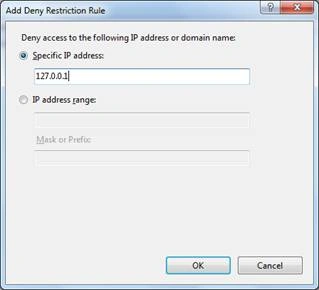
Let’s add a Deny rule to deny access to Default Web Site from IP: 127.0.0.1 by clicking on “Add Deny Entry”:
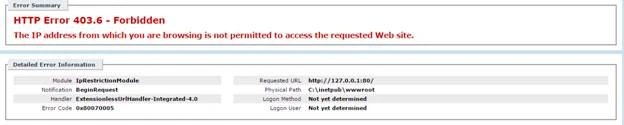
If we try to browse web site over http://127.0.0.1, we will get the following access denied message.
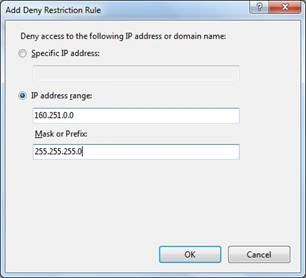
We can even specify range of IPv4 addresses for allowing\denying access to Default Web site along with subnet mask. This setting denies access to complete 160.251.0.0 network.
We can enable Domain Restrictions by going to “Edit Feature Settings” and clicking on “Enable domain name restrictions”.
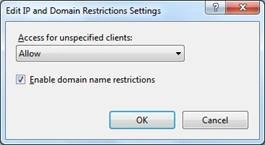
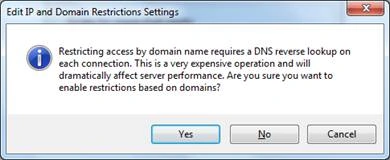
This setting may affect server performance because of DNS reverse lookup:
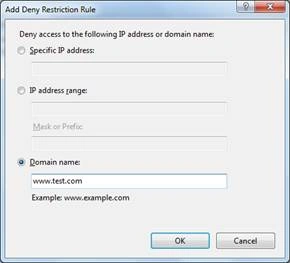
Now, we can add an Allow\Deny rule on Domain name as well:
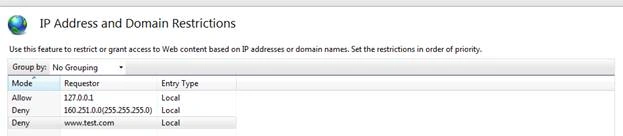
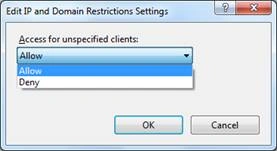
Rules are applied from top to bottom, in the order they appear in the list. We can use “Edit Feature Settings” to set default allow\deny access to unspecified clients:
Instead of IIS Manager, we can use appcmd.exe to configure it with the following command:
appcmd.exe set config "Default Web Site" -section:system.webServer/security/ipSecurity /+"[ipAddress='127.0.0.1',allowed='False']" /commit:apphost

Please ensure to use option/Commit:apphost to commit changes to correct location section in IIS configuration file [ApplicationHost.config].
It is a good practice to list all Deny rules first followed by Allow rules. This feature remains same in IIS 8, 8.5 and above settings will still apply.
I am ending things here on IP & Domain Restrictions, I hope this article will be helpful for all.
An Overview Of IIS 7.5 Feature - IP & Domain Restrictions
In this article, we will look into one of the features of IIS 7.5 that helps in restricting access to a web site based on IP address or domain name.
Read more articles on Servers:


Vivek KumarPosted Apr 24, 2016, 11:07 AM EDT
Nice share
Saillesh PawarPosted Mar 15, 2016, 4:53 AM EDT
NIce share
Mohammed IbrahimPosted Mar 14, 2016, 12:02 AM EDT
nice
Debasis SahaTOP 100Posted Mar 13, 2016, 8:47 PM EDT
Nice share
Humayun Kabir MamunPosted Mar 12, 2016, 10:07 PM EST
Nice...
Debasis SahaTOP 100Posted Mar 11, 2016, 7:58 PM EST
Good one
Ammar ShaukatPosted Mar 11, 2016, 12:41 PM EST
Nice
Vignesh ManiTOP 100Posted Mar 11, 2016, 12:40 PM EST
good
Kashif SohailPosted Mar 11, 2016, 9:40 AM EST
can you please post article about virtual path host resolution in iis?