
📌 Introduction
In today’s data-driven world, businesses generate vast amounts of information that need to be processed, analyzed, and visualized for actionable insights. Azure Synapse Analytics is Microsoft’s cloud-based solution designed to simplify data integration, analytics, and business intelligence. It provides a unified platform that combines big data and data warehousing to help organizations maximize the potential of their data.
🚀 What is Azure Synapse Analytics?
Azure Synapse Analytics is an enterprise-grade analytics service that bridges data lakes and data warehouses into a single platform. It enables seamless querying, analysis, and reporting with powerful tools such as SQL, Spark, and Synapse Pipelines.
🔹 Key Features
- Integrated Data Platform: Combines data ingestion, preparation, management, and analysis in one place.
- Scalability: Supports massive-scale data processing with on-demand and provisioned resources.
- Multi-Language Support: Allows developers to use SQL, Python, Scala, and .NET for data analysis.
- Security and Compliance: Ensures enterprise-level security, including Azure Active Directory authentication, threat detection, and encryption.
- Seamless Integration: Works with Power BI, Azure Machine Learning, and other Azure services for end-to-end data analytics.
🛠 How to Set Up Azure Synapse Analytics
Step 1. Create an Azure Synapse Workspace
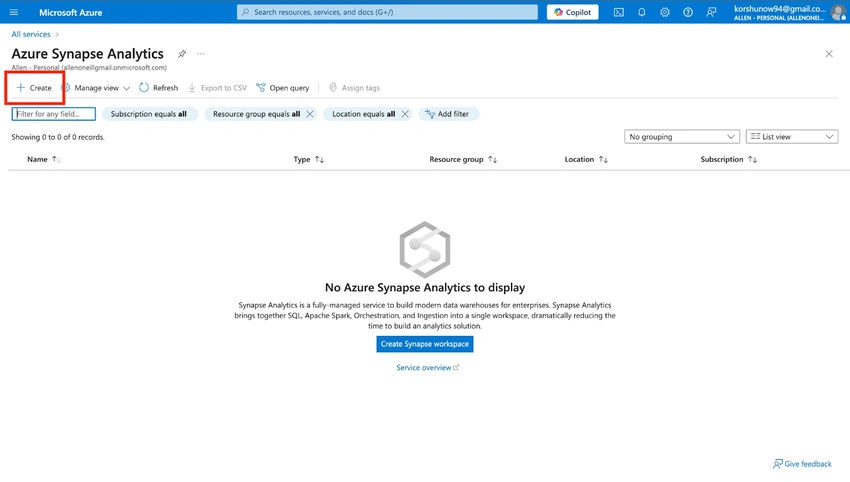
- Sign in to the Azure Portal.
- Navigate to Create a Resource > Azure Synapse Analytics.
- Choose a Subscription, Resource Group, and enter a unique workspace name.
- Select the Data Lake Storage Gen2 account to link with Synapse.
- Configure networking and security settings.
- Click Review + Create and deploy your Synapse workspace.
Step 2. Load Data into Synapse
- Use Azure Data Factory Pipelines to ingest structured and unstructured data.
- Load batch data from sources like Azure Blob Storage or SQL databases.
- Enable real-time streaming using Azure Event Hub or IoT Hub.
Step 3. Query Data using SQL Pools
- On-Demand Queries: Analyze data without prior ingestion into a structured warehouse.
- Dedicated SQL Pools: Pre-allocated resources optimized for massive parallel processing (MPP).
- Example SQL Query:
SELECT TOP 10 * FROM SalesData WHERE Region = 'North America';
Step 4. Visualize Insights with Power BI
- Connect Azure Synapse Analytics to Power BI.
- Build interactive dashboards and reports.
- Share insights with teams for data-driven decision-making.

📈 Use Cases of Azure Synapse Analytics
📊 1. Business Intelligence & Reporting
- Consolidate multiple data sources into a centralized data warehouse.
- Generate real-time reports and KPI dashboards for executive decision-making.
🔬 2. Machine Learning & AI Integration
- Train predictive models using Azure Machine Learning.
- Automate AI-driven insights with seamless ML model deployment.
🏦 3. Financial Data Processing
- Manage high-volume transactional data with real-time fraud detection.
- Optimize risk assessment models for banks and insurance companies.
🚀 4. IoT & Streaming Analytics
- Process and analyze IoT sensor data for predictive maintenance.
- Detect anomalies in real-time streaming data.
💡 Best Practices for Optimizing Azure Synapse Analytics
- ✅ Partition Large Datasets: Improve query performance with optimized table partitioning.
- ✅ Enable Query Caching: Reduce latency by caching frequent queries.
- ✅ Use Data Skipping: Process only relevant portions of data to reduce computation time.
- ✅ Monitor Performance Metrics: Use Synapse Studio to analyze query execution and optimize workloads.
- ✅ Implement Security Measures: Enforce role-based access control (RBAC) and data encryption.
🔮 Future of Data Analytics with Azure Synapse
As data complexity grows, Azure Synapse Analytics continues to evolve, incorporating AI-driven insights, automation, and deeper integrations with cloud-native services. With Microsoft’s continued investment in hybrid cloud, real-time analytics, and intelligent data processing, organizations can expect even more powerful capabilities to drive data-driven decision-making.
🔗 Further Learning

Join the conversation! Your thoughts help the community grow.