
As usual we can see this option in the settings like in every other application. But if you are new to windows 10, you may be facing some issues on how to find it out. Here, I will explain some steps to edit the windows 10 mail application signature. Please be noted that this post is for the one who is absolutely new to windows 10. Please do not mind, if you know this already. I hope you will like this article.
Please see this article in my blog here.
Steps to configure or change windows 10 mail app signature
Please go to start menu, you can see the menu as we have in Windows 7.
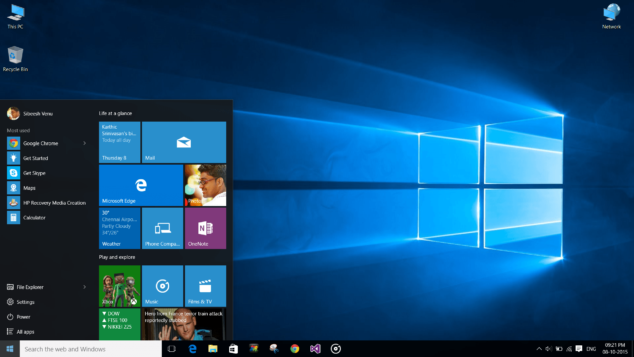
Now please go to all program and find out the mail app.

Now the mail app will open, and you can find the setting symbol in the footer area as shown in the following image. Please click on that.
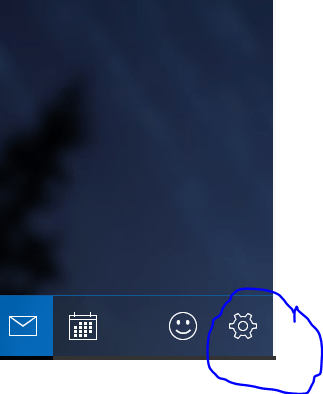
In the settings part, please click on the Options.

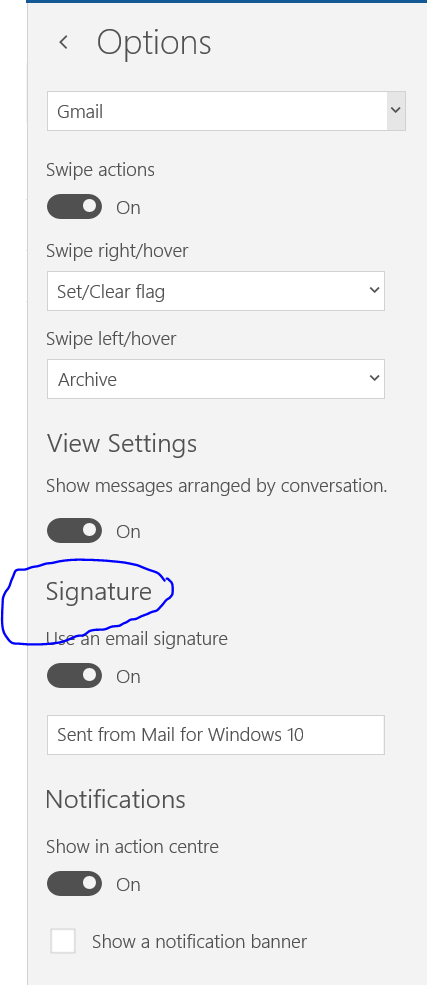
You will be given so many options to configure, please click on the signature and make sure that you have turned on this feature.
Now in the given text you can edit your signature.
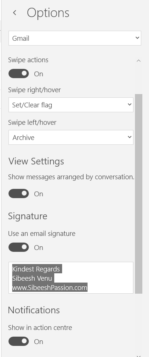
Once you are done, please press enter so that the changes will get affected. And hereafter whenever you try to send a new mail or reply for any new mail, you will get this signature instead the default one.

That’s all! Thanks for reading.
Conclusion
Did I miss anything that you may think which is needed? Have you upgraded your operating system to Window 10? Have you ever tried the new windows 10 app? Could you find this post as useful? I hope you liked this article. Please share me your valuable suggestions and feedback.
Your turn. What do you think?
If you have any questions, then please mention it in the comments section.


Santhakumar MunuswamyPosted Oct 18, 2015, 12:39 AM EDT
Good one
Sibeesh VenuTOP 100Posted Oct 10, 2015, 6:44 AM EDT
Priyaranjan K S Thank you
Priyaranjan K STOP 100Posted Oct 9, 2015, 11:23 AM EDT
Good one Sibeesh Venu
Sibeesh VenuTOP 100Posted Oct 9, 2015, 1:14 AM EDT
Nilesh Jadav Thank you
Sibeesh VenuTOP 100Posted Oct 9, 2015, 1:14 AM EDT
Harshad Pansuriya Thank you
Nilesh JadavPosted Oct 9, 2015, 1:11 AM EDT
Great !
Harshad PansuriyaPosted Oct 8, 2015, 10:43 PM EDT
Nice one